 PluginStats
Tinymist Typst installs statistics
By Myriad Dreamin · VS Code Marketplace · Programming Languages
An integrated language service for Typst
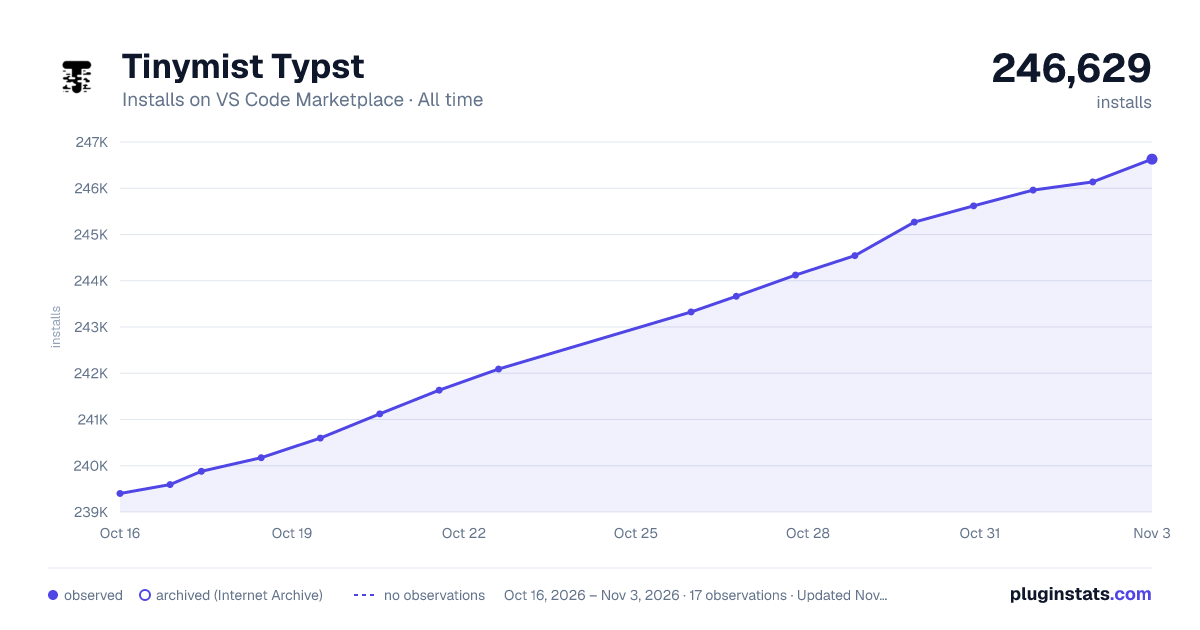
Tinymist Typst has 240,598 recorded installs on VS Code Marketplace, ranking #1330 of 2,501 tracked listings.
Rating: 5.00 / 5 from 27 ratings
About Tinymist Typst
Tinymist Typst VS Code Extension
HTML | Markdown
A VS Code or VS Codium extension for Typst. You can find the extension on:
- Stable and pre-release versions available at Visual Studio Marketplace and Open VSX.
- The artifacts built per commits at GitHub Actions.
- The artifacts built per release at GitHub Releases.
Features
See Tinymist Features for a list of features.
LLM-Assisted Documentation
The Software Specification contains user interface provided by this extension, You could find solutions by text search in the docs or ask LLMs with plugging the docs.
Configuration Reference
Usage Tips
Initializing with a Template
To initialize a Typst project:
- Use command
Typst init template(tinymist.initTemplate) to initialize a new Typst project based on a template. - Use command
Typst show template(tinymist.showTemplateGallery) to show available Typst templates for picking up a template to initialize.
🎉 If your template contains only a single file, you can also insert the template content in place with command:
- Use command
Typst template in place(tinymist.initTemplateInPlace) and input a template specifier for initialization.
Configuring LSP-Enhanced Formatters
- Open settings.
- Search for “Tinymist Formatter” and modify the value.
Tips: to enable formatting on save, you should add extra settings for typst language:
{
  "[typst]": {
    "editor.formatOnSave": true
  }
}
Configuring Linter
- Open settings.
- Search for “Tinymist Lint” and modify the value.
- Toggle “Enabled” to enable or disable the linter.
- Change “When” to configure when the linter runs.
- (Default)
onSaverun linting when you save the file. onTyperun linting as you type.
- (Default)
Configuring/Using Tinymist’s Activity Bar (Sidebar)
If you don’t like the activity bar, you can right-click on the activity bar and uncheck “Tinymist” to hide it.
Symbol View
- Search symbols by keywords, descriptions, or handwriting.
- See symbols grouped by categories.
- Click on a symbol, then it will be inserted into the editor.
Tool View
- Template Gallery: Show available Typst templates for picking up a template to initialize.
- Document Summary: Show a summary of the current document.
- Symbols: Show symbols in the current document.
- Fonts: Show fonts in the current document.
- Profiling: Profile the current document.
Package View
- Create or open some local typst packages.
- Show a list of available typst packages and invoke associated commands.
Content View
- Show thumbnail content of the current document, which is useful for creating slides.
Label View
- Show labels in the current workspace.
Outline View
- Show outline of exported document, viewing typst as a markup language.
- This is slightly different from the LSP-provided document outline, which shows the syntax structure of the document, viewing typst as a programming language.
Preview Command
Open command palette (Ctrl+Shift+P), and type >Typst Preview:.
You can also use the shortcut (Ctrl+K V).
Theme-aware template (previewing)
In short, there is a sys.inputs item added to the compiler when your document is under the context of user editing or previewing task. You can use it to configure your template:
#let preview-args = json.decode(sys.inputs.at("x-preview", default: "{}"))
// One is previewing the document.
#let is-preview = sys.inputs.has("x-preview")
// `dark` or `light`
#let preview-theme = preview-args.at("theme", default: "light")
For details, please check Preview’s sys.inputs.
Configuring path to search fonts
To configure path to search fonts:
- Open settings.
- File -> Preferences -> Settings (Linux, Windows).
- Code -> Preferences -> Settings (Mac).
- Search for “Tinymist Font Paths” for providing paths to search fonts order-by-order.
- Search for “Tinymist System Fonts” for disabling system fonts to be searched, which is useful for reproducible rendering your PDF documents.
- Reload the window or restart the vscode editor to make the settings take effect.
Note: you must provide absolute paths.
Note: you can use vscode variables in the settings, see vscode-variables for more information.
For a reproducible setup, the shared embedded-font inventory, and package-path examples that affect preview and export the same way, see Compiler Settings.
Configuring path to root directory
To configure the root path resolved for Typst compiler:
- Open settings.
- Search for “Tinymist Root Path” and modify the value.
- Reload the window or restart the vscode editor to make the settings take effect. Note: you must provide absolute paths.
If you also need package paths, package cache paths, or certificate settings, refer to Compiler Settings for examples.
Managing Local Packages…
Description from the VS Code Marketplace listing.
- debuggers
- keybindings
- language-server
- lsp
- toml
- typ
- typc
- typst
- Typst (Code Mode)
- typst-code
- typst-markdown-injection
README badge
Show your rank in a README or on your website. The badge updates automatically.
Charts
Images: 30d · 1y · all time · 1600×900 dark



Adoption over time
7/30/90-day growth
Ranking history
Ratings over time
Listing placement
Listing placement
Listing placement
Listing placement
Filled points are observed values; hollow points come from Internet Archive snapshots of the listing page. Dashed segments span periods with no observations — values between points are not interpolated.
Each band is one page of 20. Installs on a linear scale. Placement is projected from installs, so it can differ from the marketplace's own sort order. Hover a dot to see the listing.
Recent observations
Full history (5)Similar VS Code Marketplace Programming Languages plugins
All 20 Tinymist Typst alternativesData source
Install counts, average rating, and rating counts come from the public Visual Studio Marketplace gallery API. Installs are cumulative and exclude updates.
Listing: https://marketplace.visualstudio.com/items?itemName=myriad-dreamin.tinymist. First seen Oct 16, 2026; last successful collection Oct 20, 2026. See the methodology.