 PluginStats
HTML Preview Pro - Ultimate Live Preview & Responsive Testing installs statistics
By GingerTurtle · VS Code Marketplace · Snippets
🚀 The most reliable HTML preview extension for VS Code. Features live reload, responsive device testing, mobile preview, developer tools, and multi-browser support. Never fails like other extensions!
HTML Preview Pro - Ultimate Live Preview & Responsive Testing has 98,722 recorded installs on VS Code Marketplace.
It ranks #2381 of 2,501 tracked VS Code Marketplace listings by installs.
It is rated 5.0 out of 5 from 2 ratings.
PluginStats has 4 daily observations since Oct 16, 2026; the latest is from Oct 19, 2026.
Rating: 5.00 / 5 from 2 ratings
About HTML Preview Pro - Ultimate Live Preview & Responsive Testing
HTML Preview Pro - Ultimate Live Preview & Responsive Testing
🚀 The most reliable HTML preview extension for VS Code - Never fails like other extensions!
A rock-solid, feature-rich VS Code extension that provides comprehensive HTML preview capabilities with live reload, responsive device testing, developer tools integration, and multi-browser support. Built from the ground up to be reliable, fast, and developer-friendly.
🎬 See It In Action
*Live demonstration of HTML Preview Pro's responsive testing, live reload, and multi-device preview capabilities*
✨ Why HTML Preview Pro?
🛡️ Rock-Solid Reliability
• Never fails to work - Comprehensive error handling and fallbacks • Cross-platform tested - Works perfectly on Windows, Mac, and Linux • VS Code compatibility - Tested across multiple VS Code versions • Graceful degradation - Features work even if some components fail
🚀 Advanced Preview Features
• Hot CSS Reloading - Instantly updates styles without refreshing the page • Fast reload - Full page reload when HTML/JS changes • Multi-file support - Handles HTML files with external CSS/JS/images • Local server integration - Proper asset resolution and CORS handling • Auto-refresh on save - Instant updates as you save
📱 Responsive Design Testing
• Device presets: iPhone 14 Pro, iPad, Samsung Galaxy S23, Surface Pro, and more • Custom viewports - Set any width/height for testing • Pixel-perfect testing - Accurate device simulation with proper DPI • Quick device switching - Toggle between devices instantly • Orientation support - Portrait and landscape testing
🔧 Developer Tools Integration
• Browser console in VS Code - See console logs without leaving editor • Network Inspector - Monitor network requests (Fetch/XHR) directly in the preview • Error overlay - Visual error reporting for runtime issues • Device Simulation - Test responsiveness with presets for iPhone, iPad, Samsung Galaxy, and more
🌐 Multi-Browser Support
• Smart browser detection - Opens in your preferred browser • Chrome, Firefox, Edge, Safari - Full support for all major browsers • Custom browser commands - Configure specific browser versions • Private browsing mode - Test without cache/cookies
☕ Like This Extension?
Support its development and keep it free for everyone:
🚀 Installation
From VS Code Marketplace
1. Open VS Code 2. Go to Extensions (Ctrl+Shift+X) 3. Search for "HTML Preview Pro" 4. Click Install 5. Open any HTML file - you're ready!
First Use
1. Open an HTML file in VS Code 2. Press Ctrl+Shift+V for side preview or Ctrl+Shift+H for full preview 3. Or use the preview button in the editor toolbar 4. Watch live changes as you edit your code 5. Right-click for more options like responsive testing
📚 How to Use
Method 1: Keyboard Shortcuts (Recommended)
• Side Preview: Ctrl+Shift+V (Windows/Linux) or Cmd+Shift+V (Mac) • Full Preview: Ctrl+Shift+H (Windows/Linux) or Cmd+Shift+H (Mac) • Open in Browser: Ctrl+Shift+B (Windows/Linux) or Cmd+Shift+B (Mac) • Refresh Preview: Ctrl+Shift+R (Windows/Linux) or Cmd+Shift+R (Mac)
Method 2: Editor Toolbar
• Click the 📱 Show Side Preview button in the HTML editor toolbar • Click the 🖥️ Show Full Preview button for full-window preview • Click the 🌐 Open in Browser button to launch external browser
Method 3: Command Palette
• Press Ctrl+Shift+P • Type "HTML Preview Pro" • Select your desired action
Method 4: Context Menu
• Right-click any HTML file in Explorer • Select "Show Side Preview" or "Open in Browser"
📖 Detailed Features
Live Preview Panel
The preview panel provides a professional, feature-rich HTML viewing experience:
• Real-time updates - See changes instantly as you type • Smart reload - Only updates changed content, preserves scroll position • Error overlay - Visual feedback for HTML/CSS/JS errors • Status indicators - Live reload status and connection health • Zoom controls - Zoom in/out for detailed inspection
Responsive Testing Mode
Advanced responsive design testing capabilities:
• Device simulation - Accurate viewport and user agent simulation • Preset devices - iPhone, iPad, Android, Surface, MacBook, iMac presets • Custom viewports - Set any width/height combination • DPI scaling - Proper high-DPI device simulation • Mobile emulation - Simulates mobile viewport size and user agent
Developer Console Integration
Built-in console for debugging without leaving VS Code:
• Console logs - View console.log, warn, error messages • Error tracking - Capture errors from your preview • Live filtering - Search and filter console output
Smart File Watching
Intelligent file monitoring for optimal performance:
• Selective watching - Only watches relevant file types • Debounced updates - Prevents excessive reloads during rapid changes • Glob pattern support - Customizable file patterns to watch • Workspace-aware - Automatically detects workspace structure • Memory efficient - Optimized watching with minimal resource usage
⚙️ Configuration
Access settings via File > Preferences > Settings and search for "HTML Preview Pro":
Core Settings
htmlPreviewPro.autoReload
Default: true Enable/disable automatic preview refresh when files change:
htmlPreviewPro.autoReloadDelay
Default: 500 Delay in milliseconds before auto-reloading (prevents excessive reloads):
htmlPreviewPro.openInExternalBrowser
Default: "default" Choose which browser to use for "Open in Browser" command:
Options: "default", "chrome", "firefox", "edge", "safari"
Responsive Testing Settings
htmlPreviewPro.defaultDevice
Default: "desktop" Default device preset for responsive testing:
Options: "desktop", "iPhone 14 Pro", "iPhone SE", "iPad", "Samsung Galaxy S23", "Surface Pro", "MacBook Pro 13", "MacBook Pro 16", "iMac 24"
Developer Features
htmlPreviewPro.showConsole
Default: false Show browser console panel in preview:
htmlPreviewPro.injectDevTools
Default: true Inject developer tools and error overlay:
htmlPreviewPro.preserveScrollPosition…
Description from the VS Code Marketplace listing.
- android
- breakpoints
- browser
- css
- debugging
- desktop
- developer tools
- development
- frontend
- full preview
- hot reload
- html
- html viewer
- iphone
- javascript
- keybindings
- landing page
- live
- live reload
- localhost
Charts
Images: 30d · 1y · all time · 1600×900 dark


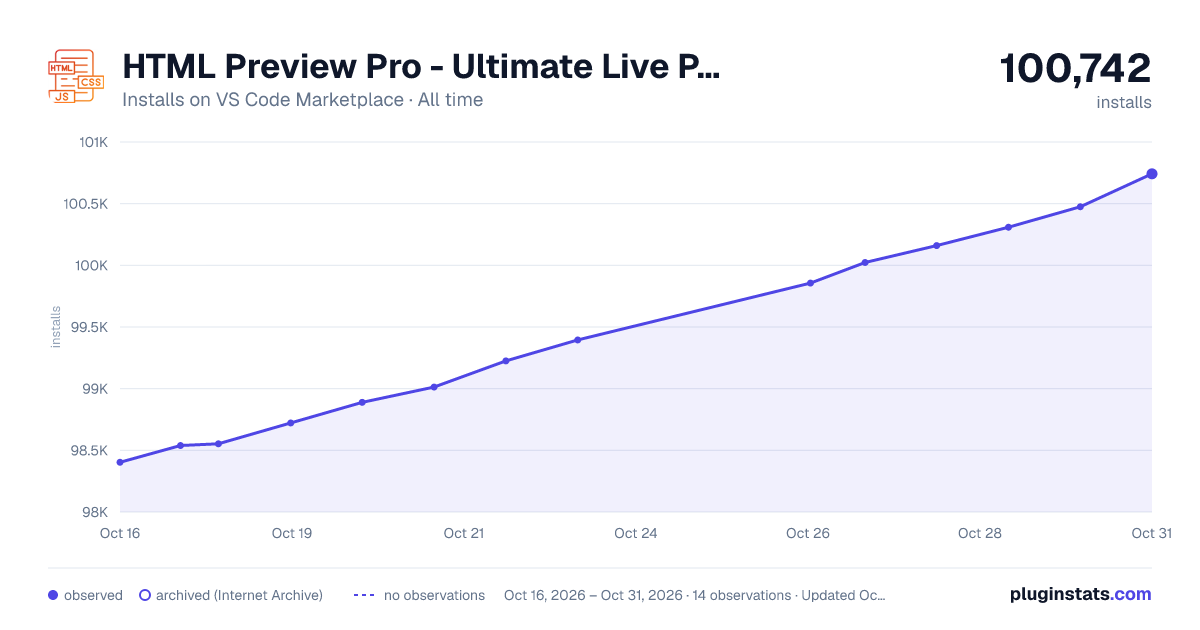

Adoption over time


7/30/90-day growth


Ranking history


Ratings over time


Listing placement


Listing placement


Listing placement


Filled points are observed values; hollow points come from Internet Archive snapshots of the listing page. Dashed segments span periods with no observations — values between points are not interpolated.
Each band is one page of 20. Installs on a log scale. Placement is projected from installs, so it can differ from the marketplace's own sort order. Hover a dot to see the listing.
Recent observations
Full history (4)Similar VS Code Marketplace Snippets plugins
All 20 HTML Preview Pro - Ultimate Live Preview & Responsive Testing alternativesData source
Install counts, average rating, and rating counts come from the public Visual Studio Marketplace gallery API. Installs are cumulative and exclude updates.
Listing: https://marketplace.visualstudio.com/items?itemName=GingerTurtle.html-preview-pro. First seen Oct 16, 2026; last successful collection Oct 19, 2026. See the methodology.