 PluginStats
LeetCode installs statistics
By 力扣 LeetCode · VS Code Marketplace · Snippets
Solve LeetCode problems in VS Code
LeetCode has 1,295,309 recorded installs on VS Code Marketplace.
It ranks #465 of 2,500 tracked VS Code Marketplace listings by installs.
It is rated 4.0 out of 5 from 81 ratings.
PluginStats has 3 daily observations since Oct 16, 2026; the latest is from Oct 18, 2026.
Rating: 4.00 / 5 from 81 ratings
About LeetCode
LeetCode
Solve LeetCode problems in VS Code
• English Document | 中文文档
❗️ Attention ❗️- Workaround to login to LeetCode endpoint
Note: If you are using leetcode.cn, you can just ignore this section.
Recently we observed that the extension cannot login to leetcode.com endpoint anymore. The root cause of this issue is that leetcode.com changed its login mechanism and so far there is no ideal way to fix that issue.
Thanks for @yihong0618 provided a workaround which can somehow mitigate this. Now you can simply click the Sign In button and then select Third Party login or Cookie login.
Note: If you want to use third-party login(Recommended), please make sure your account has been connected to the third-party. If you want to use Cookie login, click here to see the steps.
Requirements
• VS Code 1.30.1+ • Node.js 10+ NOTE: Please make sure that Node is in your PATH environment variable. You can also use the setting leetcode.nodePath to specify the location of your Node.js executable.
Quick Start
Features
Sign In/Out
• Simply click Sign in to LeetCode in the LeetCode Explorer will let you sign in with your LeetCode account. • You can also use the following command to sign in/out: • LeetCode: Sign in • LeetCode: Sign out
Switch Endpoint
• By clicking the button at the explorer's navigation bar, you can switch between different endpoints. • The supported endpoints are: • leetcode.com • leetcode.cn
Note: The accounts of different endpoints are not shared. Please make sure you are using the right endpoint. The extension will use leetcode.com by default.
Pick a Problem
• Directly click on the problem or right click the problem in the LeetCode Explorer and select Preview Problem to see the problem description. • Select Show Problem to directly open the file with the problem description.
Note:You can specify the path of the workspace folder to store the problem files by updating the setting leetcode.workspaceFolder. The default value is:$HOME/.leetcode/.
You can specify whether including the problem description in comments or not by updating the setting leetcode.showCommentDescription.
You can switch the default language by triggering the command: LeetCode: Switch Default Language.
Editor Shortcuts
• The extension supports 5 editor shortcuts (aka Code Lens): • Submit: Submit your answer to LeetCode. • Test: Test your answer with customized test cases. • Star/Unstar: Star or unstar the current problem. • Solution: Show the top voted solution for the current problem. • Description: Show the problem description page.
Note: You can customize the shortcuts using the setting: leetcode.editor.shortcuts. By default, only Submit and Test shortcuts are enabled.
Search problems by Keywords
• By clicking the button at the explorer's navigation bar, you can search the problems by keywords.
Manage Session
• To manage your LeetCode sessions, just clicking the LeetCode: * at the bottom of the status bar. You can switch between sessions or create, delete** a session.
Settings
| Setting Name | Description | Default Value |
| leetcode.hideSolved | Specify to hide the solved problems or not | false | | leetcode.defaultLanguage | Specify the default language used to solve the problem. Supported languages are: bash, c, cpp, csharp, golang, java, javascript, kotlin, mysql, php, python,python3,ruby,rust, scala, swift, typescript | N/A | | leetcode.useWsl | Specify whether to use WSL or not | false | | leetcode.endpoint | Specify the active endpoint. Supported endpoints are: leetcode, leetcode-cn | leetcode | | leetcode.workspaceFolder | Specify the path of the workspace folder to store the problem files. | "" | | leetcode.filePath | Specify the relative path under the workspace and the file name to save the problem files. More details can be found here. | | | leetcode.enableStatusBar | Specify whether the LeetCode status bar will be shown or not. | true | | leetcode.editor.shortcuts | Specify the customized shortcuts in editors. Supported values are: submit, test, star, solution and description. | ["submit, test"] | | leetcode.enableSideMode | Specify whether preview, solution and submission tab should be grouped into the second editor column when solving a problem. | true | | leetcode.nodePath | Specify the Node.js executable path. for example, C:\Program Files\nodejs\node.exe | node | | leetcode.showCommentDescription | Specify whether to include the problem description in the comments | false | | leetcode.useEndpointTranslation | Use endpoint's translation (if available) | true | | leetcode.colorizeProblems | Add difficulty badge and colorize problems files in explorer tree | true | | leetcode.problems.sortStrategy | Specify sorting strategy for problems list | None | | leetcode.allowReportData | Allow LeetCode to report anonymous usage data to improve the product. list | true |
Want Help?
When you meet any problem, you can check out the Troubleshooting and FAQ first.
If your problem still cannot be addressed, feel free to reach us in the Gitter Channel or file an issue.
Release Notes
Refer to CHANGELOG
Acknowledgement
• This extension is based on @skygragon's leetcode-cli open source project. • Special thanks to our contributors.
Description from the VS Code Marketplace listing.
- algorithm
- interview
- leetcode
Where LeetCode sits in the listing
Each band is one page of 20. Installs on a log scale. Placement is projected from installs, so it can differ from the marketplace's own sort order. Hover a dot to see the listing.


Charts
Images: 30d · 1y · all time · 1600×900 dark


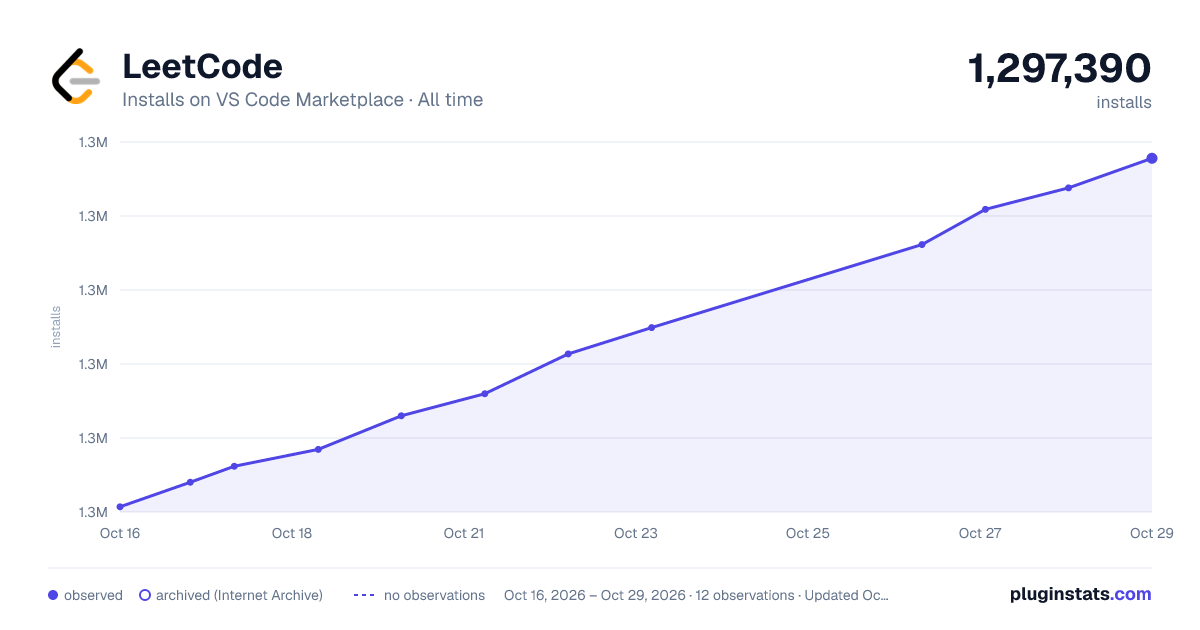

Adoption over time


7/30/90-day growth


Filled points are observed values; hollow points come from Internet Archive snapshots of the listing page. Dashed segments span periods with no observations — values between points are not interpolated.
Recent observations
Full history (3)Similar VS Code Marketplace Snippets plugins
Data source
Install counts, average rating, and rating counts come from the public Visual Studio Marketplace gallery API. Installs are cumulative and exclude updates.
Listing: https://marketplace.visualstudio.com/items?itemName=LeetCode.vscode-leetcode. First seen Oct 16, 2026; last successful collection Oct 18, 2026. See the methodology.