 PluginStats
TSLint installs statistics
By Microsoft (224 listings) · VS Code Marketplace · Programming Languages
TSLint support for Visual Studio Code
TSLint has 4,592,214 recorded installs on VS Code Marketplace, ranking #188 of 2,501 tracked listings.
Rating: 3.05 / 5 from 62 ratings
About TSLint

❗IMPORTANT: TSLint has been deprecated in favor of ESLint and this extension has also been deprecated in favor of ESLint's tooling.
Please look into migrating your projects to ESLint.
Adds tslint to VS Code using the TypeScript TSLint language service plugin.
Please refer to the tslint documentation for how to configure the linting rules.
Usage
❗ Important: If you also have the [vscode-tslint][vscode-tslint] extension in VS Code installed, please disable it to avoid linting files twice.*
This extension works using VS Code's built-in version of TypeScript and a local or global install of tslint. You do not need to configure the plugin in your tsconfig.json if you are using VS Code's version of TypeScript.
If you are using VS Code 1.30 or older and are using a workspace version of typescript, you must currently configure the TS Server plugin manually by following [these instructions][configuration]
Workspace Library Execution
By default this extension will not load TSLint or custom rules from your workspace if you are using a global version of TypeScript. This is done for security reasons. The extension always allows using globally installed versions of TSLint (npm install -g tslint).
To use enable using a local TSLint install and custom rules from the workspace, you must either:
-
Use a workspace version of TypeScript that is installed alongside TSLint.
-
Enable workspace library execution by running the
TSLint: Manage Workspace Library Executioncommand.
If the extension detects a workspace version of TSLint, it will show a warning in the editor and in the status bar. You can click on the status bar entry to configure Workspace Library Execution as well.
Configuration
You can either configure the TSLint extension using a tsconfig or jsconfig as described [here][configuration], or configure it with VS Code settings. This requires VS Code 1.30+ and TS 3.2+. Note the VS Code based configuration overrides the tsconfig or jsconfig configuration.
-
tslint.configFile- The configuration file that tslint should use instead of the default tslint.json. A relative file path is resolved relative to the project root. -
tslint.jsEnable- Enable/disable tslint for.jsfiles. Default isfalse. -
tslint.ignoreDefinitionFiles- Control if TypeScript definition files should be ignored. Default istrue. -
tslint.exclude- A glob or an array of globs. Any file matching these globs will not be linted. -
tslint.alwaysShowRuleFailuresAsWarnings- Always show rule failures as warnings, ignoring the severity configuration in the tslint.json configuration. -
tslint.suppressWhileTypeErrorsPresent- Suppress tslint errors from being reported while other errors are present.
Auto fix and auto fix on save
Some simple errors can be automatically fixed by tslint using the source.fixAll.tslint source code action in VS Code. To run this, either run the Source Action... command in the command palette or right click in the TS file and select Source Action... from the context menu:

To enable auto fixing tslint errors on save, In VS Code set:
"editor.codeActionsOnSave": {
    "source.fixAll.tslint": true
}
You can also setup a keybinding for tslint auto fix:
{
  "key": "cmd+k f",
  "command": "editor.action.codeAction",
  "args": {
    "kind": "source.fixAll.tslint",
    "apply": "first"
  }
}
Allowing comments in tslint.json files
TSlint allows // comments in tsconfig.json files but it does not allow trailing commas. In order to help you catch errors with trailing commas, this extension opts to treat tslint.json files as standard json by default. However this also means that you will see errors report for comments.
If you use comments in your tsconfig.json, you can configure VS Code to treat the file as json+comments by setting:
"files.associations": {
    "tslint.json": "jsonc"
}
However keep in mind that VS Code's json+comments mode will not report errors for trailing commas which will cause TSLint to error when loading the tsconfig.json.
Debugging why tslint is not working
If you are not seeing TSLint working in your project—such as TSLint errors not showing up—you can follow these steps to investigate what may be going wrong.
If there is a tslint.json in the workspace but we can't find the tslint executable in your workspace, you should see a TSLint warning icon in the status bar. Hover over this icon to see why TSLint is not enabled and how to fix it.

In these cases, there should also be a warning on the first line of every TypeScript files with the same information:

You can also try checking the TypeScript server logs to see why TSLint is not working:…
Description from the VS Code Marketplace listing.
- javascript
- javascriptreact
- json
- lint
- linters
- ts
- tslint
- typescript
- typescriptreact
README badge
Show your rank in a README or on your website. The badge updates automatically.
Charts
Images: 30d · 1y · all time · 1600×900 dark


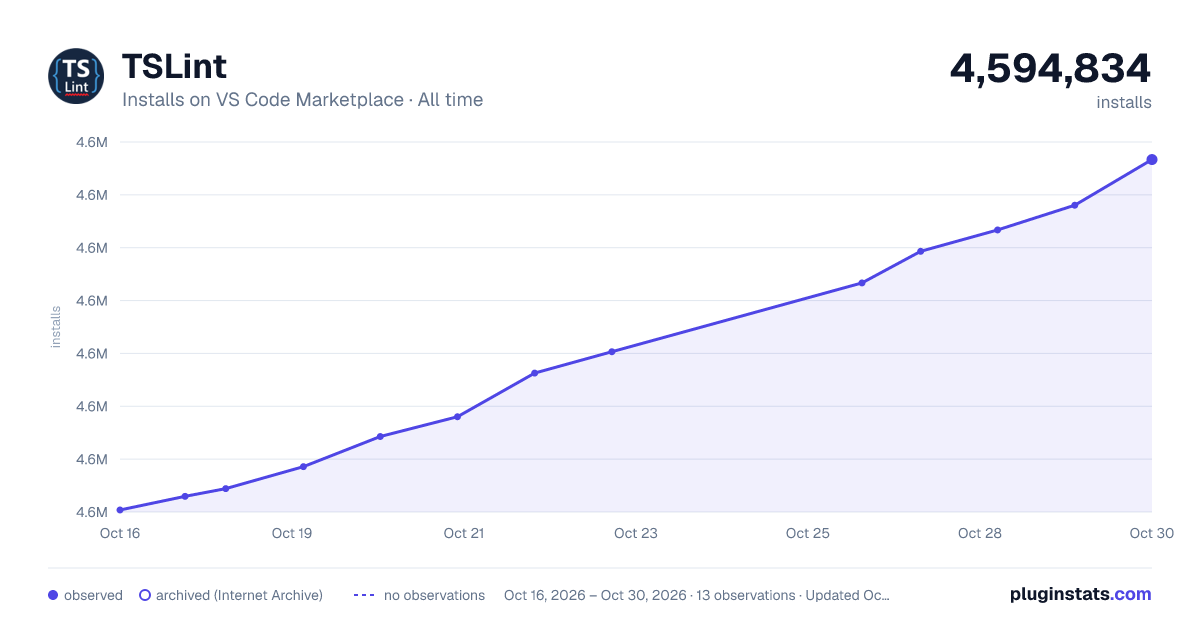

Adoption over time
7/30/90-day growth
Ranking history
Ratings over time
Listing placement
Listing placement
Filled points are observed values; hollow points come from Internet Archive snapshots of the listing page. Dashed segments span periods with no observations — values between points are not interpolated.
Each band is one page of 20. Installs on a linear scale. Placement is projected from installs, so it can differ from the marketplace's own sort order. Hover a dot to see the listing.
Recent observations
Full history (5)Similar VS Code Marketplace Programming Languages plugins
All 20 TSLint alternativesTSLint on other marketplaces
Data source
Install counts, average rating, and rating counts come from the public Visual Studio Marketplace gallery API. Installs are cumulative and exclude updates.
Listing: https://marketplace.visualstudio.com/items?itemName=ms-vscode.vscode-typescript-tslint-plugin. First seen Oct 16, 2026; last successful collection Oct 20, 2026. See the methodology.