 PluginStats
Python Debugger (PyDev) installs statistics
By Fabio Zadrozny (2 listings) · VS Code Marketplace · Debuggers
Python Debugger with the PyDev Debugger (pydevd)
Python Debugger (PyDev) has 91,813 recorded installs on VS Code Marketplace.
It ranks #2488 of 2,501 tracked VS Code Marketplace listings by installs.
PluginStats has 4 daily observations since Oct 16, 2026; the latest is from Oct 19, 2026.
About Python Debugger (PyDev)
This extension provides an integration of PyDev.Debugger (https://github.com/fabioz/PyDev.Debugger/) in VSCode, enabling its usage inside of VSCode.
Note: this extension provides a 30-day trial after installation and must be purchased for continued use.
Note: If PyDev for VSCode is installed and a valid license is available, this extension can be used without an additional license.
Check http://www.pydev.org/vscode for more details!
Features currently available
• Run with our without debugging: • Run a python program (path/to/script.py) (set program in the launch configuration) • Run a python module (python -m ) (set module in the launch configuration) • Attach to a python program waiting for a connection • The python program must call import pydevd;pydevd.settrace(host="", port=port, protocol="dap") • An attach launch configuration with an attach mode must be run • Start a server which waits for incoming connections • An attach launch configuration with a server mode must be run • The python program must call import pydevd;pydevd.settrace(host="127.0.0.1", port=port, protocol="dap")
Why use this debugger?
• pydevd is one of the fastest debuggers available, and while it was integrations through other extensions/IDEs (such as debugpy and even PyCharm, this extension is done by its author and is kept up-to date with the latest changes). • In Python 3.12 uses new APIs for very low overhead debugging. • In other Python versions it can also leverage the python frame eval for fast debugging (although it falls back to tracing once a breakpoint is hit). • Supports many features such as: • Line breakpoints • Expression • Hit Count • Log message • Exception breakpoints • Step in • Step into target • Jump to line (Set next line execution) • Step over • Step Return • Change variable • Debug Console evaluation • View variables • Customize variables • Auto attach to subprocesses • Start attach in server mode • Attach to waiting program • Launch in run or debug mode
How to use this debugger
After installing, create a run configuration that has the "type": "pydevd" with a "request": "attach" or "request": "launch" and launch it.
If you have PyDev for VSCode installed, it'll be the engine used to do launches for test cases (and any other python-related launch).
Notes
• Currently launches will use python.pydev.pythonExecutable as the python executable (contributed by the PyDev for VSCode extension) unless a pythonExecutable is given in the launch configuration. • The "request": "test-template" is actually only used in PyDev for VSCode when doing a test-case launch (if customization for the test launch is required). • The "request": "run-file-template" is actually only used in PyDev for VSCode for customizing the launch done from the related custom command to run the current file (may also be used from other places such as code lenses). • The "request": "base-template" is used by the debugger extension to customize all launch configurations.
License
• PyDev.Debugger for VSCode extension: Commercial (http://www.pydev.org/vscode/license.html)
Changelog
• 0.3.0: • Make string replacement work for pythonExecutable and cwd in the launch configuration (so entries such as ${workspaceFolder}/.venv/bin/python are supported). • An extension is now automatically added to the pythonExecutable if the file cannot be found. • 0.2.0: • Updated to pydevd 3.4.1 • Preliminary support for debugging with Python 3.14 (still not complete) • 0.1.1: • When doing a subprocess attach, the debug adapter will now pass the pythonExecutable from the base launch configuration (needed for launching subprocesses with the correct python interpreter when a venv is used for a project). • When launching with uv, it'll now try to install pydevd using uv if the pip installation fails (uv is searched for in the PATH). • 0.1.0: • Uses pydevd 3.3.0 • It's now possible to customize the variablePresentation in the launch configuration. • It's a json object which can customize how the following attributes: special, function, class, protected are shown with (hide: to hide, group: to create a group and show variables in the group, inline: to show variables inline) • It's now possible to customize the redirectOutput in the launch configuration (default is false). • If true, the debugger will redirect the output of the program to the debug console. • It's now possible to customize the stopAllThreadsOnSuspend in the launch configuration (default is false). • If true, the debugger will stop all threads when the program is suspended. • It's now possible to customize the steppingResumesAllThreads in the launch configuration (default is false). • If true, the debugger will resume all threads when the program is stepped. • It's now possible to customize the justMyCode in the launch configuration (default is false). • If true, the debugger will only stop on code from which is not in the standard library / site-packages. • It's now possible to customize the showReturnValue in the launch configuration (default is false). • If true, the debugger will show the return value of a function when stepping. • It's now possible to customize the breakOnSystemExitZero in the launch configuration (default is false). • If true, the debugger will break on SystemExit with a code of 0. • It's now possible to customize the django in the launch configuration (default is false). • If true, the debugger will enable Django templates debugging. • It's now possible to customize the jinja in the launch configuration (default is false). • If true, the debugger will enable Jinja templates debugging. • It's now possible to customize the stopOnEntry in the launch configuration (default is false). • If true, the debugger will stop on entry. • It's now possible to customize the maxExceptionStackFrames in the launch configuration (default is 0). • If 0, the debugger will show all frames in the exception stack trace, otherwise it'll show only the first maxExceptionStackFrames…
Description from the VS Code Marketplace listing.
- debug
- debugger
- debuggers
- debugging
- multi-root ready
- python
Charts
Images: 30d · 1y · all time · 1600×900 dark


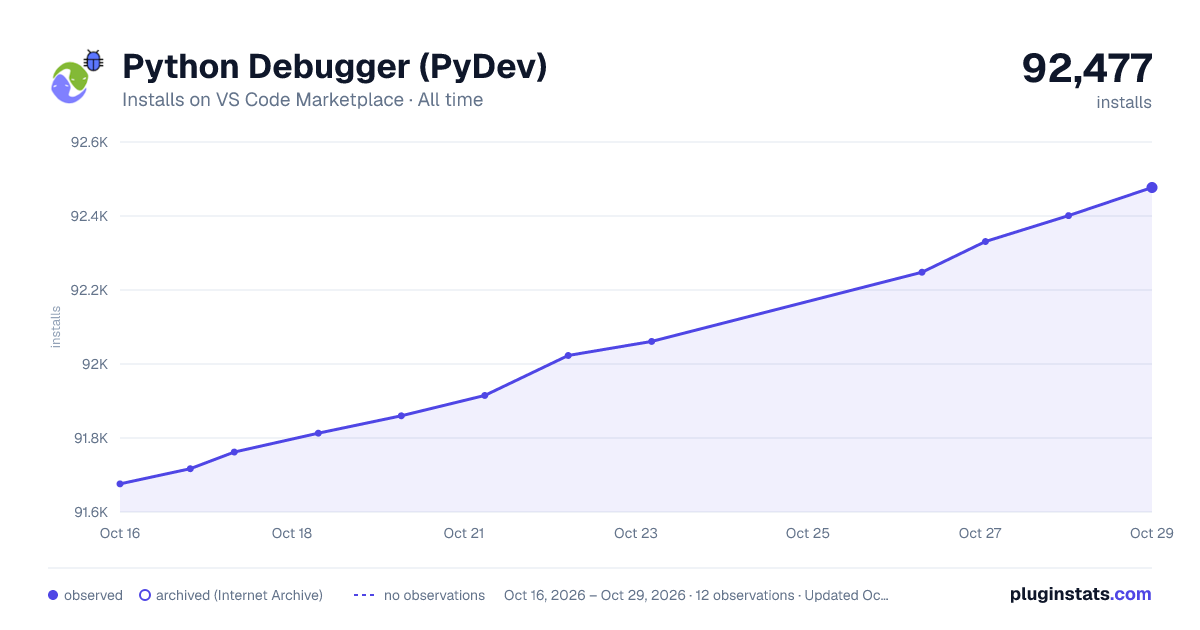

Adoption over time


7/30/90-day growth


Ranking history


Listing placement


Filled points are observed values; hollow points come from Internet Archive snapshots of the listing page. Dashed segments span periods with no observations — values between points are not interpolated.
Each band is one page of 20. Installs on a log scale. Placement is projected from installs, so it can differ from the marketplace's own sort order. Hover a dot to see the listing.
Recent observations
Full history (4)Similar VS Code Marketplace Debuggers plugins
All 20 Python Debugger (PyDev) alternativesData source
Install counts, average rating, and rating counts come from the public Visual Studio Marketplace gallery API. Installs are cumulative and exclude updates.
Listing: https://marketplace.visualstudio.com/items?itemName=fabioz.vscode-pydev-python-debugger. First seen Oct 16, 2026; last successful collection Oct 19, 2026. See the methodology.