 PluginStats
Live Server installs statistics
By Ritwick Dey (2 listings) · VS Code Marketplace · Other
Launch a development local Server with live reload feature for static & dynamic pages
Live Server has 83,583,536 recorded installs on VS Code Marketplace.
It ranks #8 of 2,500 tracked VS Code Marketplace listings by installs.
It is rated 4.4 out of 5 from 519 ratings.
PluginStats has 3 daily observations since Oct 16, 2026; the latest is from Oct 18, 2026.
Rating: 4.40 / 5 from 519 ratings
About Live Server
_Wanna try [LIVE SERVER++ (BETA) ? It'll enable live changes without saving file. https://github.com/ritwickdey/vscode-live-server-plus-plus ]_
Live Server
Live Server loves 💘 your multi-root workspace
Live Server for server side pages like PHP. Check Here
*For 'command not found error' [#78]*
Launch a local development server with live reload feature for static & dynamic pages.
Shortcuts to Start/Stop Server
_[NOTE: In case if you don't have any .html or .htm file in your workspace then you have to follow method no 4 & 5 to start server.]_
1. Open a project and click to Go Live from the status bar to turn the server on/off.
2. Right click on a HTML file from Explorer Window and click on Open with Live Server. .
3. Open a HTML file and right-click on the editor and click on Open with Live Server.
4. Hit (alt+L, alt+O) to Open the Server and (alt+L, alt+C) to Stop the server (You can change the shortcut form keybinding). *[On MAC, cmd+L, cmd+O and cmd+L, cmd+C]*
5. Open the Command Pallete by pressing F1 or ctrl+shift+P and type Live Server: Open With Live Server to start a server or type Live Server: Stop Live Server to stop a server.
Features
• A Quick Development Live Server with live browser reload. • Start or Stop server by a single click from status bar. • Open a HTML file to browser from Explorer menu.[Quick Gif Demo]. • Support for excluding files for change detection. • Hot Key control. • Customizable Port Number, Server Root, default browser. • Support for any browser _(Eg: Firefox Nightly)_ using advance Command Line. • Support for Chrome Debugging Attachment (_More Info_). [Quick Gif Demo]. • Remote Connect through WLAN (E.g.: Connect with mobile) _[Need Help? See FAQ Section]_ • Use preferable host name *(localhost or 127.0.0.1)*. • Customizable Supporting Tag for Live Reload feature. (Default is Body or head) • SVG Support • https Support. • Support for proxy. • CORS Enabled (disabled by default) • Multi-root workspace supported. • Support for any file even dynamic pages through *Live Server Web Extension*.
Installation
Open VSCode and type ctrl+P, type ext install ritwickdey.liveserver.
Settings
All settings are now listed here Settings Docs.
FAQs
*All FAQs are now listed here FAQ Docs*
What's new ?
• ### Version 5.6.1 (17.04.19) • Fixed Extension host terminated unexpectedly *[#431]* • ### Version 5.6.0 (17.04.19) • *[NEW]* Intregation of Browser Preview with Live Server *[#352 - Thanks to Kenneth Auchenberg]* • *[NEW]* Fallback to random port If given port is busy. *[#330 - Thanks to Ali Almohaya ]* • *[FIXES]* Moved to vscode-chokidar lib for *#285*. • Doc Fixes *[#388 - Thanks to Ted Silbernagel]* • ### Version 5.5.1 (12.02.19) • *[Fixes]* Fixed Extension host terminated unexpectedly for MacOS. [#285] • ### Version 5.5.0 (12.02.19) • *[Fixes]* Fixed ignoreFiles settings [#255] • Attempt to fix high cpu load [#278]
Changelog
To check full changelog click here.
Special Thanks To Maintainers
A special thanks to Max Schmitt, Joydip Roy & Ayo Adesugba for contributing their valueable time on this project.
LICENSE
This extension is licensed under the MIT License
Description from the VS Code Marketplace listing.
- html preview
- keybindings
- live preview
- live reload
- multi-root ready
- open in browser
- svg preview
Where Live Server sits in the listing
Each band is one page of 20. Installs on a log scale. Placement is projected from installs, so it can differ from the marketplace's own sort order. Hover a dot to see the listing.


Charts
Images: 30d · 1y · all time · 1600×900 dark


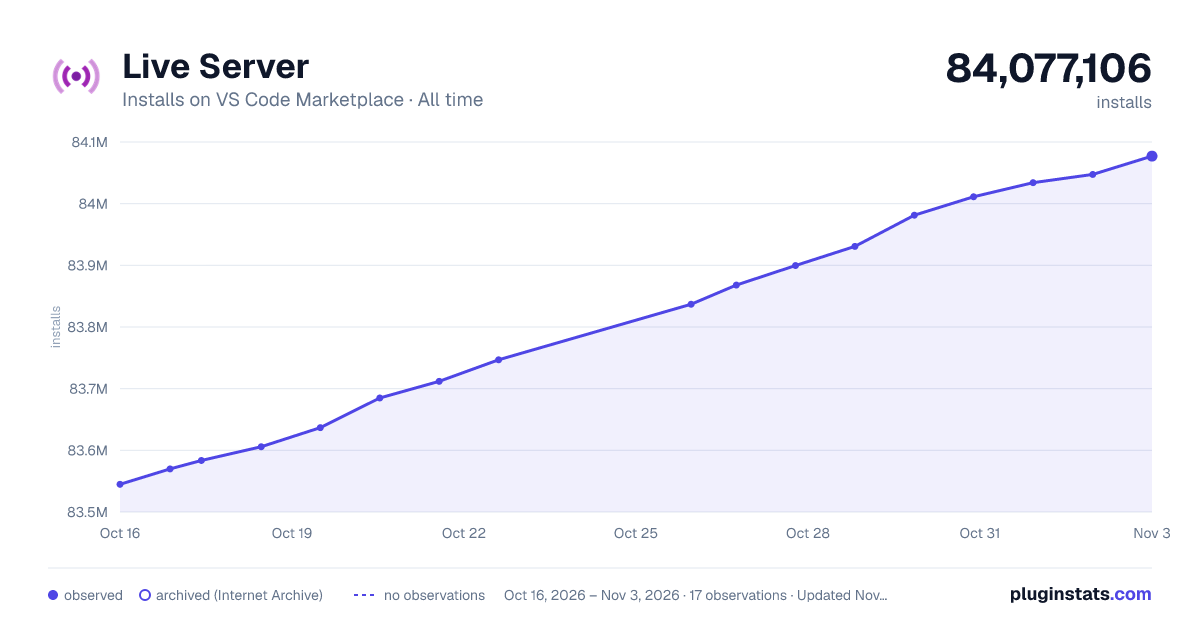

Adoption over time


7/30/90-day growth


Filled points are observed values; hollow points come from Internet Archive snapshots of the listing page. Dashed segments span periods with no observations — values between points are not interpolated.
Recent observations
Full history (3)Similar VS Code Marketplace Other plugins
Data source
Install counts, average rating, and rating counts come from the public Visual Studio Marketplace gallery API. Installs are cumulative and exclude updates.
Listing: https://marketplace.visualstudio.com/items?itemName=ritwickdey.LiveServer. First seen Oct 16, 2026; last successful collection Oct 18, 2026. See the methodology.