 PluginStats
nRF Connect for VS Code installs statistics
By Nordic Semiconductor (5 listings) · VS Code Marketplace · Other
Develop applications based on nRF Connect SDK with ease!
nRF Connect for VS Code has 265,539 recorded installs on VS Code Marketplace, ranking #1251 of 2,501 tracked listings.
Rating: 3.37 / 5 from 19 ratings
About nRF Connect for VS Code
nRF Connect for VS Code
Nordic Semiconductor’s nRF Connect for VS Code extension enhances the development experience for all aspects of the application development in VS Code for projects based on the nRF Connect SDK, nRF Connect SDK Bare Metal option, or Zephyr. It includes an interface to the compiler and linker, an RTOS-aware debugger, and a seamless interface to the nRF Connect SDK.
The extension lets you create, build, and debug applications all within the same window using either the command line or the extension's graphical interface Views.
Note: This extension provides the best user experience when it is used together with other extensions from Nordic Semiconductor: nRF DeviceTree, nRF Kconfig, and nRF Terminal. When you install nRF Connect for VS Code, the other extensions are automatically installed.
For detailed information about the extension, see the nRF Connect for VS Code documentation site on the TechDocs platform.
Install and manage Toolchain and SDK packages
Use the extension's SDK and toolchain management menus to install new versions of SDKs and toolchains. You can then configure each build configuration of an application to use a specific SDK and toolchain version.
Use the nRF Connect terminal profile for every build to initialize the appropriate toolchain environment.
Create and build applications from scratch
Smoothly create a new blank application or copy of a sample application using the Create a new application wizard. You can use a variety of sources as the fundament of your application, including blank templates, existing SDK samples, and the nRF Connect SDK Add-ons.
Create new custom boards
With its Create a new board page, nRF Connect for VS Code allows you to add new custom board structure compatible with Zephyr RTOS and the nRF Connect SDK.
Manage connected devices
Easily manage your devices in the Connected Devices View, where you can create device aliases and manage which of the device ports are connected to the terminal.

Manage and inspect source files
From the Details View, you can see the build information, such as source files, config files, output files, and more. This allows you to stay organized when working with your build and have relevant information in one location.
Create custom task bindings for specific actions
Create and manage custom task bindings in nRF Connect for VS Code and execute them when you Build, Pristine Build, Flash, or Erase and Flash to Board.
Custom task bindings can be created in nRF Connect for VS Code Actions View, or manually by editing the appropriate tasks.json file in your workspace.

Generate memory report for ROM and RAM usage
The extension offers a Memory report that shows the size and percentage of memory that each symbol uses on your device for ROM, RAM, and partitions for a particular application.
The Memory report displays both a treeview and a sunburst diagram to easily visualize how much memory each node takes up on your device.

Take advantage of an improved debugging experience
nRF Connect for VS Code uses its own nrf-debug debug type as the default debugger. Its built-in GDB/MI adapter starts west debugserver for local sessions and supports debugging multiple images and processors. The debug type also adds extension-specific Panel Views, such as Thread Viewer and Memory Explorer.
Feedback
Let us know what you think using the Give Feedback form, or ask questions in the Nordic DevZone.
Description from the VS Code Marketplace listing.
- debuggers
- json
- keybindings
README badge
Show your rank in a README or on your website. The badge updates automatically.
Charts
Images: 30d · 1y · all time · 1600×900 dark


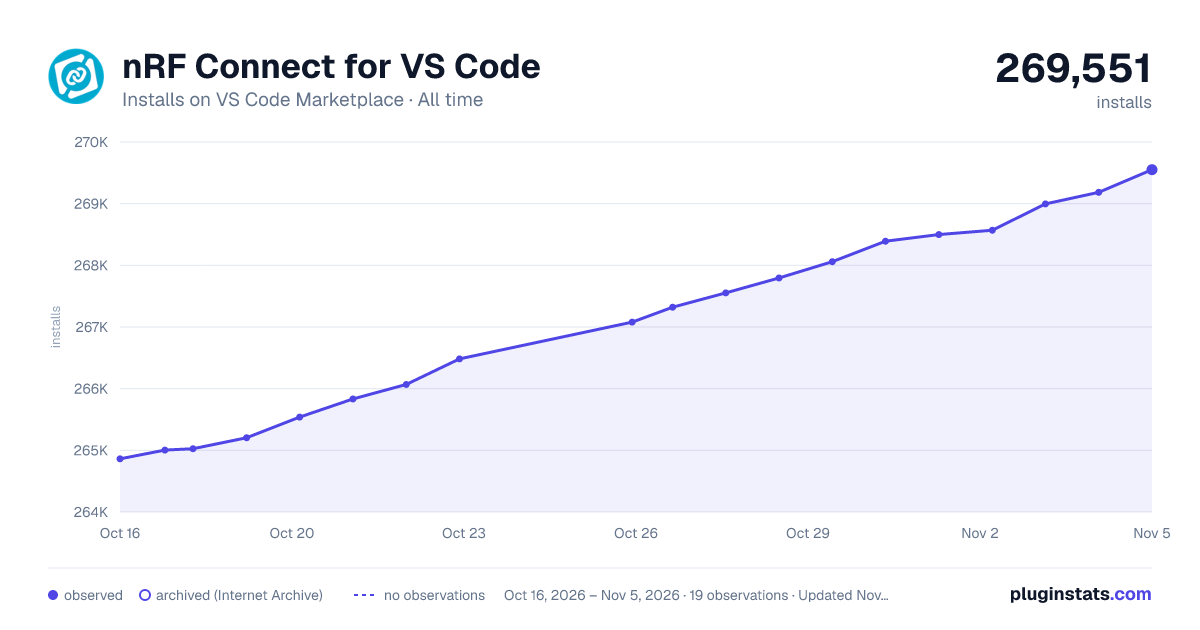

Adoption over time
7/30/90-day growth
Ranking history
Ratings over time
Listing placement
Listing placement
Filled points are observed values; hollow points come from Internet Archive snapshots of the listing page. Dashed segments span periods with no observations — values between points are not interpolated.
Each band is one page of 20. Installs on a linear scale. Placement is projected from installs, so it can differ from the marketplace's own sort order. Hover a dot to see the listing.
Recent observations
Full history (5)Similar VS Code Marketplace Other plugins
All 20 nRF Connect for VS Code alternativesData source
Install counts, average rating, and rating counts come from the public Visual Studio Marketplace gallery API. Installs are cumulative and exclude updates.
Listing: https://marketplace.visualstudio.com/items?itemName=nordic-semiconductor.nrf-connect. First seen Oct 16, 2026; last successful collection Oct 20, 2026. See the methodology.