 PluginStats
SQL Server Profiler Tool installs statistics
By epolicardo · VS Code Marketplace · Debuggers
SQL Server profiler extension using Extended Events for real-time query capture and analysis with advanced connection pooling, auto-reconnection system, and persistent UI state
SQL Server Profiler Tool has 125,023 recorded installs on VS Code Marketplace.
It ranks #2082 of 2,501 tracked VS Code Marketplace listings by installs.
It is rated 5.0 out of 5 from 1 ratings.
PluginStats has 4 daily observations since Oct 16, 2026; the latest is from Oct 19, 2026.
Rating: 5.00 / 5 from 1 ratings
About SQL Server Profiler Tool
📊 Telemetry & Observability
This extension includes OpenTelemetry instrumentation for comprehensive observability with distributed tracing, metrics, and structured logging.
✅ Enabled by Default
Telemetry is ON by default to help us improve the extension quality and performance. Your privacy is our priority:
• 🔒 Automatic sanitization of all sensitive data (passwords, connection strings, SQL queries) • 📊 Anonymous metrics only: usage patterns, performance data, error rates • ☁️ Default destination: Azure Application Insights (OTLP) • ⚙️ Full control: easily disable via sqlProfiler.telemetryEnabled: false • 🌍 Respects VS Code global settings: follows your VS Code telemetry preferences
Features
• Distributed Tracing: Track operation flows across profiling sessions • Metrics Collection: Monitor connection pool health, query durations, and error rates • Structured Logging: Correlate logs with traces for better debugging • Multi-Backend Support: Send to Jaeger, Grafana, Datadog, Application Insights, etc.
Quick Setup
To view telemetry data (run a local Jaeger instance):
View at: http://localhost:16686
Then set the endpoint to http://localhost:4318 in settings.
To disable telemetry:
To use a custom backend:
📚 Learn more: OpenTelemetry Quick Start | Full Documentation
SQL Server Profiler Tool
Professional SQL Server profiling directly in VS Code using Extended Events (XE)
🚀 Real-time query capture and analysis with advanced auto-reconnection system, connection pooling and persistent UI state for uninterrupted troubleshooting workflow.
✨ Key Features
🔄 Intelligent Auto-Reconnection System (NEW in v0.3.0)
• Automatic Recovery: Transparent reconnection for network interruptions, SSL errors, and timeouts • Circuit Breaker Protection: Prevents infinite reconnection loops with intelligent cooldown • Error Classification: Smart detection of network, SSL, authentication, database, and resource errors • Adaptive Strategies: Different reconnection approaches based on error type • Zero Downtime: Continue profiling during temporary connection issues
📊 Real-Time Profiling with Hybrid Streaming
• Live SQL query capture using Extended Events (XE) • Hybrid Architecture: Ring buffer (Azure SQL) + Event file streaming (SQL Server On-Premise) • Sub-3 Second Latency: Optimized polling (250ms Azure, 500ms SQL Server) • Persistent Expanded State: Analyze events without stopping capture (v0.2.0+) • Enhanced Polling: Intelligent recovery during Extended Events errors • Cross-Platform Support: Azure SQL Database, SQL Server On-Premise, SQL Express • Smart Anti-Recursion: Filters profiler's own queries automatically
🏗️ Enterprise-Ready Reliability
• Connection Pool Management: Advanced pooling with tarn.js (max 5 connections) • Auto-Recovery Polling: Automatic recovery from profiling interruptions • Circuit Breaker Dashboard: Real-time monitoring of connection health • Configuration Presets: Optimized settings for Azure SQL, On-Premise, and Local development • Session-Based DB Detection: Database type detected once per session (zero overhead)
🔧 Smart Configuration
• Preset Configurations: One-click setup for different environments • Auto-Format Correction: Automatic Azure SQL server name format fixes • Secure Credential Management: VS Code secret storage integration • Real-time Statistics: Comprehensive connection and reconnection metrics • Adaptive Timeouts: 120s acquire, 45s create, 90s request
🎯 Developer Experience
• Zero Configuration: Works with existing mssql extension connections • Progress Notifications: Visual feedback during reconnection attempts • Intelligent State Management: Events remain expanded during real-time updates • Advanced Export: JSON export with query metadata and connection details • Latency Tracking: Real-time feedback from SQL execution to UI display • Unique Event IDs: RFC4122 v4 GUID + counter for guaranteed uniqueness
🔄 Auto-Reconnection System
Never lose your profiling session again! The auto-reconnection system provides transparent recovery from connection issues.
🚀 How It Works
1. Automatic Detection: Monitors connection health during profiling 2. Smart Classification: Identifies error types (Network, SSL, Auth, Database, Resource) 3. Adaptive Recovery: Applies specific strategies based on error classification 4. Circuit Breaker: Prevents excessive reconnection attempts with intelligent cooldown 5. Transparent Continuation: Resumes profiling automatically when connection is restored
🎛️ Configuration Presets
Choose the optimal configuration for your environment:
| Preset | Use Case | Max Retries | Circuit Breaker | Best For |
| 🏠 Development | Local SQL Server | 3 | Disabled | Fast development cycles | | ☁️ Azure SQL | Azure SQL Database | 8 | Enabled | Cloud environments | | 🏢 On-Premise | Corporate SQL Server | 5 | Enabled | Enterprise networks |
📊 Key Benefits
• 95% Fewer Manual Interventions: Automatic recovery in most scenarios • Sub-30 Second Recovery: Fast reconnection for temporary issues • Zero Data Loss: Maintains profiling session during recovery • Smart Notifications: Informative feedback without interruption
🎯 Common Scenarios Resolved
🔧 Quick Setup
1. Open Command Palette (Ctrl+Shift+P) 2. Search: "SQL Profiler: Configure Auto-Reconnection" 3. Select: Your environment preset 4. Start Profiling: Enjoy uninterrupted sessions!
📚 Complete Documentation | ⚙️ Configuration Reference
Requisitos
• Visual Studio Code 1.74.0 o superior • SQL Server (cualquier versión que soporte Extended Events) • Permisos para crear/administrar Extended Events en SQL Server
Instalación
1. Clona este repositorio 2. Ejecuta npm install para instalar las dependencias 3. Ejecuta npm run compile para compilar el proyecto 4. Presiona F5 para abrir una nueva ventana de VS Code con la extensión cargada
Uso
1. Configurar conexión
Método recomendado: Usar conexiones de mssql…
Description from the VS Code Marketplace listing.
- auto-reconnection
- azure sql
- circuit breaker
- connection pooling
- database
- extended events
- performance
- profiler
- reliability
- sql
- sql server
Where SQL Server Profiler Tool sits in the listing
Each band is one page of 20. Installs on a log scale. Placement is projected from installs, so it can differ from the marketplace's own sort order. Hover a dot to see the listing.


Charts
Images: 30d · 1y · all time · 1600×900 dark


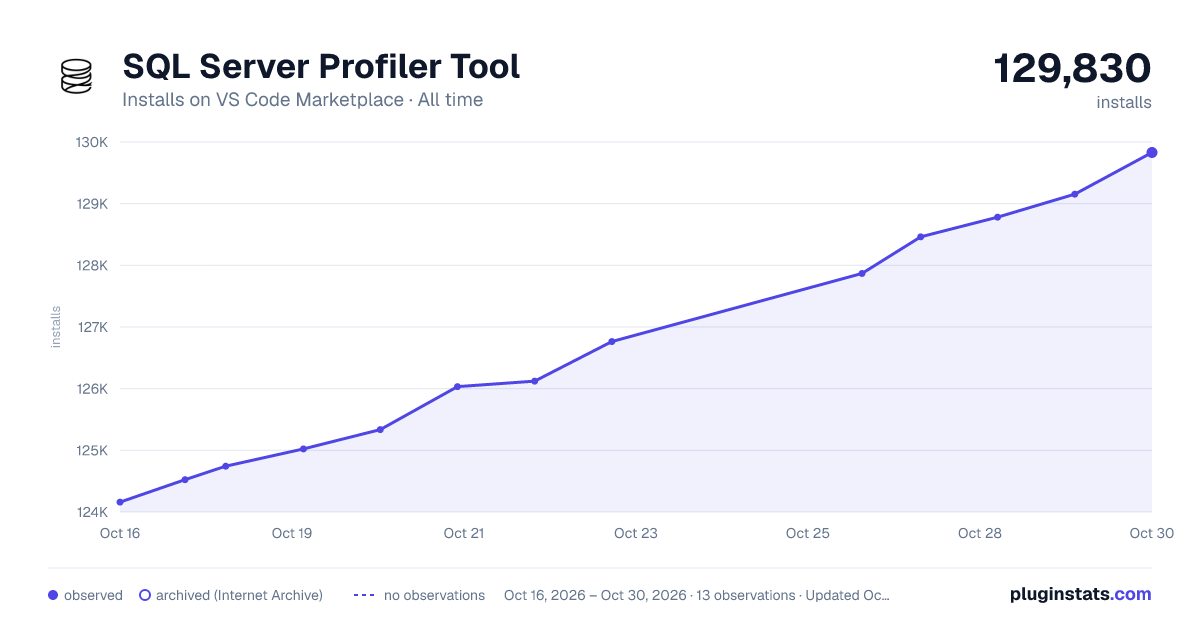

Adoption over time


7/30/90-day growth


Ranking history


Filled points are observed values; hollow points come from Internet Archive snapshots of the listing page. Dashed segments span periods with no observations — values between points are not interpolated.
Recent observations
Full history (4)Similar VS Code Marketplace Debuggers plugins
Data source
Install counts, average rating, and rating counts come from the public Visual Studio Marketplace gallery API. Installs are cumulative and exclude updates.
Listing: https://marketplace.visualstudio.com/items?itemName=epolicardo.sql-server-profiler-tool. First seen Oct 16, 2026; last successful collection Oct 19, 2026. See the methodology.