 PluginStats
SFTP has 115,658 recorded installs on VS Code Marketplace, ranking #2177 of 2,501 tracked listings.
Rating: 4.29 / 5 from 14 ratings
About SFTP
sftp sync extension for VS Code
-
VS Code marketplace : https://marketplace.visualstudio.com/items?itemName=satiromarra.code-sftp <br>
-
VSIX release : https://github.com/satiromarra/vscode-sftp/releases/
-
New Features in these Fork:
- (new) When select a image on Remote Explorer, opens as like local image.
- (new) Warn when uploading over newer file.
- (fix) Order connections when grouped
- (new) Group connections by context
- Fix save new connection on empty folder
- (new) Group connections by host
- (new) Add support for .env files
- (new) Configure charset to ASCII in Ftp protocol
- (new) Create/Edit connections with User Interface
- (new) Rename remote Files and Folders
- (new) Multiple configurations with multiples profiles
- (new) Change remote permission in folder and files
- (new) Download files and folders as another name
- Fixed many bugs
VSCode-SFTP enables you to add, edit or delete files within a local directory and have it sync to a remote server directory using different transfer protocols like FTP or SSH. The most basic setup requires only a few lines of configuration with a wide array of specific settings also available to meet the needs of any user. Both powerful and fast, it helps developers save time by allowing the use of a familiar editor and environment.
- Features
- Browser remote with Remote Explorer
- Diff local and remote
- Sync directory
- Upload/Download
- Upload on save
- File Watcher
- Multiple configurations
- Switchable profiles
- Temp File support
- Commands
- Debug
- FAQ
Installation
Method 1 (Recommended : Auto update)
- Select Extensions (Ctrl + Shift + X).
- Uninstall current sftp extension from @liximomo.
- Install new extension directly from VS Code Marketplace : https://marketplace.visualstudio.com/items?itemName=satiromarra.code-sftp.
- Voilà!
Method 2 (Manual update)
To install just follow these steps from within VSCode:
- Select Extensions (Ctrl + Shift + X).
- Uninstall current sftp extension from @liximomo.
- Open "More Action" menu(ellipsis on the top) and click "Install from VSIX…".
- Locate VSIX file and select.
- Reload VSCode.
- Voilà!
Documentation
User Interface
-
Create connection<br/>
<img src="https://github.com/satiromarra/vscode-sftp/raw/HEAD/assets/showcase/create-connection.png" width="350"/> -
Form new connection<br/>
<img src="https://github.com/satiromarra/vscode-sftp/raw/HEAD/assets/showcase/form-new-connection.png" width="350"/> -
Edit connection<br/>
<img src="https://github.com/satiromarra/vscode-sftp/raw/HEAD/assets/showcase/edit-connection.png" width="350"/> -
Delete connection<br/>
<img src="https://github.com/satiromarra/vscode-sftp/raw/HEAD/assets/showcase/delete-connection.png" width="350"/> -
Confirm delete<br/>
<img src="https://github.com/satiromarra/vscode-sftp/raw/HEAD/assets/showcase/confirm-delete-connection.png" width="350"/>
Usage
If the latest files are already on a remote server, you can start with an empty local folder, then download your project, and from that point sync.
- In
VS Code, open a local directory you wish to sync to the remote server (or create an empty directory that you wish to first download the contents of a remote server folder in order to edit locally). Ctrl+Shift+Pon Windows/Linux orCmd+Shift+Pon Mac open command palette, runSFTP: configcommand.- A basic configuration file will appear named
sftp.jsonunder the.vscodedirectory, open and edit the configuration parameters with your remote server information.
For instance:
{
    "name": "Profile Name",
    "host": "name_of_remote_host",
    "protocol": "ftp",
    "port": 21,
    "secure": true,
    // "charset": "ascii", // <---- When protocol is "ftp" you can change the charset to ASCII mode
    "username": "username",
    "remotePath": "/public_html/project", // <--- This is the path which will be downloaded if you "Download Project"
    "password": "password",
    "uploadOnSave": false
}
The password parameter in sftp.json is optional, if left out you will be prompted for a password on sync.
Note: backslashes and other special characters must be escaped with a backslash.
- Save and close the
sftp.jsonfile. Ctrl+Shift+Pon Windows/Linux orCmd+Shift+Pon Mac open command palette.- Type
sftpand you'll now see a number of other commands. You can also access many of the commands from the project's file explorer context menus. - A good one to start with if you want to sync with a remote folder is
SFTP: Download Project. This will download the directory shown in theremotePathsetting insftp.jsonto your local open directory. - Done - you can now edit locally and after each save it will upload to sync your remote file with the local copy.
- Enjoy!
For detailed explanations please go to wiki.
Example configurations
You can see the full list of configuration options here.…
Description from the VS Code Marketplace listing.
- ftp
- json
- keybindings
- remote
- sftp
- sync
README badge
Show your rank in a README or on your website. The badge updates automatically.
Charts
Images: 30d · 1y · all time · 1600×900 dark


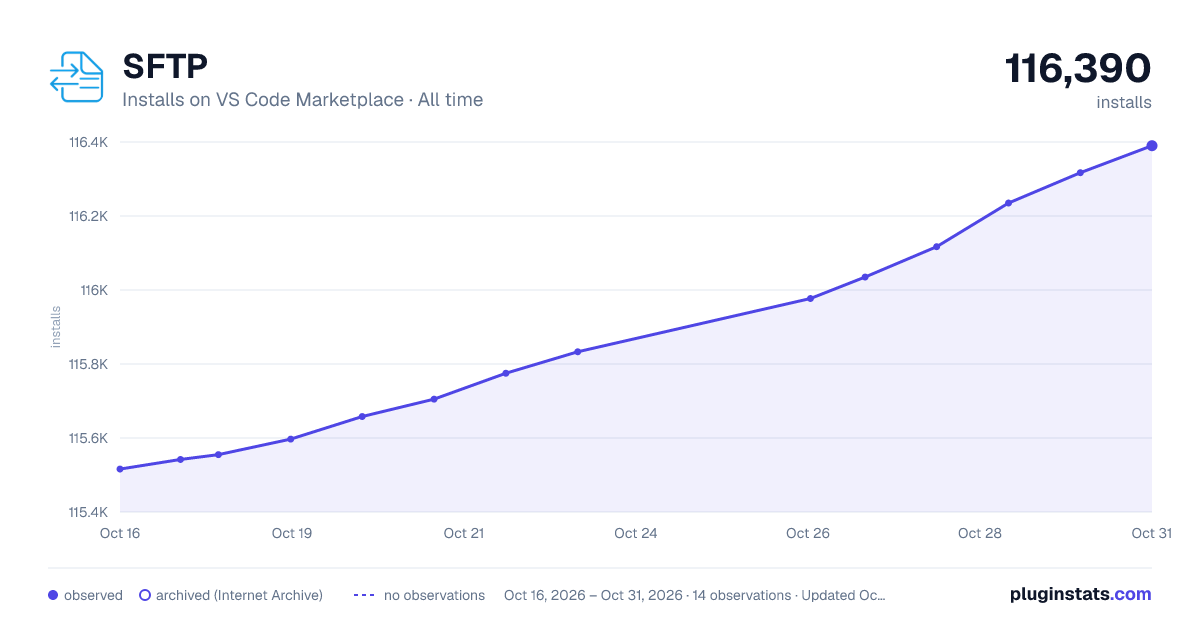

Adoption over time
7/30/90-day growth
Ranking history
Ratings over time
Listing placement
Listing placement
Filled points are observed values; hollow points come from Internet Archive snapshots of the listing page. Dashed segments span periods with no observations — values between points are not interpolated.
Each band is one page of 20. Installs on a linear scale. Placement is projected from installs, so it can differ from the marketplace's own sort order. Hover a dot to see the listing.
Recent observations
Full history (5)Similar VS Code Marketplace Other plugins
All 20 SFTP alternativesData source
Install counts, average rating, and rating counts come from the public Visual Studio Marketplace gallery API. Installs are cumulative and exclude updates.
Listing: https://marketplace.visualstudio.com/items?itemName=satiromarra.code-sftp. First seen Oct 16, 2026; last successful collection Oct 20, 2026. See the methodology.