 PluginStats
:emojisense: installs statistics
By Matt Bierner (11 listings) · VS Code Marketplace · Other
Adds suggestions and autocomplete for emoji
:emojisense: has 810,094 recorded installs on VS Code Marketplace.
It ranks #610 of 2,501 tracked VS Code Marketplace listings by installs.
It is rated 4.9 out of 5 from 33 ratings.
PluginStats has 4 daily observations since Oct 16, 2026; the latest is from Oct 19, 2026.
Rating: 4.91 / 5 from 33 ratings
About :emojisense:
Adds suggestions and autocomplete for emoji to VS Code.
Inspired by the [Atom autocomplete+ emojis suggestions plugin][atom].
Features
• Quickly insert emoji using the :smile: syntax supported by Github and many other sites • Insert emoji markup by typing :: • Enable and control emoji completion settings per language • See emoji previews of :smile: style markup inline • Can be enabled in VS Code's SCM (git) input box. • Provide an emoji picker to select and insert an emoji in the editor or terminal. To access the picker, run the Emojisense: Pick an emoji command, or use the default keybindings: • Mac: cmd + i • Linux: ctrl + alt + i • Windows: ctrl + i
[List of supported emoji][cheat]
General Configuration
• emojisense.unicodeCompletionsEnabled: Enable completions that insert emoji as unicode, i.e. :smile_cat: -> 😸 • emojisense.markupCompletionsEnabled: Enable completions that insert emoji markup, i.e. ::smile_cat -> :smile_cat: • emojisense.showOnColon: Should emoji completions automatically be shown when you type a colon? Enabled by default. If you disable showOnColon, it is recommended that you have quickSuggestions enabled. • emojisense.emojiDecoratorsEnabled: Show emoji decorators inline for :smile_cat: markup in a file? Enabled by default in markdown.
Per Language Configuration
*Emojisense* is enabled by default in markdown, git commits, and plaintext files. You can enable it in other languages using "emojisense.languages"
The language keys here come from VS Code's list of language identifiers.
You can also change the settings for each language. Here's the default emojisense configuration for example:
Whenever a value is left unspecified, the top level setting is used instead. In this case, markdown files will fallback to use the top level emojisense.unicodeCompletionsEnabled and emojisense.markupCompletionsEnabled settings, while plaintext files will have markupCompletionsEnabled disabled and fallback to the emojisense.unicodeCompletionsEnabled setting.
You can enable emojisense for all languages using *:
Credits
• Icon from emojione: https://www.emojione.com • [Atom autocomplete+ emojis suggestions plugin][atom]
Description from the VS Code Marketplace listing.
- emoji
- emojis
- emoticon
- emoticons
- keybindings
Where :emojisense: sits in the listing
Each band is one page of 20. Installs on a log scale. Placement is projected from installs, so it can differ from the marketplace's own sort order. Hover a dot to see the listing.


Charts
Images: 30d · 1y · all time · 1600×900 dark


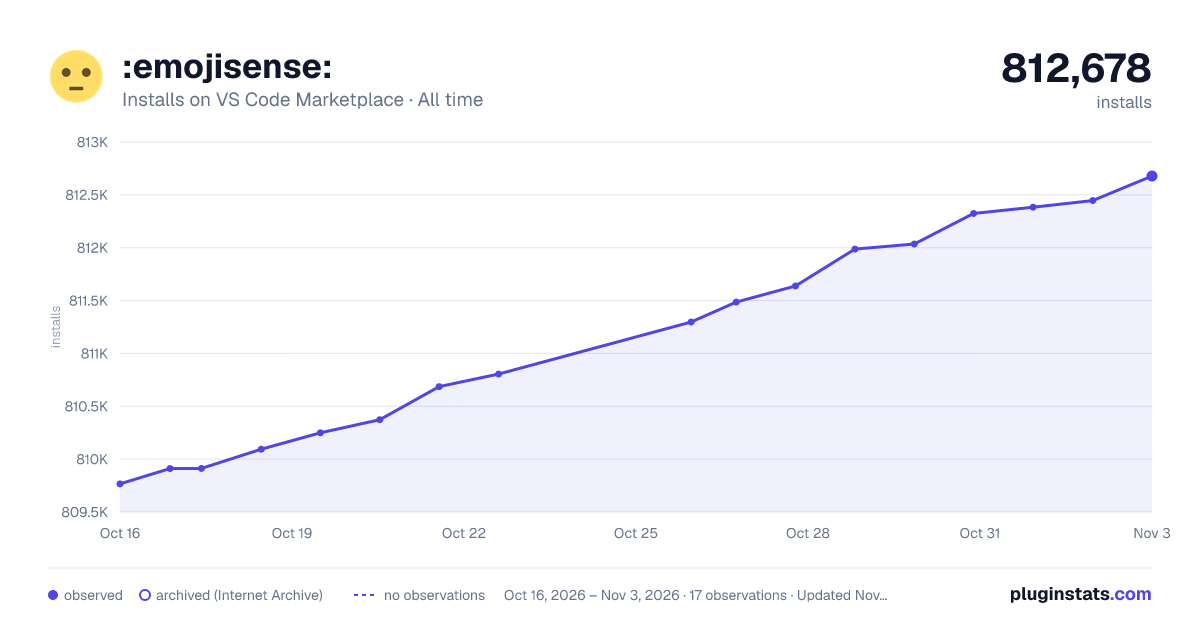

Adoption over time


7/30/90-day growth


Ranking history


Filled points are observed values; hollow points come from Internet Archive snapshots of the listing page. Dashed segments span periods with no observations — values between points are not interpolated.
Recent observations
Full history (4)Similar VS Code Marketplace Other plugins
Data source
Install counts, average rating, and rating counts come from the public Visual Studio Marketplace gallery API. Installs are cumulative and exclude updates.
Listing: https://marketplace.visualstudio.com/items?itemName=bierner.emojisense. First seen Oct 16, 2026; last successful collection Oct 19, 2026. See the methodology.