 PluginStats
Salesforce Live Preview installs statistics
By Salesforce (33 listings) · VS Code Marketplace · Programming Languages
Salesforce Live Preview for Lightning Web Components
Salesforce Live Preview has 130,129 recorded installs on VS Code Marketplace, ranking #2025 of 2,501 tracked listings.
About Salesforce Live Preview
Salesforce Live Preview for Visual Studio Code
Overview
The Salesforce Live Preview extension enables you to preview Lightning Web Components (GA) and Saleforce Multi-Framework UI Bundles (Beta) directly within Visual Studio Code. When you save changes to your component files, the preview automatically updates, allowing you to iterate quickly without deploying code or manually refreshing your browser.
Supported Preview Types:
- Lightning Web Components (GA): Preview Lightning Web Components in a VS Code webview.
- Salesforce Multi-Framework UI Bundles (Beta): Preview React, Vue, Angular, and other UI bundles with dev server integration.
- Headless Experience Layer (HXL) Widgets (Beta): Preview HXL Widgets in a VS Code webview.
Documentation
For detailed information about local development with Salesforce and previewing components, see: Preview Components with Local Dev
Contributing to the Theme Manager brand-preview feature? See docs/theme-manager-local-dev.md for the two-repo setup, build order, and how to build/test the VSIX locally.
Features
Lightning Web Components (LWC)
- Integrated Webview Preview: Preview components directly within VS Code
- Automatic Server Management: Preview server starts on extension activation
- Smart Component Tracking: Automatically updates preview when switching between files
- Context Menu Integration: Right-click any LWC file to preview without selecting from a list
- Pin/Unpin Functionality: Lock preview to specific component
- Status Bar Integration: Quick server status visibility and control
- Org Integration: Preview LWCs in the context of your connected Salesforce org
- Platform Data Access: Access org data through Lightning Data Service wire adapters, Apex controllers, and @salesforce scoped modules
Salesforce Multi-Framework (Beta)
- UI Bundle Preview: Preview UI bundles (React, Vue, Angular) with Salesforce authentication directly in VS Code
- Integrated Webview Panel: Opens preview in a VS Code webview panel (not external browser)
- Automatic Proxy: Automatically proxies requests to Salesforce orgs
- Dev Server Integration: Works with any framework's dev server
- Org Authentication: Seamless integration with Salesforce org authentication
HXL Widgets (Beta)
- Live Widget Preview: Preview HXL Widgets directly within VS Code, with per-channel simulations
- Context Menu Integration: Right-click a widget bundle or its files and select SFDX: Open in Widget Preview to preview the widget
- Schema-Driven Sample Data: Sample attribute values are derived from the widget's
schema.json, so preview data stays in sync with the widget's declared properties
Prerequisites
- Install the Salesforce Extension Pack
- Install the Salesforce CLI
For LWC Preview
Install the Local Dev CLI plugin:
sf plugins install @salesforce/plugin-lightning-dev
For Salesforce Multi-Framework UI Bundle Preview
Install the UI Bundle CLI plugin:
sf plugins install @salesforce/plugin-ui-bundle-dev
Getting Started
Installation
Install the extension from the VS Code Marketplace or search for "Live Preview" in the VS Code Extensions view.
Usage
-
Automatic Server Start: The preview server starts automatically when you preview a component
-
Preview a Component:
- Via Command Palette: Open Command Palette (
Cmd+Shift+P/Ctrl+Shift+P), runSFDX: Open in Lightning Preview, and select a component - Via Context Menu: Right-click on any LWC file (
.js,.html, or.css) in the Explorer and select "Open Lightning Component in Preview"
- Via Command Palette: Open Command Palette (
-
Preview Panel Controls:
- Pin/Unpin: Lock preview to current component
- Refresh: Reload current component
- Open in Browser: Launch in external browser
-
Server Management: Click the status bar item to toggle start / stop of the preview server
Salesforce Multi-Framework UI Bundle Preview Usage
Prerequisites
- Create a ui bundle in the SFDX project structure:
my-sfdx-project/
├── sfdx-project.json
└── force-app/main/default/uiBundles/
    └── my-app/
        ├── my-app.uibundle-meta.xml
        ├── package.json
        ├── src/
        └── ui-bundle.json
Note: The
{name}.uibundle-meta.xmlfile is required to identify a valid ui bundle. Theui-bundle.jsonis optional - if not present, the extension defaults tonpm run devcommand.
- Optional: Create
ui-bundle.jsonfor custom dev configuration:
| Field | Type | Description | Default |
|---|---|---|---|
dev.command | string | Command to start dev server. When set, CLI starts the server; URL defaults to http://localhost:5173 unless overridden. | npm run dev |
dev.url | string | Dev server URL. Command mode: Override default 5173 if needed. URL-only mode (no command): Required—CLI assumes server is already running and does not start it. | http://localhost:5173 |
Command mode (CLI starts dev server):…
Description from the VS Code Marketplace listing.
- lightning
- live
- preview
- salesforce
- salesforcedx
- sfdx
README badge
Show your rank in a README or on your website. The badge updates automatically.
Charts
Images: 30d · 1y · all time · 1600×900 dark


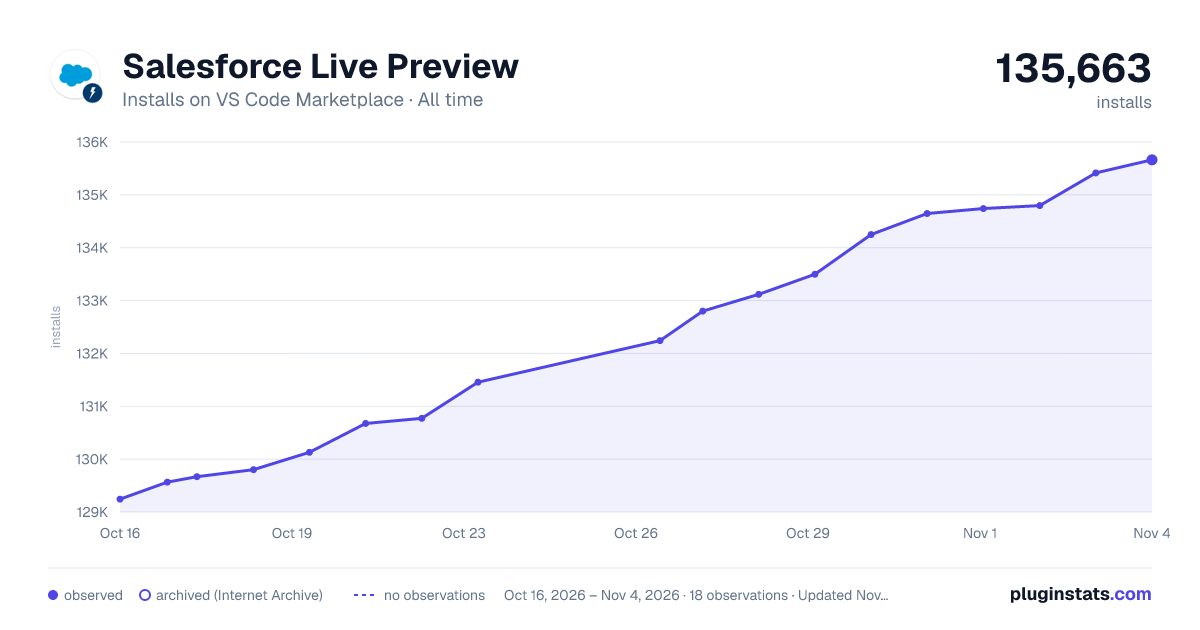

Adoption over time
7/30/90-day growth
Ranking history
Ratings over time
Listing placement
Listing placement
Filled points are observed values; hollow points come from Internet Archive snapshots of the listing page. Dashed segments span periods with no observations — values between points are not interpolated.
Each band is one page of 20. Installs on a linear scale. Placement is projected from installs, so it can differ from the marketplace's own sort order. Hover a dot to see the listing.
Recent observations
Full history (5)Similar VS Code Marketplace Programming Languages plugins
All 20 Salesforce Live Preview alternativesData source
Install counts, average rating, and rating counts come from the public Visual Studio Marketplace gallery API. Installs are cumulative and exclude updates.
Listing: https://marketplace.visualstudio.com/items?itemName=salesforce.salesforcedx-vscode-ui-preview. First seen Oct 16, 2026; last successful collection Oct 20, 2026. See the methodology.