 PluginStats
R Tools installs statistics
By Mikhail Arkhipov · VS Code Marketplace · Programming Languages
R Tools (IntelliSense, signature help, tooltips and more)
R Tools has 408,831 recorded installs on VS Code Marketplace, ranking #951 of 2,501 tracked listings.
Rating: 4.00 / 5 from 3 ratings
About R Tools
R extension for Visual Studio Code
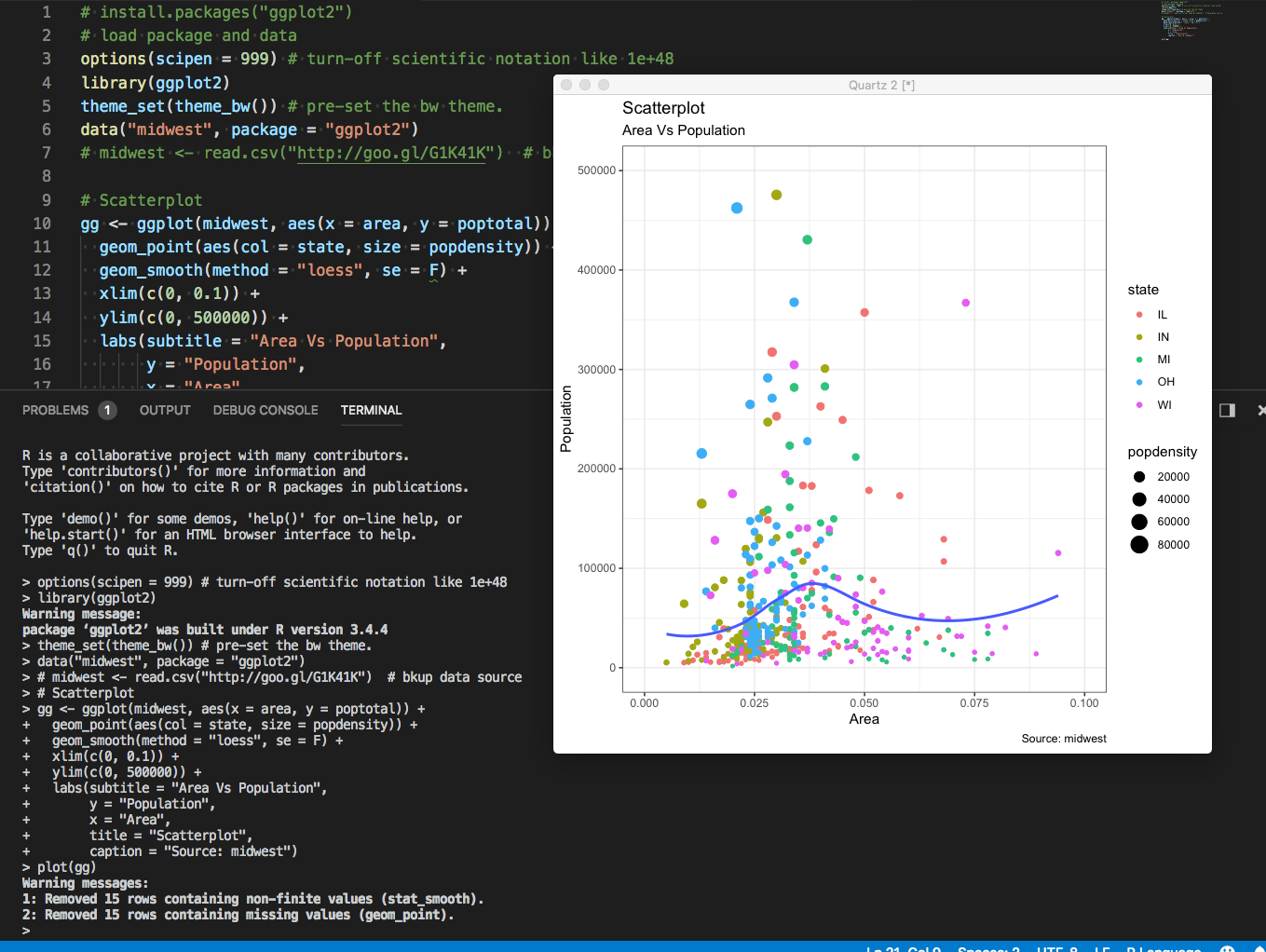
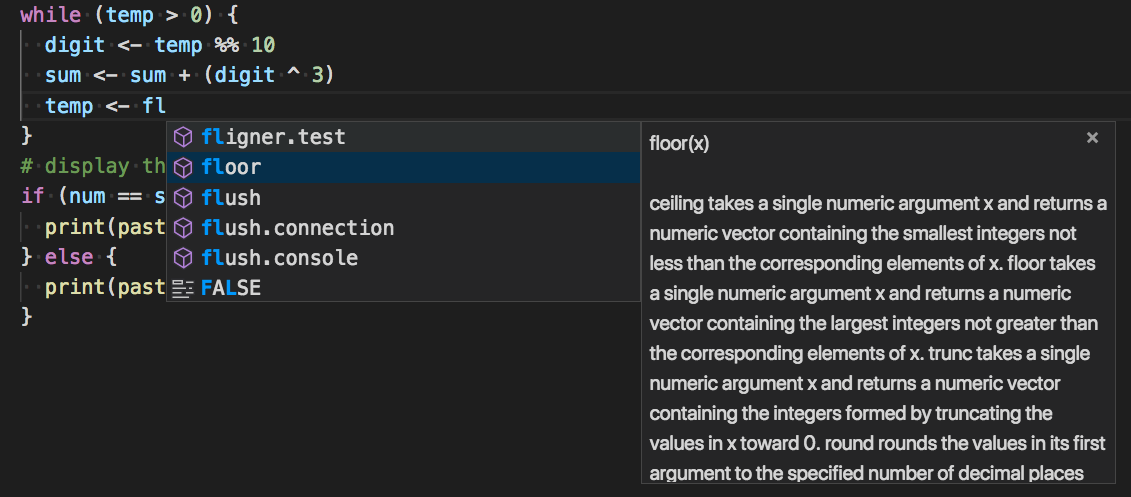
A Visual Studio Code extension provides support for the R language for R 3.2+. Features include syntax checking, completions, code formatting, formatting as you type, tooltips, linting.
Supported platforms
- Windows x64
- Mac OS 10.14+ (Intel)
- Mac OS 11.2+ Intel or ARM
- Linux distros supported by .NET 7.0 Runtime.
Prerequisites
- .NET 7.0 Runtime
- R distribution (64-bit only)
- With Apple M1 silicon and R 4.1+ please use ARM64 package.
Quick start
Open the Command Palette (Command+Shift+P on macOS and Ctrl+Shift+P on Windows/Linux) and type 'R:' to see list of available commands and shortcuts.
Syntax check
Syntax check is performed as you type or when opening a file. Look for red squiggles. Problems are also reported in the Problems tab.
Formatting
Extension provides ability to format document or selection. Formatting options are available in the r.editor settings section.
Automatic formatting (as you type)
The editor can format code after you type Enter, ; or }. You can control the feature via editor.formatOnType and r.editor.formatOnType settings. Formatting settings are the same as in the document formatting.
Linting
Functionality is close to lintr. However, you do not have to run linting explicitly, it happens as you type. By default it is disabled, you can enable it by setting r.linting.enable to true. Linter has various options available in the r.linting section.
Execute in terminal/source file
Use R: Execute line or selection commands to execute line or selection in the terminal. Similarly, use R: source file to source file from the editor into the terminal section.
Shortcuts and snippets
Extension provides shortcuts for <- and %>% as suggested in #22. There are completion triggers on % and < which allows using completion list for snippets, as in RTVS.
You can either type < and then TAB to get <- via completion list or use keyboard shortcut alt+-. For pipe %>% either type % and then TAB or use ctrl+shift+m shortcut.
Snippets file can be found in snippets/r.json in the extension folder.
Thanks to @jackbrookes for suggestions and snippets.
Remoting and WSL
The extension does work in WSL. However, output windows cannot be displayed since UI does not translate over remote connection. There is limited support for plotting though. Remoting like R Tools in Visual Studio into containers with preinstalled RTVS broker is not supported. Please use VS Code remoting instead.
Using R on Apple ARM silicon
Make sure you install VS Code for OSX for ARM. You may have to download it separately since if you have had VS Code installed on M1 before ARM build became available and kept upgrading it, it is probably still x64. The extension by default uses ARM version with R 4.1 or higher. However, if you need to use Intel build of R such as when you may be using native packages not available for ARM, you can select x64 R from the list of interpreters - such as pick '4.1' and not '4.1-arm64'. Use r.interpreter setting to specify the desired interpreter index.
Plotting
Plots typically appear in external R windows. However, there is support for internal Plot window that may come handy when working with remote sessions, such as WSL. Try r.execute command (Ctrl+Shift+Enter) to evaluate code in internal R session. Executing command over a line that yields a plot will output plot in the internal Plot window.
Remember though that Terminal window and internal R session are not connected. Executing code in Terminal and then attempting plot the result via internal session won't work. With remote sessions, you can execute code in Terminal, save results into a file, then execute plotting in internal session providing results from the file.
 )
)
Using custom R executable in terminal
You can set r.terminalPath to an executable for the R Terminal. For example, Radian. The extension completions engine still needs to know where to find R binaries so it is recommended to set r.interpreterPath to whatever version of R used in the terminal.
Known issues
R session in the editor does not automatically pick up new packages installed in the terminal. You may have to reload the window for the session to pick up newly installed modules.
Troubleshooting
R Interpreter not found
Try using r.interpreterPath setting and specify path to R installation. The path should be root folder, like C:\Program Files\R\R-3.4.3, without bin/x64.
Not currently supported
- Debugging
- Completions in console
- 32-bit R
- Dynamic update of the session when new packages are installed.
Bug reports
Please file issues at the project GitHub
Disclaimer
-
Extension is based on Microsoft R Tools for Visual Studio aka RTVS. Please visit https://github.com/microsoft/rtvs for more information.
-
This project is a personal effort and although it builds upon Microsoft code, it is not supported by Microsoft. I work on the code occasionally in my spare time.
Description from the VS Code Marketplace listing.
- keybindings
- markdown
- R
- R Language
- R Tools
- snippet
README badge
Show your rank in a README or on your website. The badge updates automatically.
Charts
Images: 30d · 1y · all time · 1600×900 dark


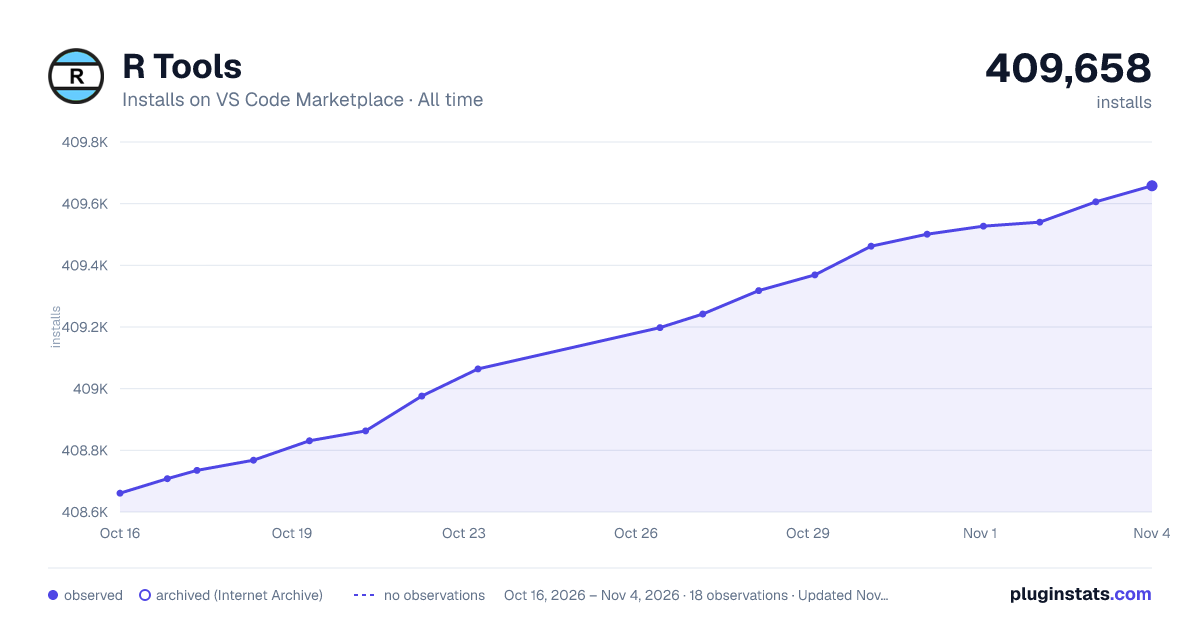

Adoption over time
7/30/90-day growth
Ranking history
Ratings over time
Listing placement
Listing placement
Listing placement
Listing placement
Filled points are observed values; hollow points come from Internet Archive snapshots of the listing page. Dashed segments span periods with no observations — values between points are not interpolated.
Each band is one page of 20. Installs on a linear scale. Placement is projected from installs, so it can differ from the marketplace's own sort order. Hover a dot to see the listing.
Recent observations
Full history (5)Similar VS Code Marketplace Programming Languages plugins
All 20 R Tools alternativesData source
Install counts, average rating, and rating counts come from the public Visual Studio Marketplace gallery API. Installs are cumulative and exclude updates.
Listing: https://marketplace.visualstudio.com/items?itemName=Mikhail-Arkhipov.r. First seen Oct 16, 2026; last successful collection Oct 20, 2026. See the methodology.