 PluginStats
Karma Test Explorer (for Angular, Jasmine, and Mocha) installs statistics
By Lucas Ononiwu · VS Code Marketplace · Testing
View and run your Karma or Angular tests in the VS Code Testing side bar
Karma Test Explorer (for Angular, Jasmine, and Mocha) has 136,080 recorded installs on VS Code Marketplace.
It ranks #1967 of 2,501 tracked VS Code Marketplace listings by installs.
It is rated 4.8 out of 5 from 13 ratings.
PluginStats has 4 daily observations since Oct 16, 2026; the latest is from Oct 19, 2026.
Rating: 4.85 / 5 from 13 ratings
About Karma Test Explorer (for Angular, Jasmine, and Mocha)
Karma Test Explorer (for Angular, Jasmine, and Mocha)
This extension adds a rich and fully integrated testing experience to Visual Studio Code for Angular, TypeScript, and JavaScript projects that use Karma for testing.
It shows your Karma tests in a visual explorer in VS Code, adds code lenses and gutter decorations to your test files, and shows test failure details inline within your code at the point of each failure.
The side bar shows rich information about your tests, including focused ⚡ and disabled 💤 tests (left image), and details summarizing passed, failed and skipped tests after each test execution (right image).
Please take a minute to rate this extension in the marketplace and star it on GitHub. For issues, questions, or feature requests, see Reporting Issues.
Why this Extension
Karma Test Explorer is a complete rewrite of the deprecated Angular/Karma Test Explorer, and adds various significant enhancements and new features to provide robust support for:
• Cloud and remote development sceanarios with Dev Containers • Good performance with large projects having many thousands of tests • Zero-configuration user experience that "just works" for most setups • Flexibility to support a wide range of testing scenarios and workflows • Reliability, usability, and productivity
Features
• Rich visual test browsing, execution, and debugging • Angular, Karma, Jasmine, and Mocha support • Multi-project / monorepo / multi-root workspace support • Live test validation of changing product code • Auto-detection and fix recommendations for various testing issues • Much more
Quick Start
In many cases, testing should work out of the box:
• Ensure Chrome browser and the project dependencies are installed • Install the Karma Test Explorer extension and wait a moment while it initializes • When done, your tests should be displayed in the Testing side bar • Use the many extension settings to customize it to any other needs of your project • If you run into any issues, see extension setup for more detailed setup instructions
Documentation
For a more detailed guide on setting up, customizing, and fully leveraging all the available features to work for your project, please see the Karma Test Explorer Documentation.
Acknowledgement
Special thanks to the authors of the deprecated Angular/Karma Test Explorer on which Karma Test Explorer was originally based.
See Also
Documentation | Contributing | Changelog | Report an issue
Description from the VS Code Marketplace listing.
- angular
- angular.js
- jasmine
- javascript
- karma
- karma-jasmine
- karma-mocha
- mocha
- testing
- typescript
Charts
Images: 30d · 1y · all time · 1600×900 dark


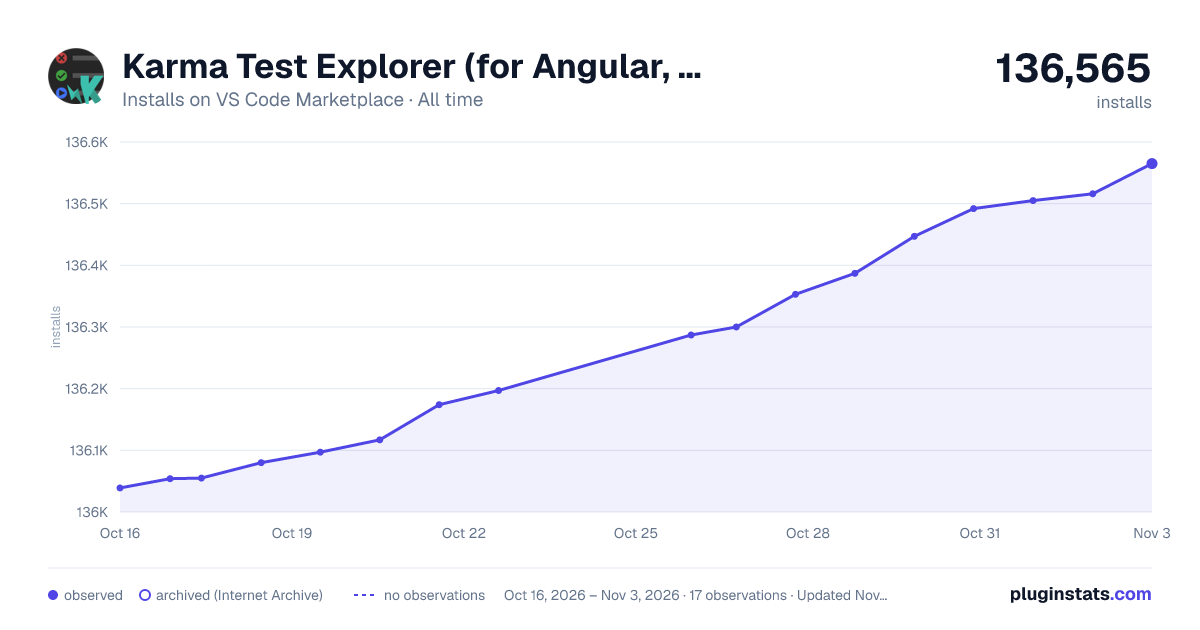

Adoption over time


7/30/90-day growth


Ranking history


Ratings over time


Listing placement


Filled points are observed values; hollow points come from Internet Archive snapshots of the listing page. Dashed segments span periods with no observations — values between points are not interpolated.
Each band is one page of 20. Installs on a log scale. Placement is projected from installs, so it can differ from the marketplace's own sort order. Hover a dot to see the listing.
Recent observations
Full history (4)Similar VS Code Marketplace Testing plugins
All 20 Karma Test Explorer (for Angular, Jasmine, and Mocha) alternativesData source
Install counts, average rating, and rating counts come from the public Visual Studio Marketplace gallery API. Installs are cumulative and exclude updates.
Listing: https://marketplace.visualstudio.com/items?itemName=lucono.karma-test-explorer. First seen Oct 16, 2026; last successful collection Oct 19, 2026. See the methodology.