 PluginStats
Preview on Web Server installs statistics
By YuichiNukiyama · VS Code Marketplace · Other
Preview Web Page on Web Server.
Preview on Web Server has 610,132 recorded installs on VS Code Marketplace, ranking #753 of 2,501 tracked listings.
Rating: 4.79 / 5 from 47 ratings
About Preview on Web Server
vscode-preview-server


Features
This extension provide preview of HTML which execute on web server. When you save files, this extension automatically reload browser or side panel (live preview feature). You can call these features from the context menu or editor menu. The main features are as follows.
Preview on side panel (ctrl+shift+v): Open preview of HTML on side panel. With this feature, you can easely check the operation of HTML, CSS and JavaScript.Launch on browser (ctrl+shift+l): Open Web Page on default browser. You can check all operation with web page.Stop the web server (ctrl+shift+s): Stop the web server. This feature can be used only from command palette.Resume the web server (ctrl+shift+r): Resume the web server. This feature can be used only from command palette.show UI Page (ctrl+shift+u): Show UI Page. You can change options at UI page.

Extension Settings
Description
This extension contributes the following settings:
previewServer.browsers: Browsers to launch. Even if you do not set this option, default browser launch if the ignoreDefaultBrowser is false. Default setting is null.previewServer.ignoreDefaultBrowser: Controls whether launch default browser or not. Default setting is false.previewServer.isWatchConfiguration: Controls whether resume the Web Server or not, when change settings. Default setting is true.previewServer.port: Port number of the Web Server. If you set null, vscode-preview-server generate random number, and set port as random number. Default setting is 8080.previewServer.proxy: Set proxy. This is usefull when execute web app on another web server. Default setting is "".previewServer.sync: Controls whether synchronized or not. Default setting is true.previewServer.ui: Port number of UI Page. Default setting is 3001.startupProject: Name of startup project. This setting is meaningful only when in the workspace. This value is the name of the folder. When using this workspace and omitting this value, the first folder becomes the startup project Default setting is null.
Simple example
{
    "previewServer.browsers": ["firefox", "chrome"],
    "previewServer.ignoreDefaultBroswer": true,
    "previewServer.port": 9999,
    "previewServer.ui": {
        "port": 3001,
        "weinrePort": 8081
    }
}
Settings with workspace
{
    "previewServer.startupProject": "Product"
}
{
	"folders": [
		{
			"name": "Product",
			"path": "foo"
		},
		{
			"name": "Test",
			"path": "bar"
		}
	],
	"settings": {
		"previewServer.startupProject": "Product"
	}
}
How to build locally
- Ensure that you have
gulp-cliinstalled globally usingnpm i -g gulp-cli. - Run
npm installto bring in the dependencies. - Run
gulp buildto produce i18n files. - Press
F5key to launch extension.
Known Issues
Preview on side panel somethimes don't work with CDN, Link etc.
Acknowledgements
This extension use browsersync. I would like to thank browsersync team for useful work.
Lisence
Description from the VS Code Marketplace listing.
- HTML
- keybindings
- multi-root ready
- Preview
- VSCode
README badge
Show your rank in a README or on your website. The badge updates automatically.
Charts
Images: 30d · 1y · all time · 1600×900 dark


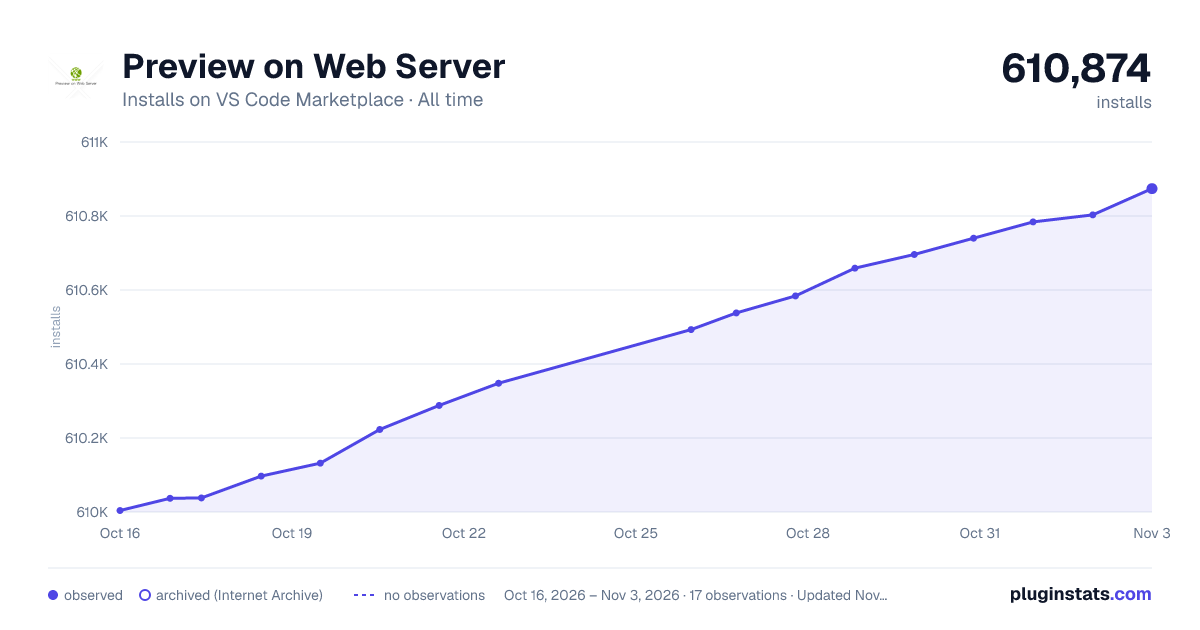

Adoption over time
7/30/90-day growth
Ranking history
Ratings over time
Listing placement
Listing placement
Filled points are observed values; hollow points come from Internet Archive snapshots of the listing page. Dashed segments span periods with no observations — values between points are not interpolated.
Each band is one page of 20. Installs on a linear scale. Placement is projected from installs, so it can differ from the marketplace's own sort order. Hover a dot to see the listing.
Recent observations
Full history (5)Similar VS Code Marketplace Other plugins
All 20 Preview on Web Server alternativesData source
Install counts, average rating, and rating counts come from the public Visual Studio Marketplace gallery API. Installs are cumulative and exclude updates.
Listing: https://marketplace.visualstudio.com/items?itemName=yuichinukiyama.vscode-preview-server. First seen Oct 16, 2026; last successful collection Oct 20, 2026. See the methodology.