 PluginStats
Ollama installs statistics
By Ollama · VS Code Marketplace · AI
Ollama language model provider for VS Code.
Ollama has 307,262 recorded installs on VS Code Marketplace, ranking #1138 of 2,501 tracked listings.
Rating: 3.71 / 5 from 7 ratings
About Ollama
Ollama for VS Code
Use Ollama models in VS Code Chat.
The Ollama extension adds models from your running Ollama server to the VS Code model picker.
Requirements
- Visual Studio Code 1.127 or newer. Earlier versions do not reliably cancel requests from language model providers.
- Ollama installed and running.
- At least one local or cloud model available in Ollama.
Ollama 0.17.6 or newer is recommended for cloud model sign-in and richer model metadata. Older Ollama versions may still work for local models.
# Pull a local model
ollama pull qwen3.6

# Pull a cloud model
ollama pull kimi-k2.6:cloud

# Sign in for cloud models
ollama signin
Local models do not require sign-in. Run ollama signin to use cloud models.
Get started
- Install the Ollama extension from the VS Code Marketplace.
- Start Ollama.
- Open Chat in VS Code.
- Open the model picker at the bottom of the chat input.
- Choose a model from the
Ollamasection.
The extension discovers models from http://127.0.0.1:11434 by default.
Thinking effort
Configure thinking effort for compatible Ollama models. Each model uses its own
supported values; models that advertise thinking values through /api/show
do not need a model-specific mapping in the extension.
-
Run
ollama listto find the exact model name, including its tag. -
Open the Command Palette and choose Preferences: Open User Settings (JSON).
-
Add
ollama.thinkingLevelsto your existing settings object. Replace the placeholders with your model's name and a thinking value it supports:{ "ollama.thinkingLevels": { "<model-name:tag>": "<supported-level>" } } -
Save the settings, select the matching Ollama model in Chat, and send a new message. Changes apply to the next request; no restart is needed.
Add an entry for each model you want to configure. Some models accept booleans
(true or false); others accept named levels such as "low" or "high".
Use only values supported by the selected model, and do not quote booleans.
The extension uses the values advertised by the server's /api/show response,
with known-model fallbacks for older servers. Remove a model's entry to use the
server default. Unsupported values are ignored.
This setting controls the model's thinking effort. Native thinking display and the effort dropdown beside the Chat model picker are separate follow-ups. The dropdown depends on a VS Code proposed API; using a normal setting keeps this change compatible with stable extension APIs and avoids the Marketplace restriction on proposed APIs.
Commands
The extension adds these commands to the Command Palette:
Ollama: Refresh Models: reload the list of Ollama models shown in VS Code.Ollama: Diagnose Models: print model discovery information to the Ollama output channel for troubleshooting.
Use Diagnose Models if models are available in Ollama but do not appear in the VS Code model picker.
Troubleshooting
If Ollama models do not appear:
- Make sure Ollama is running.
- Run
ollama listand confirm models are available. - Run
Ollama: Refresh Modelsfrom the Command Palette. - Run
Ollama: Diagnose Modelsand check theOllamaoutput channel.
If a cloud model asks you to sign in, run ollama signin.
If an inference request takes more than 10 minutes to begin responding, increase Ollama: Inference Timeout Minutes in VS Code Settings. The timeout only affects inference requests made by this extension. Cancelling Chat still stops the request immediately.
Description from the VS Code Marketplace listing.
- agent
- copilot
- gemma
- glm-5.2
- kimi-k3
- language-models
- ollama
README badge
Show your rank in a README or on your website. The badge updates automatically.
Charts
Images: 30d · 1y · all time · 1600×900 dark


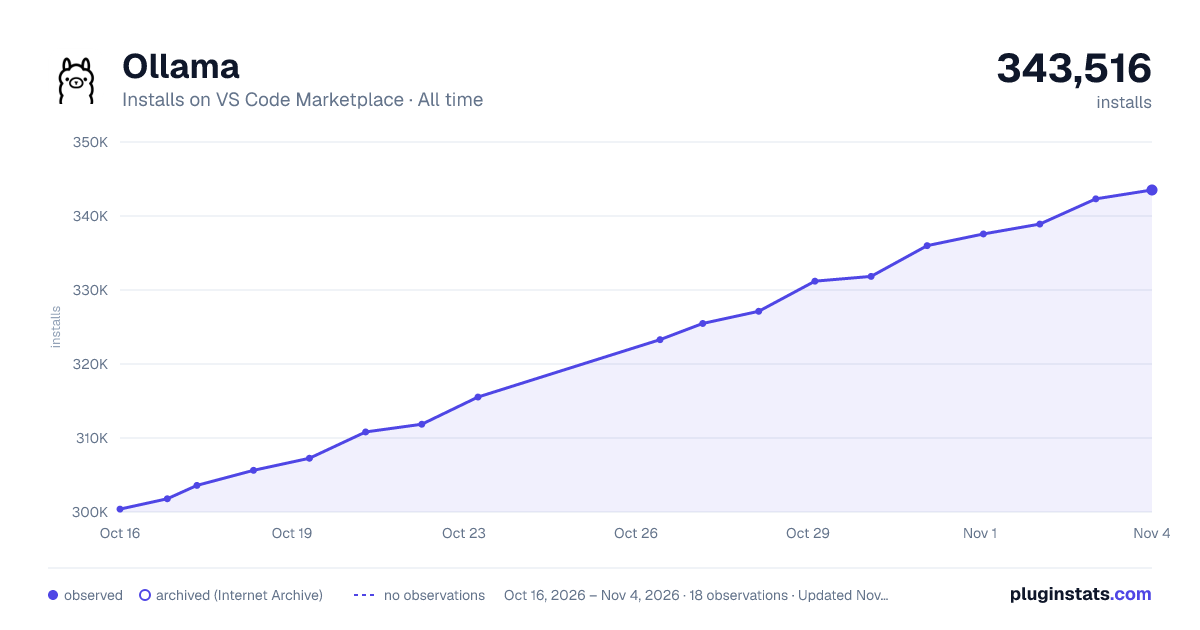

Adoption over time
7/30/90-day growth
Ranking history
Ratings over time
Listing placement
Listing placement
Filled points are observed values; hollow points come from Internet Archive snapshots of the listing page. Dashed segments span periods with no observations — values between points are not interpolated.
Each band is one page of 20. Installs on a linear scale. Placement is projected from installs, so it can differ from the marketplace's own sort order. Hover a dot to see the listing.
Recent observations
Full history (5)Similar VS Code Marketplace AI plugins
All 20 Ollama alternativesData source
Install counts, average rating, and rating counts come from the public Visual Studio Marketplace gallery API. Installs are cumulative and exclude updates.
Listing: https://marketplace.visualstudio.com/items?itemName=Ollama.ollama. First seen Oct 16, 2026; last successful collection Oct 20, 2026. See the methodology.