 PluginStats
YAML with Script installs statistics
By Matthiesen Technology · VS Code Marketplace · Programming Languages
A VS Code extension designed for GitLab CI users to analyze and execute shell scripts within YAML files. Highlight issues with ShellCheck diagnostics, run scripts directly from the editor, and streamline your CI pipeline development. Perfect for debugging and optimizing `.gitlab-ci.yml` files.
YAML with Script has 284,382 recorded installs on VS Code Marketplace, ranking #1197 of 2,502 tracked listings.
Rating: 5.00 / 5 from 1 ratings
About YAML with Script
YAML with Script
🚀 Extend YAML files with embedded shell scripts and linting – the perfect solution for seamless automation and debugging directly within VS Code!
💡 Primary Use Case: GitLab CI/CD
This extension is specifically designed for GitLab CI/CD, making it easier
to work with .gitlab-ci.yml files. Automate, debug, and test your CI pipelines
without the need for constant commits and pushes.
Features
- CodeLens Integration: Add interactive buttons to YAML files to execute
shell scripts (
script) with a single click. - ShellCheck Support: Integrated linting to detect and fix issues in your shell scripts.
- Real-time YAML Analysis: Provides instant feedback on YAML file syntax errors and warnings directly in the VS Code Problems panel.
- Optimized for GitLab CI/CD: Simplifies working with
.gitlab-ci.yml, includingscriptblocks,before_script, and more. - Customizable Settings: Configure script dialects, severity levels, and other options via the extension settings.
Example Usage
This extension takes always the last item from the script array which should be
a yaml scalar (- |) to take the
reference tags from GitLab CI/CD
into consideration.
YAML file with a script
after_script, script and before_script are getting highlighted, checked
with shellcheck and are executable
with a button click on Run YAML with Script.

How to execute a script:
- Open a
.gitlab-ci.ymlfile in VS Code. - Click the CodeLens button (
▶️ Run YAML with Script) above your script. - The script is executed in an integrated WebViewPanel which will open besides the active editor. You can view the output live, toggle Auto Scroll and stop the script (kill the process) if you need to.

Automated Debugging with ShellCheck
When errors are detected in your shell script, they are highlighted directly in VS Code:
- Severity Levels:
- Errors
- Warnings
- Info
- Style
Quickly check issues with direct links to the ShellCheck documentation. Unfortunately quick actions are not implemented, but might be in the future.

Settings
Customize the extension via VS Code settings:
| Setting | Description |
|---|---|
yaml-with-script.enabled | Enable or disable the extension. |
yaml-with-script.baseScript | A global script to be executed before the YAML script is executed with a click on ▶️ Run YAML with Script (e.g., source ~/.env or source ~/.yaml-with-script-base.sh). |
yaml-with-script.dialect | Specify the shell dialect for ShellCheck (bash, sh, dash, zsh, etc.). |
yaml-with-script.severity | Configure severity levels for ShellCheck (error, warning, info, style). |
yaml-with-script.shellcheckFolder | This is the path to the folder that includes 'shellcheck', e.g. (/opt/homebrew/bin will lead to /opt/homebrew/bin/shellcheck --version) |
Prerequisites
- ShellCheck: Ensure ShellCheck is installed and available in your
PATH. Install ShellCheck.
License
This software is released under the MIT License (see License).
Description from the VS Code Marketplace listing.
- bash
- ci/cd
- debugging
- gitlab-ci
- scripts
- shellcheck
- yaml
- yml
README badge
Show your rank in a README or on your website. The badge updates automatically.
Charts
Images: 30d · 1y · all time · 1600×900 dark


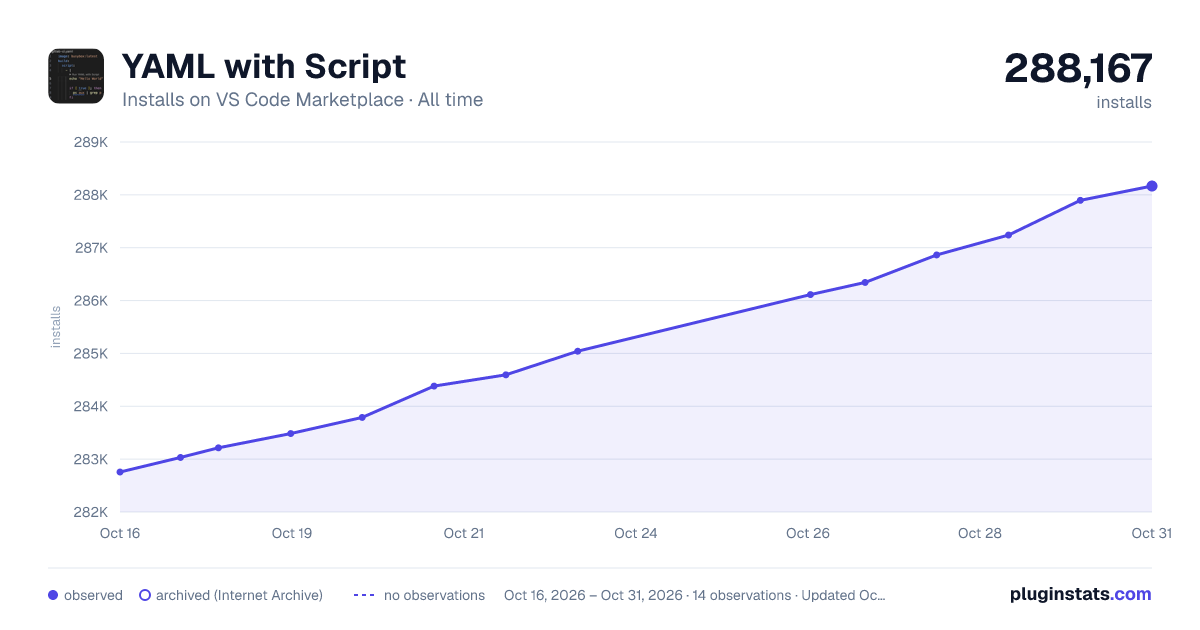

Adoption over time
7/30/90-day growth
Ranking history
Ratings over time
Listing placement
Listing placement
Listing placement
Listing placement
Filled points are observed values; hollow points come from Internet Archive snapshots of the listing page. Dashed segments span periods with no observations — values between points are not interpolated.
Each band is one page of 20. Installs on a linear scale. Placement is projected from installs, so it can differ from the marketplace's own sort order. Hover a dot to see the listing.
Recent observations
Full history (6)Similar VS Code Marketplace Programming Languages plugins
All 20 YAML with Script alternativesData source
Install counts, average rating, and rating counts come from the public Visual Studio Marketplace gallery API. Installs are cumulative and exclude updates.
Listing: https://marketplace.visualstudio.com/items?itemName=matthiesen-technology.yaml-with-script. First seen Oct 16, 2026; last successful collection Oct 21, 2026. See the methodology.