 PluginStats
JupyterHub installs statistics
By Microsoft (224 listings) · VS Code Marketplace · Data Science
Support for connecting to Jupyter Hub in VS Code along with the Jupyter Extension
JupyterHub has 342,997 recorded installs on VS Code Marketplace, ranking #1060 of 2,501 tracked listings.
About JupyterHub
JupyterHub Extension for Visual Studio Code
A Visual Studio Code extension that integrates with the Jupyter Extension allowing user to connect and execute code against kernels running on JupyterHub.
Quick Start
- Step 1. Install VS Code
- Step 2. Install the JupyterHub Extension
- Step 3. Open or create a notebook file by opening the Command Palette (
Ctrl+Shift+P) and selectJupyter: Create New Jupyter Notebook. - Step 4. Open the kernel picker by clicking on the kernel picker in the top right of the notebook or by invoking the
Notebook: Select Notebook Kernelcommand - Select the option
Existing JupyterHub Server... - Follow the prompts to enter the Url of the JupyterHub Server, username and password (or an API token).
- Next select a Kernel and start coding!
Questions, issues, feature requests, and contributions
-
If you have a question about how to accomplish something with the extension, please ask on Discussions. - Any and all feedback is appreciated and welcome! If you come across a problem or bug with the extension, please file an issue.
- If someone has already filed an issue that encompasses your feedback, please leave a 👍/👎 reaction on the issue.
-
Contributions are always welcome, so please see our contributing guide for more details.
Data and telemetry
The Microsoft Jupyter Extension for Visual Studio Code collects usage data and sends it to Microsoft to help improve our products and services. Read our privacy statement to learn more. This extension respects the telemetry.telemetryLevel setting which you can learn more about at https://code.visualstudio.com/docs/supporting/faq#_how-to-disable-telemetry-reporting.
Trademarks
This project may contain trademarks or logos for projects, products, or services. Authorized use of Microsoft trademarks or logos is subject to and must follow Microsoft's Trademark & Brand Guidelines. Use of Microsoft trademarks or logos in modified versions of this project must not cause confusion or imply Microsoft sponsorship. Any use of third-party trademarks or logos are subject to those third-party's policies.
Description from the VS Code Marketplace listing.
- interactive
- jupyter
- jupyterhub
- multi-root ready
- notebook
- notebookKernelJupyterNotebook
- python
README badge
Show your rank in a README or on your website. The badge updates automatically.
Charts
Images: 30d · 1y · all time · 1600×900 dark


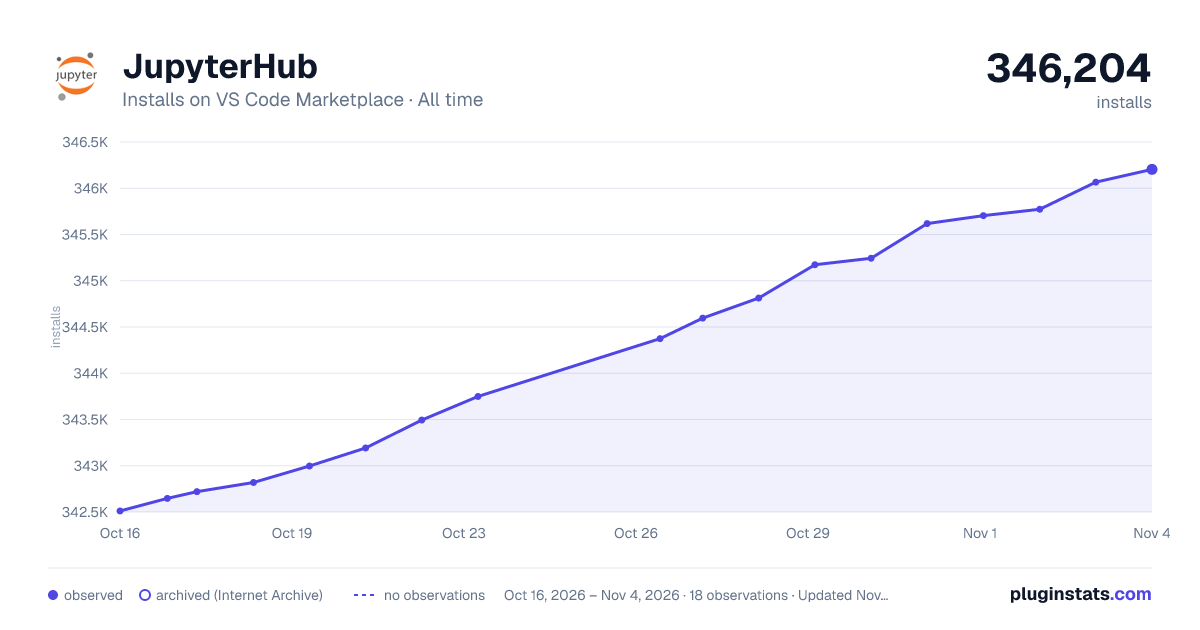

Adoption over time
7/30/90-day growth
Ranking history
Ratings over time
Listing placement
Listing placement
Listing placement
Listing placement
Filled points are observed values; hollow points come from Internet Archive snapshots of the listing page. Dashed segments span periods with no observations — values between points are not interpolated.
Each band is one page of 20. Installs on a linear scale. Placement is projected from installs, so it can differ from the marketplace's own sort order. Hover a dot to see the listing.
Recent observations
Full history (5)Similar VS Code Marketplace Data Science plugins
All 20 JupyterHub alternativesData source
Install counts, average rating, and rating counts come from the public Visual Studio Marketplace gallery API. Installs are cumulative and exclude updates.
Listing: https://marketplace.visualstudio.com/items?itemName=ms-toolsai.jupyter-hub. First seen Oct 16, 2026; last successful collection Oct 20, 2026. See the methodology.