 PluginStats
hexdump for VSCode installs statistics
By slevesque (6 listings) · VS Code Marketplace · Other
Display a specified file in hexadecimal
hexdump for VSCode has 438,762 recorded installs on VS Code Marketplace, ranking #908 of 2,501 tracked listings.
Rating: 4.70 / 5 from 37 ratings
About hexdump for VSCode
vscode-hexdump
hexdump for Visual Studio Code
Description
Display a specified file in hexadecimal
Main Features
Right-click on a file in the explorer to see Show Hexdump
Hover in the data section to see numerical values
Hover a selection to preview it as a string
Right-click in the hexdump to see more options
Colorize modified bytes
Show Hexdump button
Commands
• hexdumpFile (ctrl+shift+alt+h, cmd+shift+alt+h) Show Hexdump for the current file • hexdumpPath Show Hexdump for a specific path • hexdumpOpen Show Hexdump for a file selected in an Open dialog • editValue (shift+enter) Edit Value Under Cursor • gotoAddress (ctrl+g) Go to Address... • exportToFile (ctrl+shift+s, cmd+shift+s) Export to Binary File... • save (ctrl+s, cmd+s) Save file • searchString (ctrl+f, cmd+f) Search String in File • searchHex (ctrl+alt+f, cmd+alt+f) Search Hex String in File • copyAsFormat (ctrl+alt+c, cmd+alt+c) Copy the selection in a specific format
Configuration
• hexdump.littleEndian Set default endianness (true for little endian, false for big endian) • hexdump.nibbles How many nibbles per group (2, 4, 8) • hexdump.uppercase Display hex digits in uppercase • hexdump.width Number of bytes per line (8, 16, 32) • hexdump.showOffset Show offset on first line • hexdump.showAddress Show address on each line • hexdump.showAscii Show ASCII section • hexdump.showInspector Show Hex Inspector when hovering data • hexdump.sizeWarning Display a warning if file is larger than this • hexdump.sizeDisplay Maximum size of the buffer to display • hexdump.charEncoding Identify the source character encoding • hexdump.btnEnabled Display Hexdump button
Installation
- Install Visual Studio Code (1.17.0 or higher) 2. Launch Code 3. From the command palette ctrl+shift+p (Windows, Linux) or cmd+shift+p (OS X) 4. Select Install Extension 5. Choose the extension hexdump for VSCode 6. Reload Visual Studio Code
Contributing
- Fork it! 2. Create your feature branch: git checkout -b my-new-feature 3. Commit your changes: git commit -am 'Add some feature' 4. Push to the branch: git push origin my-new-feature 5. Submit a pull request :D
Requirements
Visual Studio Code v1.17.0
Credits
• Visual Studio Code • vscode-docs on GitHub • hexdump-nodejs on GitHub • hexy.js on GitHub • iconv-lite on GitHub • Clipboardy on GitHub • nrf-intel-hex on GitHub • long.js on GitHub
License
MIT
Description from the VS Code Marketplace listing.
- hexadecimal
- hexdump
- keybindings
- vscode
README badge
Show your rank in a README or on your website. The badge updates automatically.
Charts
Images: 30d · 1y · all time · 1600×900 dark


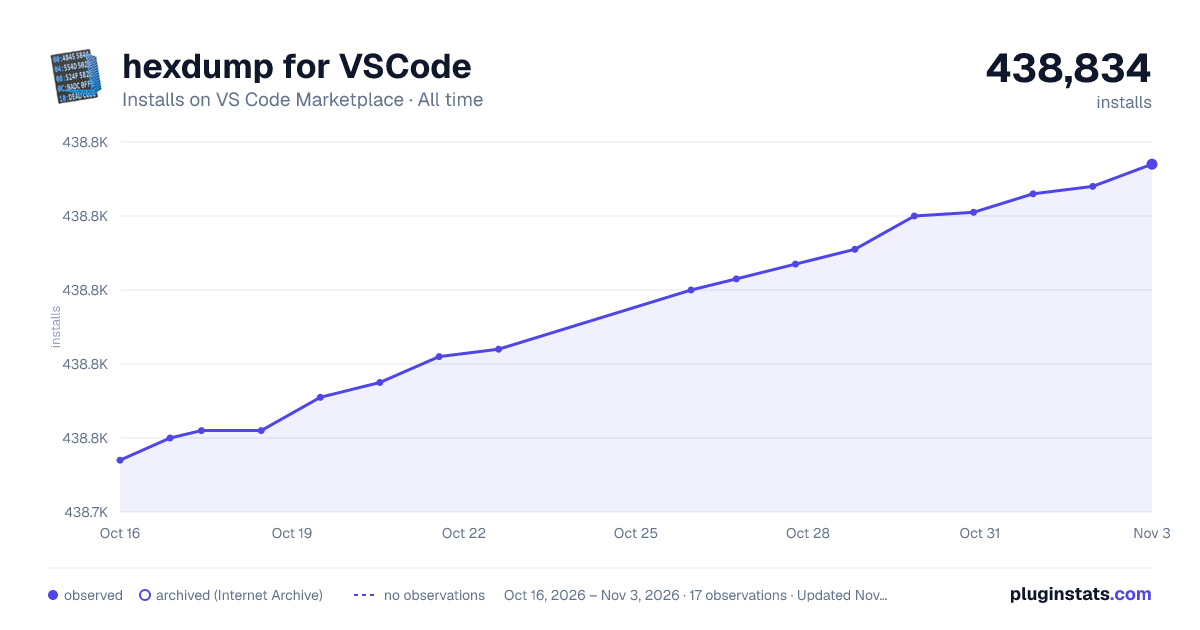

Adoption over time
7/30/90-day growth
Ranking history
Ratings over time
Listing placement
Listing placement
Filled points are observed values; hollow points come from Internet Archive snapshots of the listing page. Dashed segments span periods with no observations — values between points are not interpolated.
Each band is one page of 20. Installs on a linear scale. Placement is projected from installs, so it can differ from the marketplace's own sort order. Hover a dot to see the listing.
Recent observations
Full history (4)Similar VS Code Marketplace Other plugins
All 20 hexdump for VSCode alternativesData source
Install counts, average rating, and rating counts come from the public Visual Studio Marketplace gallery API. Installs are cumulative and exclude updates.
Listing: https://marketplace.visualstudio.com/items?itemName=slevesque.vscode-hexdump. First seen Oct 16, 2026; last successful collection Oct 19, 2026. See the methodology.