 PluginStats
STM32CubeIDE for Visual Studio Code installs statistics
By STMicroelectronics (13 listings) · VS Code Marketplace · Extension Packs
STM32 embedded development support added to Visual Studio Code.
STM32CubeIDE for Visual Studio Code has 385,058 recorded installs on VS Code Marketplace.
It ranks #982 of 2,501 tracked VS Code Marketplace listings by installs.
It is rated 3.5 out of 5 from 43 ratings.
PluginStats has 4 daily observations since Oct 16, 2026; the latest is from Oct 19, 2026.
Rating: 3.49 / 5 from 43 ratings
About STM32CubeIDE for Visual Studio Code
STM32CubeIDE for Visual Studio Code Extension Pack promoting STM32Cube experience
General
The stm32-vscode-extension extension for Visual Studio Code is designed to enhance the development experience for STM32 microcontrollers by providing a comprehensive and updatable set of tools. The _extension pack_ allow users to install one single pack bringing a full STM32 IDE experience into VS Code.
Breaking Changes
• Complete architecture redesign: The tool architecture has been split into three major building blocks with the purpose of creating a flexible, maintainable and updatable platform consisting of the following blocks: GUI, CLI tools and STM32 device support. • GUI: The platform's single extension has been transformed into an extension pack, offering a more modular, updatable and flexible setup. • CLI tools: A new bundle manager is enabling VS Code to download required CLI tools. This replaces the all-in-one _STM32CubeCLT_ package. The bundle manager will provide developers flexibility, updatability and re-producibility in terms of CLI tooling. • STM32 device support: The STM32 device support is decoupled from VS Code and sourced via CMSIS-PACK DFPs. Developers can now start using a new MCU without having to install a new STM32CubeCLT package. • Simplified Debugging: A new ST provided Debug Adapter Protocol (DAP) implementation supporting ST-LINK and SEGGER J-Link probes, simplifying the setup and launch of debug on STM32 devices. • Clangd Integration: The update now relies on clangd for managing C/C++ code indexing, enhancing code navigation and analysis capabilities. • Auto-Discovery of STM32Cube Projects: This feature automatically detects STM32Cube projects, streamlining the setup and configuration process.
Features
• Project Creation Modes: Two distinct modes for project creation are supported, offering flexibility in development workflows: • STM32CubeMX Projects: Supports project creation with integrated CMake, enabling streamlined configuration and management. • Empty Projects: Allows for the creation of bare projects with CMake, providing a clean slate for custom development. • Cube Discovery Process: Project import step, designed to allow STM32 developers to easily move legacy CMake code bases into STM32CubeIDE for Visual Studio Code and configure the tooling properly. • Edit & Compile Tools: The following edit and compiler tools part of the package: • clangd indexing: Helps developers navigate, write, understand, and improve C/C++ code. • Microsoft CMake Tools: Provides developer a full-featured, convenient, and powerful workflow for CMake-based projects in Visual Studio Code. • Build Analyzer: A new build analyzer has been developed, offering insights into linked elf-file, helping developers troubleshoot and optimize the code. • Debug features: The following debug features are added on top of standard VS Code debug features: • Board manager: The board manager view allows developers to show the ST-LINK serial number and update the ST-LINK firmware. • Simplified Debugging: A new ST provided Debug Adapter Protocol (DAP) implementation supporting ST-LINK and SEGGER J-Link probes, simplifying the setup and launch of debug on STM32 devices. • Embedded Peripheral Inspector: Helping developers to debug peripheral registers. Open-source fork. • Enhanced RTOS debug: The existing open-source debug views have been complemented with two additional tree views showing additional kernel objects as well as the full call stack for all RTOS threads. Supported RTOSes are FreeRTOS and ThreadX. • Serial terminal: Enabling developers to easily setup serial communication for example leveraging the ST-LINK virtual com port. • Bundle Manager View: A dedicated view for managing bundles has been introduced, simplifying downloads, updates and activation of bundles in system and project context. • Cube CLI Command: The cube CLI command is available, a CLI wrapper which will over time will provide developers with a powerful CLI toolbox.
Documentation
The STM32CubeIDE for Visual Studio Code extension offers a wealth of resources directly accessible within your integrated development environment. By installing the extension pack, you gain access to the "STM32Cube Resources" section, which is a centralized hub for valuable information which includes:
• Manuals: Comprehensive documentation that covers various aspects of STM32 development. These manuals provide detailed insights into the functionalities and features of STM32 microcontrollers, helping you understand the hardware and software integration. • Tutorials: Step-by-step guides designed to assist both beginners and experienced developers. These tutorials cover a wide range of topics, from basic setup and configuration to advanced programming techniques, ensuring you have the guidance needed to effectively utilize STM32Cube tools. • Known Issues: A curated list of known issues and their potential solutions. This section helps you stay informed about any existing challenges and provides workarounds or fixes, allowing you to troubleshoot effectively and maintain smooth development workflows.
Feedback & Support
If you need assistance or have any questions regarding STM32CubeIDE for Visual Studio Code, support is readily available. You can access a wide range of resources and get help from the STMicroelectronics support team. Additionally, your feedback is valuable to us and helps improve the STM32CubeIDE for Visual Studio Code extension. If you have any suggestions, issues, or comments, we encourage you to share them with the community.
• Feedback: To give feedback and participate in discussions, visit the STM32CubeIDE for Visual Studio Code Extension Forum. • Community and ST expert help: To get help through our community and our ST experts on our forum, visit the STM32CubeIDE for Visual Studio Code Extension Forum. • ST Support Home: For more information about getting support, visit the STMicroelectronics Support Home.
Data & Telemetry…
Description from the VS Code Marketplace listing.
- ARM
- Cortex
- Microcontroller
- Nucleo
- STM32Cube
Where STM32CubeIDE for Visual Studio Code sits in the listing
Each band is one page of 20. Installs on a log scale. Placement is projected from installs, so it can differ from the marketplace's own sort order. Hover a dot to see the listing.


Charts
Images: 30d · 1y · all time · 1600×900 dark


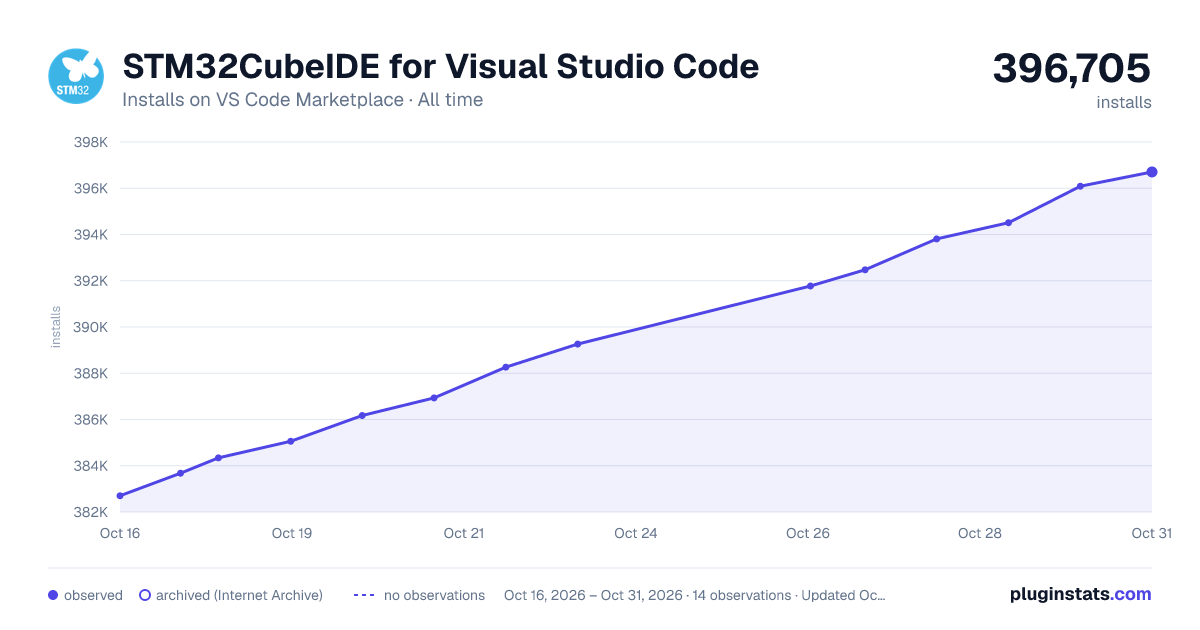

Adoption over time


7/30/90-day growth


Ranking history


Filled points are observed values; hollow points come from Internet Archive snapshots of the listing page. Dashed segments span periods with no observations — values between points are not interpolated.
Recent observations
Full history (4)Similar VS Code Marketplace Extension Packs plugins
Data source
Install counts, average rating, and rating counts come from the public Visual Studio Marketplace gallery API. Installs are cumulative and exclude updates.
Listing: https://marketplace.visualstudio.com/items?itemName=stmicroelectronics.stm32-vscode-extension. First seen Oct 16, 2026; last successful collection Oct 19, 2026. See the methodology.