 PluginStats
R Debugger has 824,557 recorded installs on VS Code Marketplace, ranking #603 of 2,501 tracked listings.
Rating: 5.00 / 5 from 1 ratings
About R Debugger
R Debugger
This extension adds debugging capabilities for the R programming language to Visual Studio Code and depends on the R package vscDebugger (documentation). For further R support in VS Code see vscode-R.
Features

The debugger includes the following features:
- Run and debug R Code by launching a new R process or attaching to a running one.
- View scopes and variables of the currently selected stack frame. For many variables it is also possible to assign a new value to the variable or individual entries/attributes in this view.
- Add watch expressions that are evaluated in the selected stack frame on each breakpoint/step.
- View and browse through the call stack when execution is paused.
- Set breakpoints and break on errors.
- Control the program flow using step, step in, step out, continue.
- Output generated by the program is printed to the debug console (filtering out text printed by the browser itself).
- The debugger adds a modified version of
print,cat,message, andstrthat also print a link to the file and line where the text was printed. - The debug console allows the execution of arbitrary R code in the currently selected stack frame.
Installation
The latest version of the VS Code extension can be installed from the
marketplace.
After installing the extension, the R package can be installed or updated using the command
r.debugger.installOrUpdateRPackage.
If your R path is neither in the Windows registry nor the PATH environment variable, make sure to provide a valid path to the R executable in the setting r.rpath.xxx.
If the package installation does not work,
the command r.debugger.installRPackage will attempt to install from
a release on r-universe.dev,
the source code on GitHub,
and a GitHub Release
(in that order).
You can also install the package manually using
# OPTION 1: From r-universe.dev:
install.packages("vscDebugger", repos = "https://manuelhentschel.r-universe.dev")

# OPTION 2: From source code on GitHub:
remotes::install_github("ManuelHentschel/vscDebugger")
or from artifacts on the releases site.
If you want to install a development version of the extension, it can be installed from the .vsix-files found in the artifacts of the GitHub Actions Workflows.
Using the Debugger
Launch Mode
- Press F5 and select
R Debuggeras debugger. With the default launch configuration, the debugger will start a new R session. - To run a file, focus the file in the editor and press F5 (or the continue button in the debug controls)
- Output will be printed to the debug console, expressions entered into the debug console are evaluated in the currently active frame
- During debugging in the global workspace it is often necessary to click the dummy frame
in the callstack labelled 'Global Workspace' to see the variables in
.GlobalEnv.
Attach Mode
- Start R in a terminal
- Load
library(vscDebugger) - Call
.vsc.listen() - Start the debugger with launch configuration including
"request":"attach", e.g.:
{
    "type": "R-Debugger",
    "request": "attach",
    "name": "Attach to R process"
}
Configuration
For a detailed explanation of possible launch config entries and other settings, see Configuration.
Encoding issues on windows
Due to some changes in v0.5.0 concerning the communication between this extension and the R package vscDebugger,
combined with the way non-utf-8 encodings are handled in R,
there might be some problems with this extension on Windows.
However, as of R-version 4.2.2, R can handle UTF-8 encoded communication on Windows much better.
To avoid these issues, it is recommended to update R to at least v4.2.2 and use the latest version of this extension and the related R package.
How it works
The debugger works as follows:
- An R process is started inside a child process
- The R package
vscDebuggeris loaded. - The Debugger starts and controls R programs by sending input to stdin of the child process
- After each step, function call etc., the debugger calls functions from the package
vscDebuggerto get info about the stack/variables
The output of the R process is read and parsed as follows:
- Information sent by functions from
vscDebuggeris encoded as json and sent via a TCP socket. These lines are parsed by the VS Code extension and not shown to the user. - Information printed by the
browser()function is parsed and used to update the source file/line highlighted inside VS Code. These lines are also hidden from the user. - Everything else is printed to the debug console
Debugging R Packages
Packages can now be debugged using load_all from pkgload.
To do so, it is required to install pkgload (part of devtools).
By default, load_all will be masked by a modified version that automatically sets breakpoints
in the loaded package and attaches the modified versions of print, cat, message.
To always load a package when launching a debug session, you can specify an array of paths in the launch config entry "loadPackages".
This is done (for the currently opened package) in the example debug config "Debug R-Package".…
Description from the VS Code Marketplace listing.
- Debugger
- debuggers
- R
- R Language
README badge
Show your rank in a README or on your website. The badge updates automatically.
Charts
Images: 30d · 1y · all time · 1600×900 dark


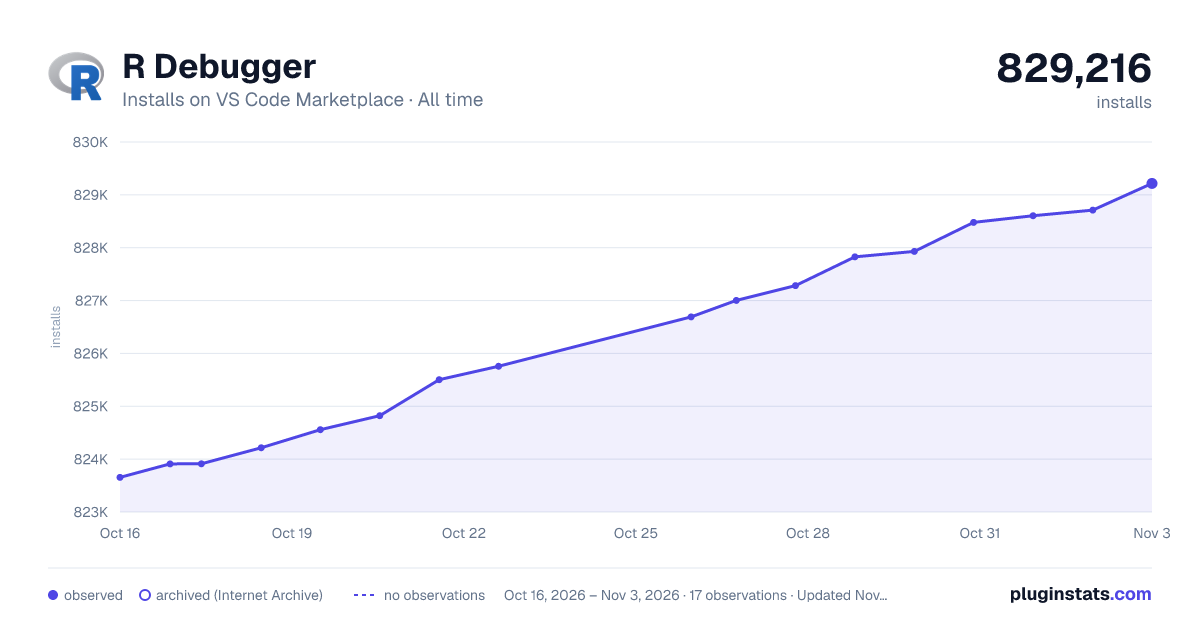

Adoption over time
7/30/90-day growth
Ranking history
Ratings over time
Listing placement
Listing placement
Filled points are observed values; hollow points come from Internet Archive snapshots of the listing page. Dashed segments span periods with no observations — values between points are not interpolated.
Each band is one page of 20. Installs on a linear scale. Placement is projected from installs, so it can differ from the marketplace's own sort order. Hover a dot to see the listing.
Recent observations
Full history (5)Similar VS Code Marketplace Debuggers plugins
All 20 R Debugger alternativesData source
Install counts, average rating, and rating counts come from the public Visual Studio Marketplace gallery API. Installs are cumulative and exclude updates.
Listing: https://marketplace.visualstudio.com/items?itemName=RDebugger.r-debugger. First seen Oct 16, 2026; last successful collection Oct 20, 2026. See the methodology.