 PluginStats
PHP: Unit Test Explorer UI With Docker installs statistics
By Satiro Marra (2 listings) · VS Code Marketplace · Programming Languages
PHP: Unit Test Explorer UI With Docker
PHP: Unit Test Explorer UI With Docker has 273,125 recorded installs on VS Code Marketplace, ranking #1226 of 2,501 tracked listings.
About PHP: Unit Test Explorer UI With Docker
PHP: Unit Test Explorer UI for Visual Studio Code
Run your PHP tests using the Test Explorer UI.
This project is a fork from recca0120/vscode-phpunit ❤️
Features
• Shows a Test Explorer in the Test view in VS Code's sidebar with all detected tests and suites and their state • Adds CodeLenses to your test files for starting and debugging tests • Adds Gutter decorations to your test files showing the tests' state • Adds line decorations to the source line where a test failed • Shows a failed test's log when the test is selected in the explorer • Lets you choose test suites or individual tests in the explorer that should be run automatically after each file change • Forwards the console output from PHPUnit to a VS Code output channel • Run tests into the docker container • (new) pathMapping when local folder and docker mount folder are different.
Getting started
• Install the extension • Restart VS Code and open the Test view • Run your tests using the icons in the Test Explorer or the CodeLenses in your test file • For running tests on a docker container see the configuration • For running phpunit on a remote system or using vagrant see Troubleshooting
Configuration
Custom debugger configuration
Other options
| Property | Description |
| testExplorer.codeLens | Show a CodeLens above each test or suite for running or debugging the tests | | testExplorer.gutterDecoration | Show the state of each test in the editor using Gutter Decorations | | testExplorer.onStart | Retire or reset all test states whenever a test run is started | | testExplorer.onReload | Retire or reset all test states whenever the test tree is reloaded |
Commands
The following commands are available in VS Code's command palette, use the ID to add them to your keyboard shortcuts:
| ID | Command |
| test-explorer.reload | Reload tests | | test-explorer.run-all | Run all tests | | test-explorer.run-file | Run tests in current file | | test-explorer.run-test-at-cursor | Run the test at the current cursor position | | test-explorer.cancel | Cancel running tests |
Troubleshooting
All tests are appearing twice with "* duplicate ID *" found.
You likely have a file sensitive file system. The default value of "phpunit.files": "{test,tests,Test,Tests}//*Test.php", should be changed to "phpunit.files": "{test,tests}//*Test.php",
I'm using Vagrant / Homestead for remote execution
Your tests will list in the explorer for reading locally, but you need to run your tests remotely using PHP on your vagrant machine.
To do this you need to configure the following settings:
"phpunit.relativeFilePath": true, - This will ensure your files are located correctly for local checks
"phpunit.phpunit": "/FULL_PATH_TO/vendor/bin/phpunit", - your remote path, likely in /var/www/html/
"phpunit.discoverConfigFile": false, if true the extension automatically try to find phpunit.xml or phpunit.xml.dist in you project.
"phpunit.configFile": "/FULL_PATH_TO/phpunit.xml", path to phpunit.xml or phpunit.xml.dist file. If this config is specified the "phpunit.discoverConfigFile" automatically turns to false
"phpunit.php": "/usr/local/bin/vagrant exec php", this is to execute PHP on the remote machine. You'll need to install and configure https://github.com/p0deje/vagrant-exec - this wraps the command like using ssh -C
You can also use the method above to execute on Docker remotely
"phpunit.docker": true, this is to enable run the tests into the docker container
"phpunit.dockerImage": "docker run --rm -v $(pwd):$(pwd) -w=$(pwd) dockername", this is to use the docker container to run the tests. If you need configure this with docker-compose configure: "phpunit.dockerImage": "docker-compose exec -T dockername"
"phpunit.pathMappings": "{"workspace/local/folder": "docker/folder"}", this is to use differents path between local folder and docker mount folder. Example any project folder:
You need mount src/ into /var/www/html/, then configure pathMapping like this:
My /usr/local/bin/vagrant isn't found?
Spawn likely can't find vagrant locally. You need to switch to using your regular terminal using something like "phpunit.shell": "/bin/bash", or "phpunit.shell": "/bin/zsh",
Description from the VS Code Marketplace listing.
- codeception
- keybindings
- language server protocol
- Log
- php
- phpunit
- test
- test explorer
- testing
README badge
Show your rank in a README or on your website. The badge updates automatically.
Charts
Images: 30d · 1y · all time · 1600×900 dark


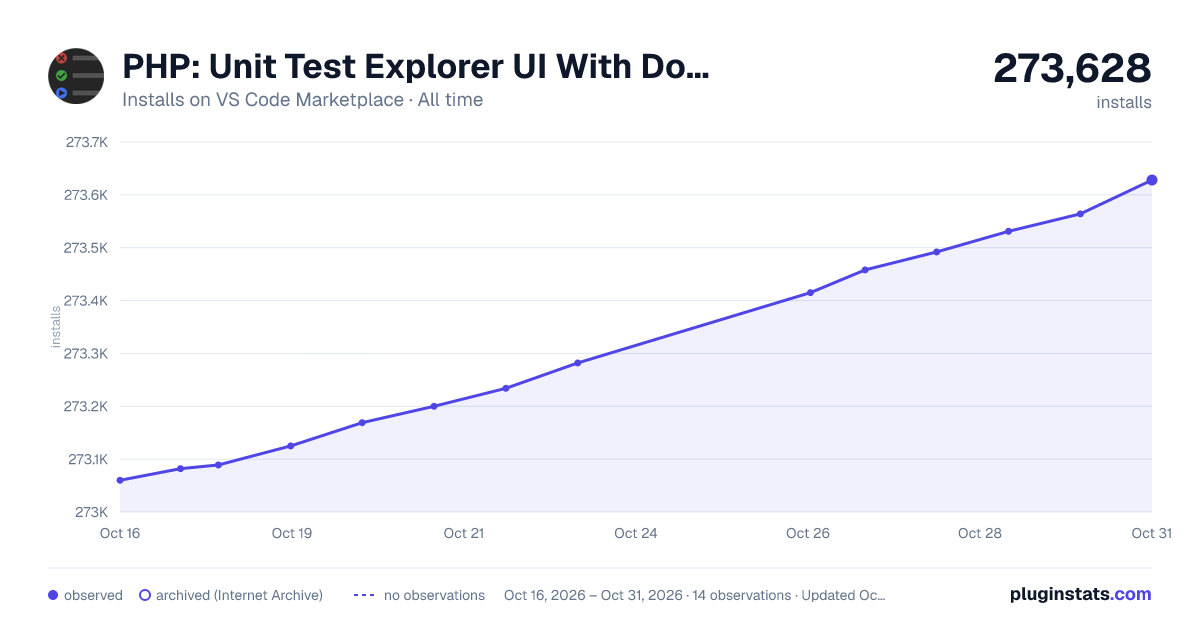

Adoption over time
7/30/90-day growth
Ranking history
Ratings over time
Listing placement
Listing placement
Listing placement
Filled points are observed values; hollow points come from Internet Archive snapshots of the listing page. Dashed segments span periods with no observations — values between points are not interpolated.
Each band is one page of 20. Installs on a linear scale. Placement is projected from installs, so it can differ from the marketplace's own sort order. Hover a dot to see the listing.
Recent observations
Full history (4)Similar VS Code Marketplace Programming Languages plugins
All 20 PHP: Unit Test Explorer UI With Docker alternativesData source
Install counts, average rating, and rating counts come from the public Visual Studio Marketplace gallery API. Installs are cumulative and exclude updates.
Listing: https://marketplace.visualstudio.com/items?itemName=satiromarra.vscode-php-test-explorer-docker. First seen Oct 16, 2026; last successful collection Oct 19, 2026. See the methodology.