 PluginStats
Turbo Console Log installs statistics
By Anas Chakroun · VS Code Marketplace · Programming Languages
Insert debug logs in one keystroke — and with Pro, automatically remove them before every commit. AST-powered logging for JavaScript, TypeScript, Python, and PHP.
Turbo Console Log has 2,135,301 recorded installs on VS Code Marketplace, ranking #335 of 2,502 tracked listings.
Rating: 3.98 / 5 from 101 ratings
About Turbo Console Log
Turbo Console Log 🚀
Official Website | Turbo Pro | GitHub Repository
Automated Logging for JavaScript, TypeScript, Python, and PHP
Turbo Console Log transforms debugging in JavaScript, TypeScript, Python, and PHP. It's built for developers who refuse to waste time manually typing log statements or hunting them down across dozens of files.
Two Editions
Turbo Console Log Community 🚀
Single-file debugging for JavaScript, TypeScript, Python, and PHP. Insert, comment, uncomment, and delete logs with keyboard shortcuts. Uses AST parsing to place logs correctly, even in complex code structures.
Turbo Console Log Pro 👑
The other half of Turbo — Pro automatically removes the debug logs in your staged changes the moment you commit, previewed first, with the scope under your control (limit it to Turbo's own logs with 🚀 Turbo Logs Only). Plus a workspace-wide tree view, instant search, and git-aware filtering across JavaScript, TypeScript, Python, and PHP.
| Community | Pro | |
|---|---|---|
| AST-accurate log insertion for JavaScript, TypeScript, Python, and PHP | ✅ | ✅ |
| Comment, uncomment, delete, and correct logs in the active file | ✅ | ✅ |
| Auto-cleanup of debug logs on commit, previewed first | ✅ | |
| Workspace-wide log tree, instant search, and real-time filtering | ✅ | |
| Bulk cleanup by log type and scope (workspace, folder, or file) | ✅ | |
| Price | Free | One-time payment, lifetime access |
🎯 New in v3.29.0: Every Log on the Right Line
This release is about one promise: when you insert a log, it lands on the right line. We probed the insertion engine against more than 700 real-world React, TypeScript, Node, and framework snippets and fixed 14 patterns where a log used to land in the wrong place: inside an object literal, after a return, before the value it was meant to show, or outside the block where the variable exists. Every fix ships free and is pinned by an end-to-end test, so it stays fixed.
🧹 Never Commit a Debug Log Again
<p align="center"> <img src="https://www.turboconsolelog.io/assets/turbo-commit-auto-cleanup.webp" alt="Turbo Pro removes debug logs automatically on commit" width="280"> </p>Turbo puts the logs in; Pro takes them out. Turbo Pro removes the debug logs in your staged changes automatically, the moment you commit — previewed first, so a stray console.log never slips into a PR again. A one-time payment funds the free core and includes every future update.
Community Version Features 🚀
The free version provides intelligent log insertion in your active editor:
✨ Smart Log Insertion
- AST-Powered Precision – Logs are placed correctly based on code structure, handling complex patterns like ternaries, destructuring, and nested expressions
- 7 Console Methods (JS/TS) – Dedicated commands for
console.log,console.info,console.debug,console.warn,console.error,console.table, and custom log functions - Python Methods – Support for
print(),logging.debug(),logging.info(),logging.warning(),logging.error(), and custom Python logging functions - PHP Methods – Support for
var_dump(),print_r(),error_log(), and custom PHP logging functions - Individual Shortcuts – Each method has its own keyboard shortcut (⌘K combinations)
- Multi-Cursor Support – Insert logs for multiple variables simultaneously
- Customizable Format – Configure prefixes, quotes, spacing, and context information
🛠️ Log Management (Active Editor)
- Comment All Logs – Comment out all logs in the current file
- Uncomment All Logs – Restore previously commented logs
- Delete All Logs – Remove all logs from the current file
- Correct Log Messages – Update file names and line numbers after refactoring
Best for: Single-file work, small projects, and everyday debugging tasks
⌨️ Keyboard Shortcuts
JavaScript / TypeScript
⌘K ⌘L(Ctrl+K Ctrl+L on Windows/Linux) – Insert console.log⌘K ⌘E– Insert console.error⌘K ⌘R– Insert console.warn⌘K ⌘N– Insert console.info
Python
⌘K ⌘L(Ctrl+K Ctrl+L on Windows/Linux) – Insert print()⌘K ⌘B– Insert logging.debug()⌘K ⌘N– Insert logging.info()⌘K ⌘R– Insert logging.warning()⌘K ⌘E– Insert logging.error()
PHP
⌘K ⌘L(Ctrl+K Ctrl+L on Windows/Linux) – Insert var_dump()⌘K ⌘N– Insert print_r()⌘K ⌘B/⌘K ⌘E– Insert error_log()
Log Management (all languages)
Alt+Shift+D– Delete all logs in current fileAlt+Shift+C– Comment all logs in current fileAlt+Shift+U– Uncomment all logs in current fileAlt+Shift+X– Correct log messages (update file names & line numbers)
Full Documentation: Turbo Console Log Docs
⚙️ Configuration
Both editions are fully customizable through VS Code settings. Access via Preferences > Settings and search for "Turbo Console Log".
Log Message Format…
Description from the VS Code Marketplace listing.
- ast parser
- console log
- debug
- debugging
- developer tools
- error_log
- javascript
- javascriptreact
- keybindings
- laravel
- log management
- log panel
- multi-language
- nodejs
- php
- print_r
- productivity
- python
- typescript
- typescriptreact
README badge
Show your rank in a README or on your website. The badge updates automatically.
Charts
Images: 30d · 1y · all time · 1600×900 dark


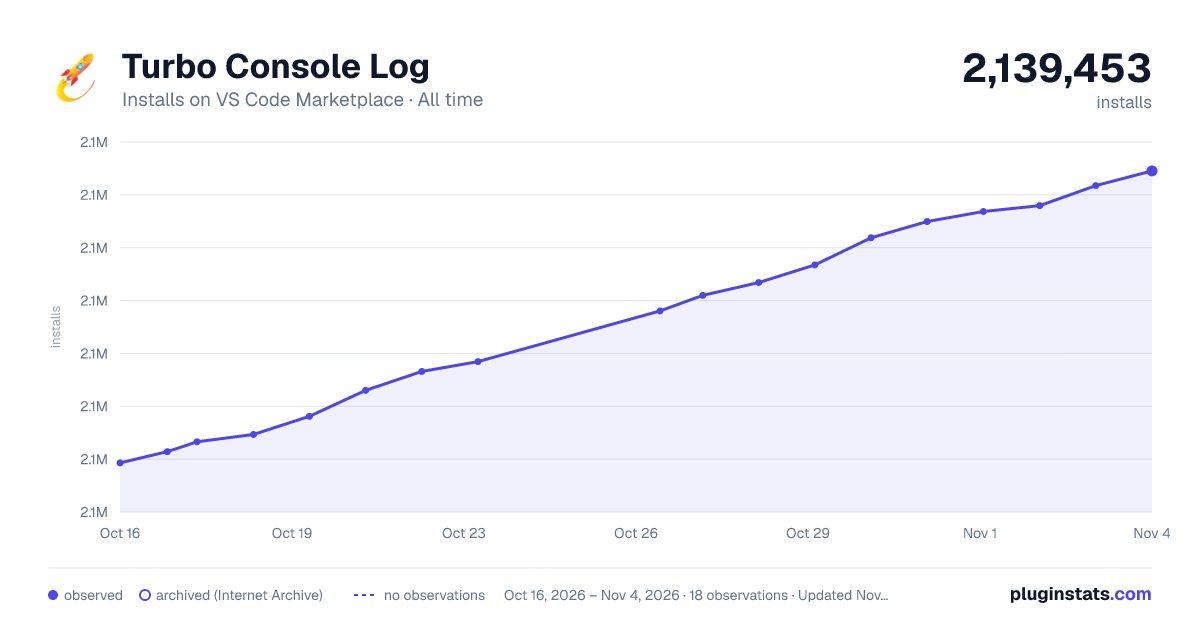

Adoption over time
7/30/90-day growth
Ranking history
Ratings over time
Listing placement
Listing placement
Listing placement
Listing placement
Filled points are observed values; hollow points come from Internet Archive snapshots of the listing page. Dashed segments span periods with no observations — values between points are not interpolated.
Each band is one page of 20. Installs on a linear scale. Placement is projected from installs, so it can differ from the marketplace's own sort order. Hover a dot to see the listing.
Recent observations
Full history (6)Similar VS Code Marketplace Programming Languages plugins
All 20 Turbo Console Log alternativesData source
Install counts, average rating, and rating counts come from the public Visual Studio Marketplace gallery API. Installs are cumulative and exclude updates.
Listing: https://marketplace.visualstudio.com/items?itemName=ChakrounAnas.turbo-console-log. First seen Oct 16, 2026; last successful collection Oct 21, 2026. See the methodology.