 PluginStats
Zhihu On VSCode has 147,849 recorded installs on VS Code Marketplace, ranking #1876 of 2,502 tracked listings.
Rating: 4.20 / 5 from 15 ratings
About Zhihu On VSCode


👽 Zhihu On VSCode
基于 VSCode 的知乎客户端提供包括阅读,搜索,创作,发布等一站式服务,内容加载速度比 Web 端更快,创新的 Markdown-Latex 混合语法让内容创作者更方便地插入代码块,数学公式,并一键发布至知乎平台。项目由 牛岱 独立设计开发,喜欢的话请献出你的 ⭐。
⚡ Features
📃 Reference
🔑 登录
<a name = "login"></a>
进入主页面,左侧最上方栏为个人中心,点击登录图标,或使用 Ctrl + Shift + P 打开命令面板,搜索并执行 Zhihu: Login 命令。
选择登录方式:
二维码
选择二维码登陆后,会弹出二维码页面,打开知乎 APP,扫码后点击确认登录:
<p align="center"> <img src="https://raw.githubusercontent.com/niudai/ImageHost/master/zhihu/2020-02-08-20-28-08.png" style="box-shadow: 2px 2px 8px 0px #5dd8fd;border-radius: 6px;"/></p>账号密码
视情况,插件会加载并显示验证码,提示你输入验证码,输入后,再依次根据提示输入手机号和密码即可。
登录成功后会有问候语,推荐栏会自动刷新出你的个性签名和头像:
<p align="center"> <img src="https://raw.githubusercontent.com/niudai/ImageHost/master/zhihu/2020-02-08-20-30-17.png" style="box-shadow: 2px 2px 8px 0px #5dd8fd;border-radius: 6px;"/></p> <p align="center"> <img src="https://raw.githubusercontent.com/niudai/ImageHost/master/zhihu/2020-02-08-20-32-09.png" style="box-shadow: 2px 2px 8px 0px #5dd8fd;border-radius: 6px;"/></p>🎭 个性推荐
登陆成功后,个性推荐板块会自动刷新,提供你的个性推荐内容:
<p align="center"> <img src="https://raw.githubusercontent.com/niudai/ImageHost/master/zhihu/2020-02-08-20-30-27.png" style="box-shadow: 2px 2px 8px 0px #5dd8fd;border-radius: 6px;"/></p>内容可能为答案,问题,或文章,点击条目,就会打开VSCode知乎页面:
<p align="center"> <img src="https://raw.githubusercontent.com/niudai/ImageHost/master/zhihu/2020-02-08-21-02-30.png" style="box-shadow: 2px 2px 8px 0px #5dd8fd;border-radius: 6px;"/></p>💥 热榜
在左侧的中间位置,你会看到热榜栏,内部有六个分类,内容与知乎Web端、移动端同步,助你掌控实时资讯:
<img src="https://raw.githubusercontent.com/niudai/ImageHost/master/zhihu/2020-02-10-11-01-37.png" style="box-shadow: 2px 2px 8px 0px #5dd8fd;border-radius: 6px;"/></p>
🔎 搜索
<a name = "search"></a>
点击搜索按钮,或搜索命令 Zhihu: Search Items,搜索全站知乎内容:
🖍 内容创作
<a name = "write"></a>
新建一个后缀名为.md的文件,若不需要数学公式,只需要按照你最熟悉的 Markdown 语法写即可,右键点击 Zhihu: Preview 可预览答案:
Latex 语法支持
为了更好地支持数学公式的写作,知乎定制的 Markdown 转换器提供了 Latex 语法拓展,语法示例:
$$
  |\vec{A}|=\sqrt{A_x^2 + A_y^2 + A_z^2}.
$$
用 $$ 包围的部分会被当做 latex 语言进行解析,生成知乎的数学公式,比如上方的数学公式发布至知乎会生成如下公式:
行内 latex 也同样支持,语法举例:$\sqrt6$,一个dollar符号包裹公式即可。
代码块:
记得声明语言标签, 这样发布至知乎的答案才能获得正确的语法高亮,示例如下:
```java
public class Apple {
  public Apple() {}
}
```
发布后会提供 java 的语法高亮:
<p align="center"> <img src="https://raw.githubusercontent.com/niudai/ImageHost/master/zhihu/2020-02-08-22-47-18.png" style="box-shadow: 2px 2px 8px 0px #5dd8fd;border-radius: 6px;"/></p>支持mermaid 转化为图片
{
    "zhihu.enableMermaidToPng": true, // 设置开启才能生效
    "zhihu.mermaidTheme": "dark" // 支持设置 mermaid 图片主题,默认值是 "default"
}
支持知乎表格
直接在本地书写 markdown 表格即可,row-style 默认使用"striped",行首,列首是灰色,隔行是灰色 。
| 知乎表格 row-style | 效果 |
|---|---|
| normal | 行首是灰色 |
| striped | 行首,列首是灰色,隔行是灰色 |
📩 内容发布
<a name = "publish"></a>
链接扫描 😊
若你想在特定的问题下回答,或想修改自己的某个原有回答,就将问题/答案链接以 #! https://... 的格式放置于答案的第一行,发布时,插件会自动扫描识别,发布至相应的问题下,或修改原有的答案。
比如,你想在 轻功是否真的存在,其在科学上可以解释吗? 该问题下回答问题, 只需将
#! https://www.zhihu.com/question/19602618
若是你已经创作过的答案, 则将答案的链接, 形如:
#! https://www.zhihu.com/question/355223335/answer/1003461264
的链接复制至文件顶部即可。
若是你已经创作过的文章,则将文章的链接,形如:
#! https://zhuanlan.zhihu.com/p/107810342
若插件没有在首行扫描到链接,则会询问创作者接下来的操作,你可以选择发布新文章,或从收藏夹中选取相应问题,发布至相应问题下:
<p align="center"> <img src="https://raw.githubusercontent.com/niudai/ImageHost/master/zhihu/2020-02-08-20-47-45.png" style="box-shadow: 2px 2px 8px 0px #5dd8fd;border-radius: 6px;"/></p>发布文章
选择发布文章后,会继续提示你输入文章标题,输入完成后,按下回车,当前的文档就会以文章的形式发布至你的账号。
文章标题智能识别
文章标题无需手动输入,插件会自动检测文本的第一个一级头标签:
# 这是一个标题(必须只是一个#)
然后将其作为标题,改行的内容也不会进入到正文中,如果没有检测到,还需用户手动输入。
背景图片智能识别
插件会自动扫描文本第一个一级头标签之前的内容,将第一个发现的图片链接作为背景图片:
# 标题在这, 上面的链接会变成背景图片, 不会进入正文
Html 支持
可以在正常的 Markdown 文本中插入 html 文本, 扩展了写作能力。
绝大多数 html 标签为非法标签,包括 table 在内,会被服务端过滤掉,只有 <p>, <div>, <img> 等合法标签才会被服务端存储,具体使用时小伙伴们可以自己尝试。
从收藏夹中选取
关于如何管理收藏夹,请移至 收藏夹。
插件会提示选择你收藏过的问题:
<p align="center"> <img src="https://raw.githubusercontent.com/niudai/ImageHost/master/zhihu/2020-02-08-20-51-43.png" style="box-shadow: 2px 2px 8px 0px #5dd8fd;border-radius: 6px;"/></p>选择后,答案就会发布至相应的答案下(若已在该答案下发布过问题,请用顶部链接的方式来发布!)。
---…
Description from the VS Code Marketplace listing.
- entertainment
- feed
- keybindings
- markdown
- zhihu
README badge
Show your rank in a README or on your website. The badge updates automatically.
Charts
Images: 30d · 1y · all time · 1600×900 dark


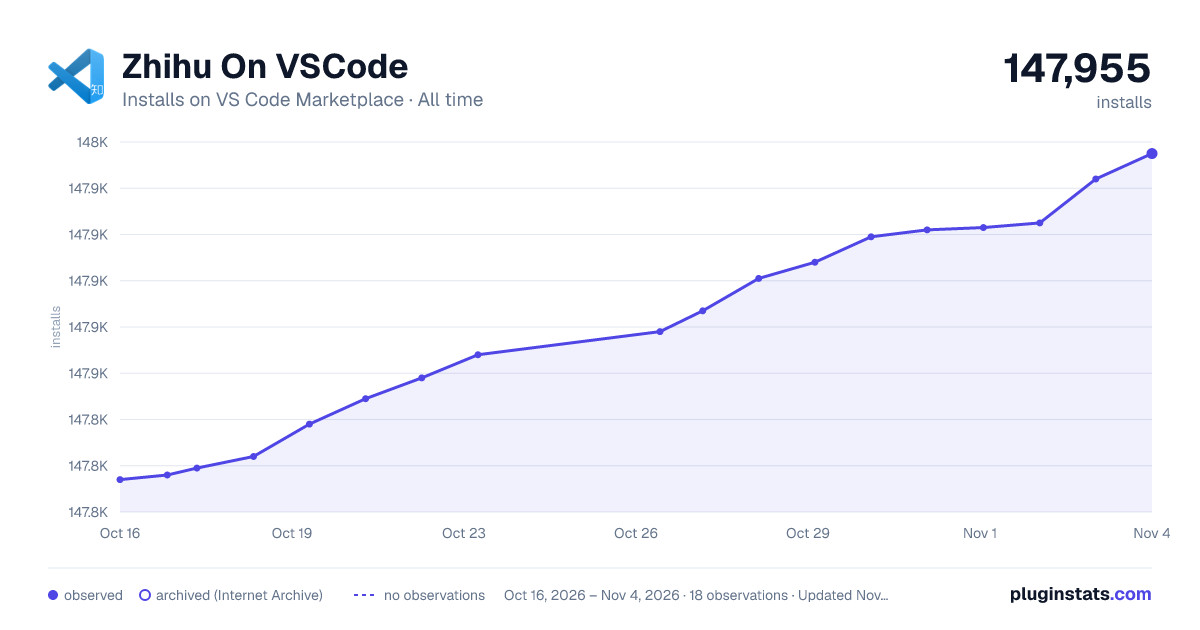

Adoption over time
7/30/90-day growth
Ranking history
Ratings over time
Listing placement
Listing placement
Filled points are observed values; hollow points come from Internet Archive snapshots of the listing page. Dashed segments span periods with no observations — values between points are not interpolated.
Each band is one page of 20. Installs on a linear scale. Placement is projected from installs, so it can differ from the marketplace's own sort order. Hover a dot to see the listing.
Recent observations
Full history (6)Similar VS Code Marketplace Other plugins
All 20 Zhihu On VSCode alternativesData source
Install counts, average rating, and rating counts come from the public Visual Studio Marketplace gallery API. Installs are cumulative and exclude updates.
Listing: https://marketplace.visualstudio.com/items?itemName=niudai.vscode-zhihu. First seen Oct 16, 2026; last successful collection Oct 21, 2026. See the methodology.