 PluginStats
markdownlint installs statistics
By David Anson · VS Code Marketplace · Linters
Markdown linting and style checking for Visual Studio Code
markdownlint has 12,402,509 recorded installs on VS Code Marketplace.
It ranks #86 of 2,501 tracked VS Code Marketplace listings by installs.
It is rated 4.5 out of 5 from 86 ratings.
PluginStats has 4 daily observations since Oct 16, 2026; the latest is from Oct 19, 2026.
Rating: 4.52 / 5 from 86 ratings
About markdownlint
markdownlint
Markdown/CommonMark linting and style checking for Visual Studio Code
Introduction
The Markdown markup language is designed to be easy to read, write, and understand. It succeeds - and its flexibility is both a benefit and a drawback. Many styles are possible, so formatting can be inconsistent. Some constructs don't work well in all parsers and should be avoided. For example, here are some common/troublesome Markdown constructs.
markdownlint is an extension for the Visual Studio Code editor that includes a library of rules to encourage standards and consistency for Markdown files. It is powered by the markdownlint library for Node.js (which was inspired by markdownlint for Ruby). Linting is performed by the markdownlint-cli2 engine, which can be used in conjunction with this extension to provide command-line support for scripts and continuous integration scenarios. The markdownlint-cli2-action GitHub Action uses the same engine and can be integrated with project workflows. For more, see the Interoperability section below.
Install
1. Open Visual Studio Code 2. Press Ctrl+P/Ctrl+P/⌘P to open the Quick Open dialog 3. Type ext install markdownlint to find the extension 4. Click the Install button, then the Enable button
OR
1. Press Ctrl+Shift+X/Ctrl+Shift+X/⇧⌘X to open the Extensions tab 2. Type markdownlint to find the extension 3. Click the Install button, then the Enable button
OR
1. Open a command-line prompt 2. Run code --install-extension DavidAnson.vscode-markdownlint
Use
When editing a Markdown file in VS Code with markdownlint installed, any lines that violate one of markdownlint's rules (see below) will trigger a *Warning* in the editor. Warnings are indicated by a wavy green underline and can also be seen by pressing Ctrl+Shift+M/Ctrl+Shift+M/⇧⌘M to open the Errors and Warnings dialog. Hover the mouse pointer over a green line to see the warning or press F8 and Shift+F8/Shift+F8/⇧F8 to cycle through all the warnings (markdownlint warnings all begin with MD###). For more information about a markdownlint warning, place the cursor on a line and click the light bulb icon or press Ctrl+./Ctrl+./⌘. to open the quick fix dialog. Clicking one of the warnings in the dialog will display that rule's help entry in the default web browser.
For a tutorial, please see Build an Amazing Markdown Editor Using Visual Studio Code and Pandoc by Dave Johnson.
By default, markdownlint will scan and report issues for files that VS Code treats as Markdown. You can see what language mode the current file has in the Status Bar at the bottom of the window and you can change the language mode for the current file. If you have a custom file type that VS Code should always treat as Markdown, you can associate that file extension with the markdown language identifier.
Rules
• MD001 *heading-increment* - Heading levels should only increment by one level at a time • MD003 *heading-style* - Heading style • MD004 *ul-style* - Unordered list style • MD005 *list-indent* - Inconsistent indentation for list items at the same level • MD007 *ul-indent* - Unordered list indentation • MD009 *no-trailing-spaces* - Trailing spaces • MD010 *no-hard-tabs* - Hard tabs • MD011 *no-reversed-links* - Reversed link syntax • MD012 *no-multiple-blanks* - Multiple consecutive blank lines • MD013 *line-length* - Line length • MD014 *commands-show-output* - Dollar signs used before commands without showing output • MD018 *no-missing-space-atx* - No space after hash on atx style heading • MD019 *no-multiple-space-atx* - Multiple spaces after hash on atx style heading • MD020 *no-missing-space-closed-atx* - No space inside hashes on closed atx style heading • MD021 *no-multiple-space-closed-atx* - Multiple spaces inside hashes on closed atx style heading • MD022 *blanks-around-headings* - Headings should be surrounded by blank lines • MD023 *heading-start-left* - Headings must start at the beginning of the line • MD024 *no-duplicate-heading* - Multiple headings with the same content • MD025 *single-title/single-h1* - Multiple top level headings in the same document • MD026 *no-trailing-punctuation* - Trailing punctuation in heading • MD027 *no-multiple-space-blockquote* - Multiple spaces after blockquote symbol • MD028 *no-blanks-blockquote* - Blank line inside blockquote • MD029 *ol-prefix* - Ordered list item prefix • MD030 *list-marker-space* - Spaces after list markers • MD031 *blanks-around-fences* - Fenced code blocks should be surrounded by blank lines • MD032 *blanks-around-lists* - Lists should be surrounded by blank lines • MD033 *no-inline-html* - Inline HTML • MD034 *no-bare-urls* - Bare URL used • MD035 *hr-style* - Horizontal rule style • MD036 *no-emphasis-as-heading* - Emphasis used instead of a heading • MD037 *no-space-in-emphasis* - Spaces inside emphasis markers • MD038 *no-space-in-code* - Spaces inside code span elements • MD039 *no-space-in-links* - Spaces inside link text • MD040 *fenced-code-language* - Fenced code blocks should have a language specified • MD041 *first-line-heading/first-line-h1* - First line in file should be a top level heading • MD042 *no-empty-links* - No empty links • MD043 *required-headings* - Required heading structure • MD044 *proper-names* - Proper names should have the correct capitalization • MD045 *no-alt-text* - Images should have alternate text (alt text) • MD046 *code-block-style* - Code block style • MD047 *single-trailing-newline* - Files should end with a single newline character • MD048 *code-fence-style* - Code fence style • MD049 *emphasis-style* - Emphasis style should be consistent • MD050 *strong-style* - Strong style should be consistent • MD051 *link-fragments* - Link fragments should be valid • MD052 *reference-links-images* - Reference links and images should use a label that is defined • MD053 *link-image-reference-definitions* - Link and image reference definitions should be needed • MD054 *link-image-style* - Link and image style • MD055…
Description from the VS Code Marketplace listing.
- CommonMark
- json
- lint
- linters
- markdown
- md
- multi-root ready
- snippet
Charts
Images: 30d · 1y · all time · 1600×900 dark


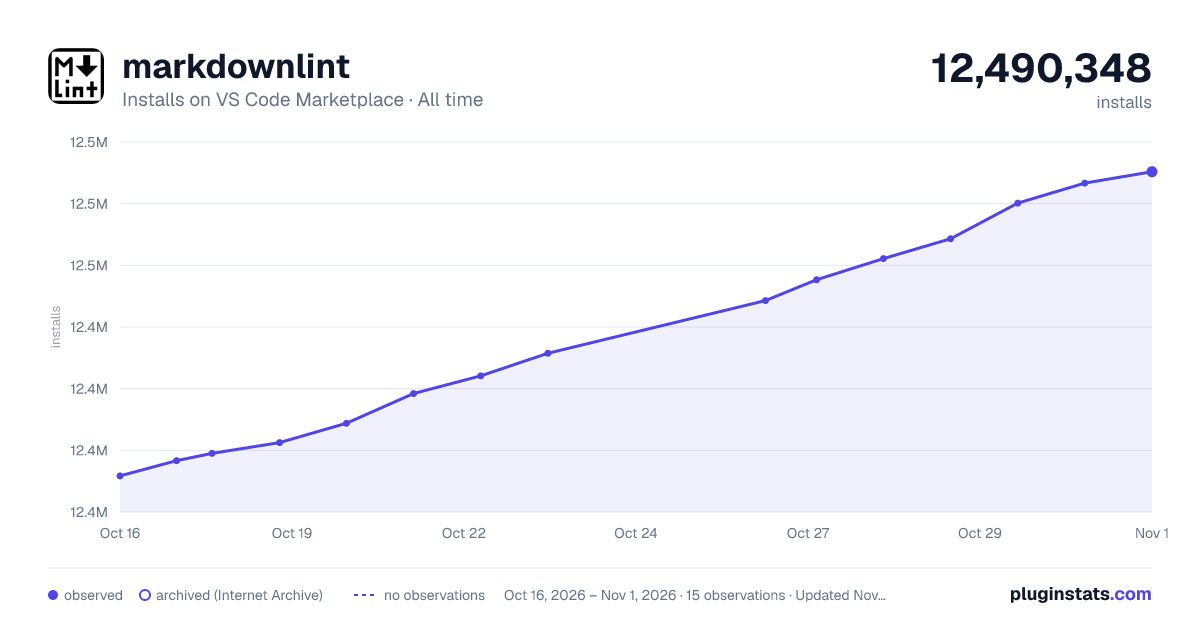

Adoption over time


7/30/90-day growth


Ranking history


Ratings over time


Listing placement


Listing placement


Filled points are observed values; hollow points come from Internet Archive snapshots of the listing page. Dashed segments span periods with no observations — values between points are not interpolated.
Each band is one page of 20. Installs on a log scale. Placement is projected from installs, so it can differ from the marketplace's own sort order. Hover a dot to see the listing.
Recent observations
Full history (4)Similar VS Code Marketplace Linters plugins
All 20 markdownlint alternativesData source
Install counts, average rating, and rating counts come from the public Visual Studio Marketplace gallery API. Installs are cumulative and exclude updates.
Listing: https://marketplace.visualstudio.com/items?itemName=DavidAnson.vscode-markdownlint. First seen Oct 16, 2026; last successful collection Oct 19, 2026. See the methodology.