 PluginStats
Gist has 164,572 recorded installs on VS Code Marketplace, ranking #1752 of 2,501 tracked listings.
Rating: 4.44 / 5 from 18 ratings
About Gist
Gist Extension


Access your GitHub Gists within Visual Studio Code. You can add, edit, and delete public and private gists.
Installation
Press <kbd>F1</kbd> and narrow down the list commands by typing extension. Pick Extensions: Install Extensions.
Select the Gist Extension extension from the list.
GitHub Profiles
NOTE: You must provide a personal access token to be authenticated with GitHub or a GitHub Enterprise instance.
Press <kbd>F1</kbd> and type select profile to initialize the profile selector. You can add as many profiles as you would like.

If you are using a GitHub Enterprise account, be sure to add the appropriate API url. This extension uses the REST v3 API by GitHub. Your GHE API url should look similar to this: http(s)://[hostname]/api/v3 (documentation)
Usage
Create Gists
You must have a file open and active to create a gist.
Press <kbd>F1</kbd> and enter the following:
GIST: Create New Gist
You will be prompted a gist description.
Open/Edit Gists
Press <kbd>F1</kbd> and enter one fo the following:
GIST: Open Gist
GIST: Open Favorite Gist
All files associated with the gist will be opened in group layout.
Once you have opened an owned* gist, saving it will commit a new revision.
* an owned gist is one created by you, not a favorited (starred) gist.
You can also use the following commands:
GIST: Delete Gist
GIST: Delete File
GIST: Add File
GIST: Open Gist In Browser
GIST: Insert Text From Gist File
Extension Settings
Mostly you will not need to change these settings.
| Setting | Type | Default Value | Purpose |
|---|---|---|---|
| maxFiles | Number | 10 | The maximum number of files to open without a prompt. |
| defaultPrivate | Boolean | false | Defaults all newly created Gists to PRIVATE. |
| profileOptions | Object | {} | Override profile configuration options. |
profileOptions gives you some debugging capabilities. You can provide a profile name along with key, url, and rejectUnauthorized values. Before you can use profileOptions you *MUST* have the profile created.
interface ProfileOptions {
    key?: string; // the personal access token to use
    url?: string; // the REST endpoint to use
    rejectUnauthorized?: boolean; // set this to false if you are having ssl issues with your enterprise REST endpoint
}
An example value for profileOptions would be something like this:
{
    "GHE": { // "GHE" MUST correspond with the name used when originally configuring the profile
        "rejectUnauthorized": false
    }
}
All Commands & Keyboard Mappings
Here is a list of commands and their mapped keyboard shortcuts
| Command | Command Pallet Label | Keyboard Mapping | Notes |
|---|---|---|---|
| extension.gist.open | Open Gist | ctrl+alt+o | |
| extension.gist.openFavorite | Open Favorite Gist | not mapped | |
| extension.gist.create | Create New Gist | not mapped | |
| extension.gist.openInBrowser | Open Gist In Browser | ctrl+alt+b | |
| extension.gist.delete | Delete Gist | not mapped | |
| extension.gist.deleteFile | Delete File | not mapped | |
| extension.gist.add | Add File | ctrl+alt+a ctrl+alt+a | |
| extension.gist.insert | Insert Text From Gist File | not mapped | |
| extension.profile.select | Select Profile | ctrl+alt+= | |
| extension.resetState | n/a | ctrl+shift+0 | Delete All Extension Memory (removes auth tokens) |
Show Your Support
If you'd like to support Gist, please consider the following — feel free to choose more than one. 😉
- Become a Sponsor — see backers
- Donations via PayPal
- Donations via Cash App
- Write a Review
- Star or Fork me on GitHub
- Follow me on Twitter
Maintainer
vscode-gist is maintained by Ken Howard.
Description from the VS Code Marketplace listing.
- keybindings
README badge
Show your rank in a README or on your website. The badge updates automatically.
Charts
Images: 30d · 1y · all time · 1600×900 dark


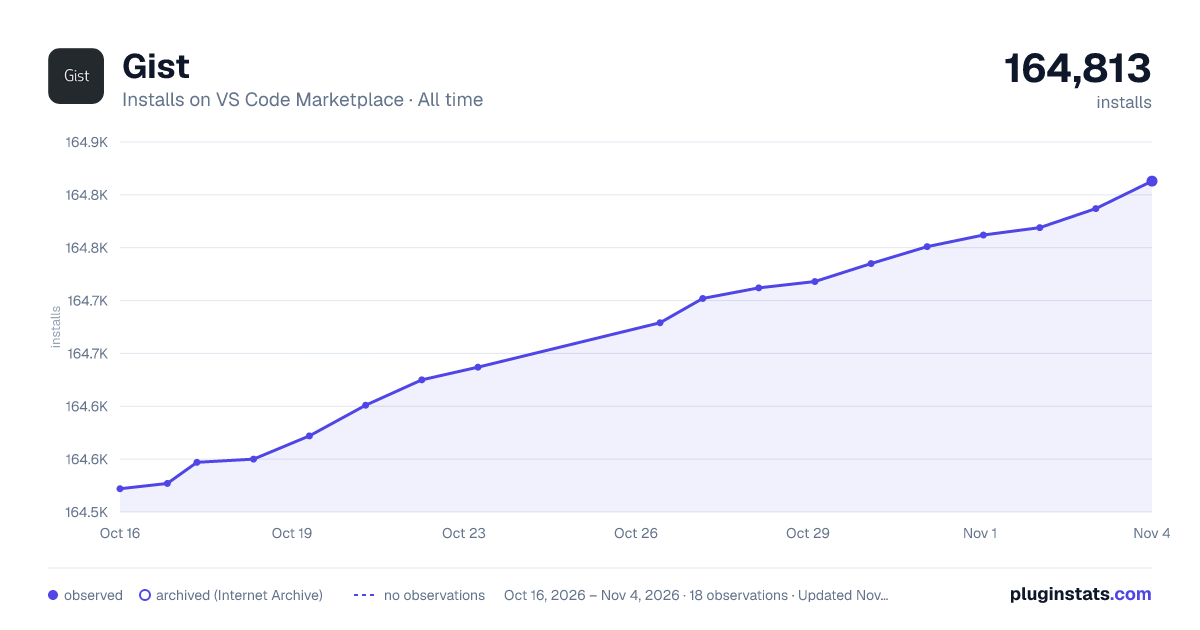

Adoption over time
7/30/90-day growth
Ranking history
Ratings over time
Listing placement
Listing placement
Filled points are observed values; hollow points come from Internet Archive snapshots of the listing page. Dashed segments span periods with no observations — values between points are not interpolated.
Each band is one page of 20. Installs on a linear scale. Placement is projected from installs, so it can differ from the marketplace's own sort order. Hover a dot to see the listing.
Recent observations
Full history (5)Similar VS Code Marketplace Other plugins
All 20 Gist alternativesData source
Install counts, average rating, and rating counts come from the public Visual Studio Marketplace gallery API. Installs are cumulative and exclude updates.
Listing: https://marketplace.visualstudio.com/items?itemName=kenhowardpdx.vscode-gist. First seen Oct 16, 2026; last successful collection Oct 20, 2026. See the methodology.