 PluginStats
DeepSeek Code Generator installs statistics
By Peter' Studio · VS Code Marketplace · Other
Generate code using DeepSeek AI
DeepSeek Code Generator has 149,170 recorded installs on VS Code Marketplace.
It ranks #1865 of 2,501 tracked VS Code Marketplace listings by installs.
It is rated 4.0 out of 5 from 3 ratings.
PluginStats has 4 daily observations since Oct 16, 2026; the latest is from Oct 19, 2026.
Rating: 4.00 / 5 from 3 ratings
About DeepSeek Code Generator
DeepSeek Code Generator
• 中文说明 • English
中文说明
DeepSeek Code Generator 是一个 VS Code 编程助手插件,支持在侧边栏中与 DeepSeek 对话,并围绕选中代码进行解释、修复、重构、生成注释、生成测试和代码审查。
重磅更新:全面支持 DeepSeek V4 接入。
核心功能
• 侧边栏对话:点击 VS Code 左侧边栏的 DeepSeek 图标即可打开插件。 • 代码解析:选中代码后让 DeepSeek 解释代码行为、关键控制流和潜在问题。 • 代码审查:针对选中代码输出按严重程度排序的审查结果。 • 代码修复:对选中代码进行 bug 修复,并优先返回修复后的代码。 • 回复操作:AI 回复支持一键复制、插入到光标位置、替换当前选区、新建文件。 • 聊天历史:支持查看最近 10 条对话,并可清除历史。 • 可配置模型:支持配置 API Key、Base URL、模型和最大输出 token 数。 • 界面语言跟随:会根据 VS Code 的 language 设置决定 DeepSeek 对话界面显示中文或英文。 • 语言跟随:默认根据 VS Code 当前显示语言回复,代码、标识符、命令和路径保持原样。
界面截图
01. 主界面(新对话界面)
点击左侧边栏的 DeepSeek 图标开启插件。插件界面右上角提供最近 10 条对话、设置、新对话按钮。
02. 代码解析
选中代码后,让 DeepSeek 解释代码用途、主要行为、关键控制流和潜在 bug。
03. 代码审查
对选中代码进行代码审查,按严重程度输出问题、原因和修复建议。
04. 复制/插入/替换/新建文件按钮
每条 AI 回复右上角提供复制、插入、替换、新建文件按钮。鼠标悬浮时会显示功能提示。
05. 聊天历史
打开历史面板后,可查看最近 10 条对话,并支持清除全部历史。
06. 设置项
在 VS Code 设置中配置 DeepSeek API Key、Base URL、Max Tokens 和模型。
安装
1. 打开 VS Code。 2. 进入 扩展 视图,或使用快捷键 Ctrl+Shift+X。 3. 搜索 DeepSeek Code Generator。 4. 点击 安装。
基本用法
1. 点击左侧边栏的 DeepSeek 图标打开聊天界面。 2. 在输入框中输入问题,点击发送按钮开始对话。 3. 在编辑器中选中代码,右键选择 DeepSeek 相关命令: • 解释选中代码 • 重构选中代码 • 修复选中代码 • 为选中代码生成注释 • 为选中代码生成测试 • 评审选中代码 4. 在 AI 回复右上角点击操作按钮: • 复制:复制完整 AI 回复到剪贴板。 • 插入:把回复内容插入到当前光标位置。 • 替换:用回复内容替换当前选区。 • 新建文件:将回复内容打开为一个新的未保存文件。
快捷键
• Cmd+Shift+V / Ctrl+Alt+V:打开 DeepSeek 侧边栏。 • Cmd+Shift+T / Ctrl+Alt+T:触发与 DeepSeek 对话命令。
配置
可选模型:
• deepseek-v4-flash • deepseek-v4-pro
如果没有使用自定义兼容网关,deepseek.baseUrl 保持默认值即可。
API Key 申请
https://platform.deepseek.com/api_keys
支持与推广
Email: dai.david2005@gmail.com
微信
打赏通道
AI 群星会
如果你希望继续系统学习 AI 编程、智能体、知识库搭建和企业落地实践,也可以了解一下 AI 群星会。这是一个中文 AI 实战学习社群,面向想把 AI 真正用到工作、产品和项目中的开发者与创作者。
• 六大学习方向:AI 编程、智能体、知识库搭建、企业落地、获客增长、副业变现。 • 实战训练:定期组织 AI 实战训练营和主题分享。 • 内容更新:持续更新教程、案例、工具玩法和落地经验。 • 同行交流:连接正在实践 AI 的开发者、创作者和业务同学。
如果你想进一步了解或加入社群,可以扫描下方第四张图片中的知识星球邀请二维码,直接加入 AI 群星会。
图 1:六大学习方向
围绕 AI 编程、智能体、知识库搭建、企业落地、获客增长、副业变现,建立更完整的 AI 实战能力。
图 2:实战训练营
社群会持续组织 AI 实战训练营和主题打卡,帮助你把工具、流程和项目真正跑起来。
图 3:社群权益介绍
了解 AI 群星会的会员权益、内容更新、实战分享和同行交流方式。
图 4:知识星球邀请二维码
扫描图片中的知识星球邀请二维码,可以直接加入 AI 群星会。
English
DeepSeek Code Generator is a VS Code assistant extension for chatting with DeepSeek in the sidebar and working with selected code: explain, fix, refactor, comment, test, and review.
Major update: full support for DeepSeek V4 integration.
Features
• Sidebar chat: Open the extension from the DeepSeek icon in the VS Code Activity Bar. • Code explanation: Explain selected code, important behavior, control flow, and possible issues. • Code review: Review selected code and list findings by severity. • Code fixing: Fix bugs in selected code and return corrected code first. • Response actions: Copy, insert at cursor, replace selection, or create a new file from an AI response. • Chat history: View the latest 10 conversations and clear history when needed. • Configurable model: Configure API Key, Base URL, model, and max tokens. • Interface language matching: The DeepSeek chat UI follows the VS Code language setting and displays Chinese or English accordingly. • Language matching: Replies follow the current VS Code display language while preserving code, identifiers, commands, and paths.
Screenshots
01. New Chat
Open the extension from the DeepSeek icon in the left Activity Bar. The top-right buttons provide recent conversations, settings, and new chat.
02. Code Explanation
Ask DeepSeek to explain selected code, including behavior, control flow, and possible bugs.
03. Code Review
Review selected code with severity-based findings and suggested fixes.
04. Response Actions
Each AI response includes action buttons for copy, insert, replace, and new file. Hovering a button shows its tooltip.
05. Chat History
Open the history panel to view the latest 10 conversations and clear all history.
06. Settings
Configure DeepSeek API Key, Base URL, Max Tokens, and model in VS Code Settings.
Installation
1. Open VS Code. 2. Go to Extensions, or use Ctrl+Shift+X. 3. Search for DeepSeek Code Generator. 4. Click Install.
Basic Usage
1. Click the DeepSeek icon in the left Activity Bar to open the chat view. 2. Type a prompt and click the send button. 3. Select code in the editor and use the DeepSeek context menu commands: • Explain Selected Code • Refactor Selected Code • Fix Selected Code • Generate Comments for Selected Code • Generate Tests for Selected Code • Review Selected Code 4. Use the action buttons on each AI response: • Copy: copy the full AI response to the clipboard. • Insert: insert the response at the current cursor position. • Replace: replace the current selection with the response. • New File: open the response as a new unsaved file.
Keyboard Shortcuts
• Cmd+Shift+V / Ctrl+Alt+V: open the DeepSeek sidebar. • Cmd+Shift+T / Ctrl+Alt+T: trigger the DeepSeek chat command.
Configuration
Available models:
• deepseek-v4-flash • deepseek-v4-pro
Keep deepseek.baseUrl unchanged unless you use a compatible custom gateway.
API Key
Apply for an API key at https://platform.deepseek.com/api_keys.
Support & Promotion
Email: dai.david2005@gmail.com
Buy me a coffee
My USDT(TRON) Address:TWPocwazdrucz53DDHSTYk8ZZK9aTViw3P
My Paypal:
Community
I also run a Chinese-language AI learning community focused on AI coding, agents, knowledge bases, business adoption, growth, and practical AI projects.
Members get access to hands-on workshops, practical tutorials, case studies, and peer discussions. If you are interested, feel free to contact me by email.
Description from the VS Code Marketplace listing.
- keybindings
Where DeepSeek Code Generator sits in the listing
Each band is one page of 20. Installs on a log scale. Placement is projected from installs, so it can differ from the marketplace's own sort order. Hover a dot to see the listing.


Charts
Images: 30d · 1y · all time · 1600×900 dark


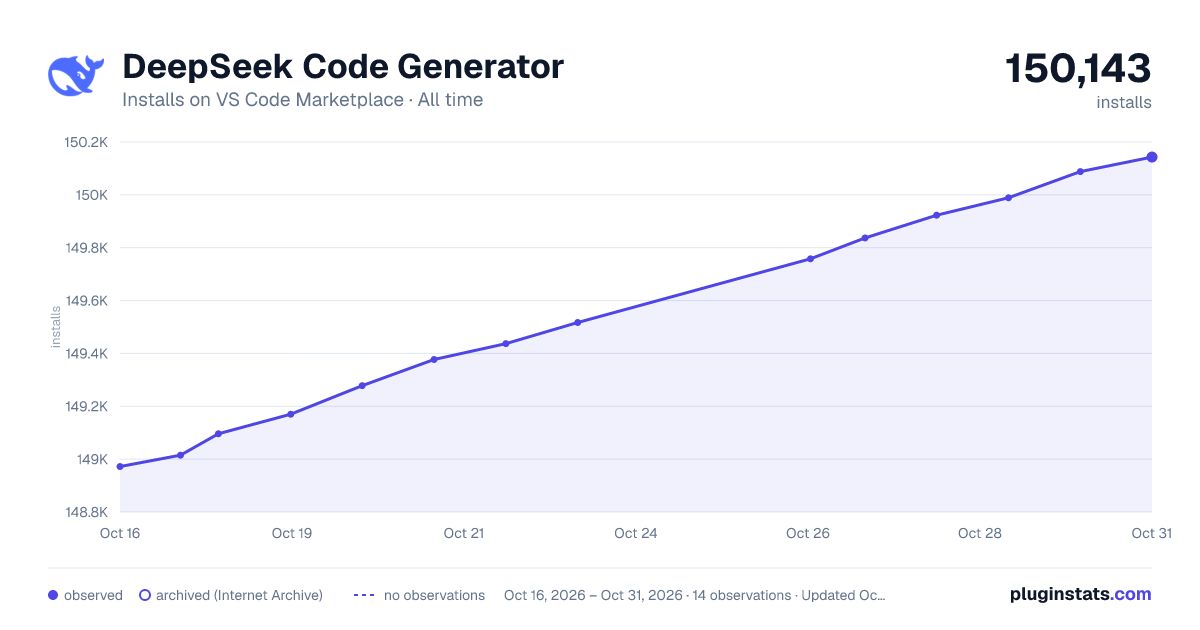

Adoption over time


7/30/90-day growth


Ranking history


Filled points are observed values; hollow points come from Internet Archive snapshots of the listing page. Dashed segments span periods with no observations — values between points are not interpolated.
Recent observations
Full history (4)Similar VS Code Marketplace Other plugins
Data source
Install counts, average rating, and rating counts come from the public Visual Studio Marketplace gallery API. Installs are cumulative and exclude updates.
Listing: https://marketplace.visualstudio.com/items?itemName=DavidDai.deepseek-code-generator. First seen Oct 16, 2026; last successful collection Oct 19, 2026. See the methodology.