 PluginStats
Find unused exports installs statistics
By Iulian Radu · VS Code Marketplace · Linters
A Visual Studio Code extension for displaying all unused exports in a typescript/javascript project.
Find unused exports has 102,741 recorded installs on VS Code Marketplace, a change of +0.3% over the past 7 days, ranking #2333 of 2,504 tracked listings.
Rating: 3.29 / 5 from 7 ratings
About Find unused exports
Find Unused Exports
<a href="http://opensource.org/licenses/GPL-3.0" target="_blank" rel="noreferrer noopener"><img src="https://img.shields.io/badge/license-GPL-orange.png?color=blue&style=flat-square" alt="The GPL-3.0 License"></a>
Automatically find all exports in typescript and javascript files which are not imported in other files.
Sponsorship
By purchasing Coding Guidelines for React with TypeScript from any Amazon website, you will get a set of guidelines for writing a clean, maintainable, and efficient code. Also you will sponsor me, showing your appreciation for my effort in creating and mentaining this extension.
Features
- Automatically find all exports and imports in .ts and .tsx files
- Automatically find all exports and imports in .js and .jsx files, if tsconfig.json allows for .js files in project
- All imports from node modules are ignored
- Configurable display of results as expanded or collapsed
- If tsconfig.json/jsconfig.json defines baseUrl, all imports will be resolved using paths relative to baseUrl
- A file having only not used exports will be marked as "not used" and a delete button will be available
- If there are no unused exports, then the panel will display an entry saying this
- A not use export can be marked as being ignored using the following comment in its previous line
- // find-unused-exports:ignore-next-line-exports
- Can detect circular imports, which produce undefined variables by import
- Only the first set of circular imports for a file is displayed in panel (for clarity of the circular path)
- Files can be added to a list (via the interface) to ignore all their current and futher unused exports
- The list is stored in .vscode/find-unused-exports.json
- You can add a file to ignore list using the checkmark right from its name and only if there are some used exports
Usage
This extension has its own panel. The symbol of this panel is a ban sign with two arrows (see bellow).
Open the panel and the extension will start the scan of the project. If you made changes to the files, the extension will not detect these to avoid unnecessary scans. You can force a rescan using the reload button found at top right of the panel.
If there are no unused exports, the panel will display a single entry saying this.
An "import * as" will assume that all imported exports are used from that file.
Included/Excluded files
By default are matched only .js, .jsx, .ts and .tsx files. The .js and .jsx are included in pattern only if compilerOptions.allowJs from tsconfig.json is true or the project is in javascript.
If there are no defined exclude then the default exclude globs are used:
- node_modules/**/*
- bower_components/**/*
- jspm_packages/**/*
If there are no defined files nor include globs, then the following exclude globs are added:
- **/node_modules/**/*
- **/*.d.ts
If you want to include/exclude other files than the default (like storybook's .stories.ts files or .svelte files), you can:
- add a section called findUnusedExports in package.json
# package.json
{
  "findUnusedExports": {
    "include": [ "./src/**/*.d.ts", "src/**/*.svelte" ],
    "exclude": [ "./src/**/*.stories.@(js|jsx|ts|tsx)" ]
  }
}
- create a file called .findUnusedExports.json in the same folder with package.json
# .findUnusedExports.json
{
  "include": [ "./src/**/*.d.ts", "src/**/*.svelte" ],
  "exclude": [ "./storybook/**/*.stories.@(js|jsx|ts|tsx)" ]
}
If both are used then the include and excluded rules from both of them will be used.
Screenshot
Bellow you can see the list of unused exports and circular imports found in the currently opened project as are they displayed by this extension:

Buttons
OVERVIEW:
- Refresh list of unused exports (and circular imports)
- Show the output window
UNUSED EXPORTS:
- Expand all rows
- Collapse all rows
- Refresh list of unused exports (and circular imports)
CIRCULAR IMPORTS:
- Enable/Disable detection of circular imports
- Expand all rows
- Collapse all rows
- Refresh list of unused exports (and circular imports)
Requirements
There are no special requirements.
Extension Settings
-
findUnusedExports.considerMainExportsUsed
- Find unused exports: consider all exports from the file used in the main field of package.json as used
- default false
-
findUnusedExports.defaultResultExpanded:
- Find unused exports: show all found results initially expanded (otherwise collapsed)
- default false
-
findUnusedExports.debug:
- Find unused exports: log all actions in an output window
- default false
-
findUnusedExports.logInFile
- Save the log in a file (.vscode/find-unused-exports.log located in the first folder defined for a workspace)
-
findUnusedExports.logOnlyLastRun
- Save only the log for the last run/check
-
findUnusedExports.showIgnoredExports
- Find unused exports: show all unused exports, even if they are marked as ignored
- default false
-
findUnusedExports.detectCircularImports
- Find unused exports: detect circular imports
- default false
-
findUnusedExports.highlightUnusedExportsInEditor
- Find unused exports: highlights unused exports in editor
- default false
Known Issues
If the main/entry file has exports then this extension marks them as "not used", it allows you to remove it. Hence, please check before deleting any file if it is the main/entry file.
There is no support for defined paths aliases or rootDirs in tsconfig.json and jsconfig.json files.
If there are no files or include globs and there are a lot of files, the extension can take a lot of time to scan for files and it looks like it is stuck in a loop.
FAQ
- Why it is a component reported as not being used when it is?…
Description from the VS Code Marketplace listing.
- javascript
README badge
Show your rank in a README or on your website. The badge updates automatically.
Charts
Images: 30d · 1y · all time · 1600×900 dark


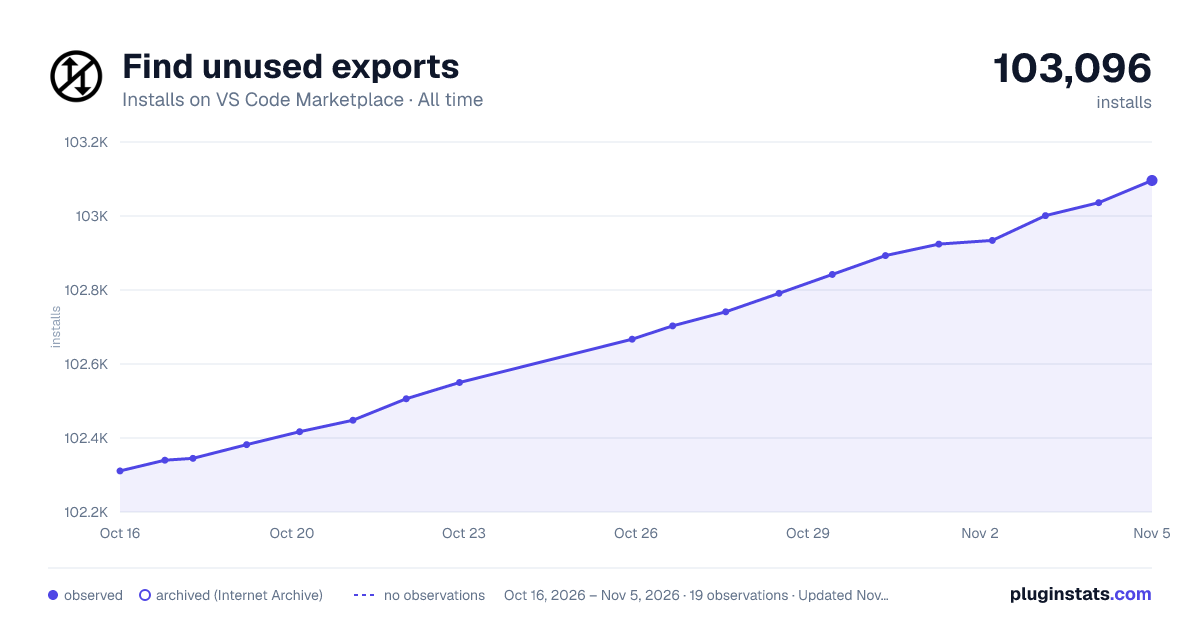

Adoption over time
7/30/90-day growth
Ranking history
Ratings over time
Listing placement
Listing placement
Filled points are observed values; hollow points come from Internet Archive snapshots of the listing page. Dashed segments span periods with no observations — values between points are not interpolated.
Each band is one page of 20. Installs on a linear scale. Placement is projected from installs, so it can differ from the marketplace's own sort order. Hover a dot to see the listing.
Recent observations
Full history (11)Similar VS Code Marketplace Linters plugins
All 20 Find unused exports alternativesData source
Install counts, average rating, and rating counts come from the public Visual Studio Marketplace gallery API. Installs are cumulative and exclude updates.
Listing: https://marketplace.visualstudio.com/items?itemName=iulian-radu-at.find-unused-exports. First seen Oct 16, 2026; last successful collection Oct 28, 2026. See the methodology.