 PluginStats
VS Sharper for C# installs statistics
By eService Online · VS Code Marketplace · Programming Languages
C# IDE, Code Generation and Refactoring for VS Code
VS Sharper for C# has 91,359 recorded installs on VS Code Marketplace, ranking #2491 of 2,501 tracked listings.
Rating: 4.00 / 5 from 4 ratings
About VS Sharper for C#
VS Sharper VS Code Extension for C#
An extension to make developing C# projects in VS Code fun and productive.
Installation
Install from within VS Code or through VS Code Marketplace.
Requires an installation of .NET Core Runtime >= 2.1 (2.1, 2.2 or 3.0) or .NET Core SDK for some features.
Features
Add a New C# Class or Interface File
Creates a new class or interface file and generates an apropriate name for the namespace of the new file.
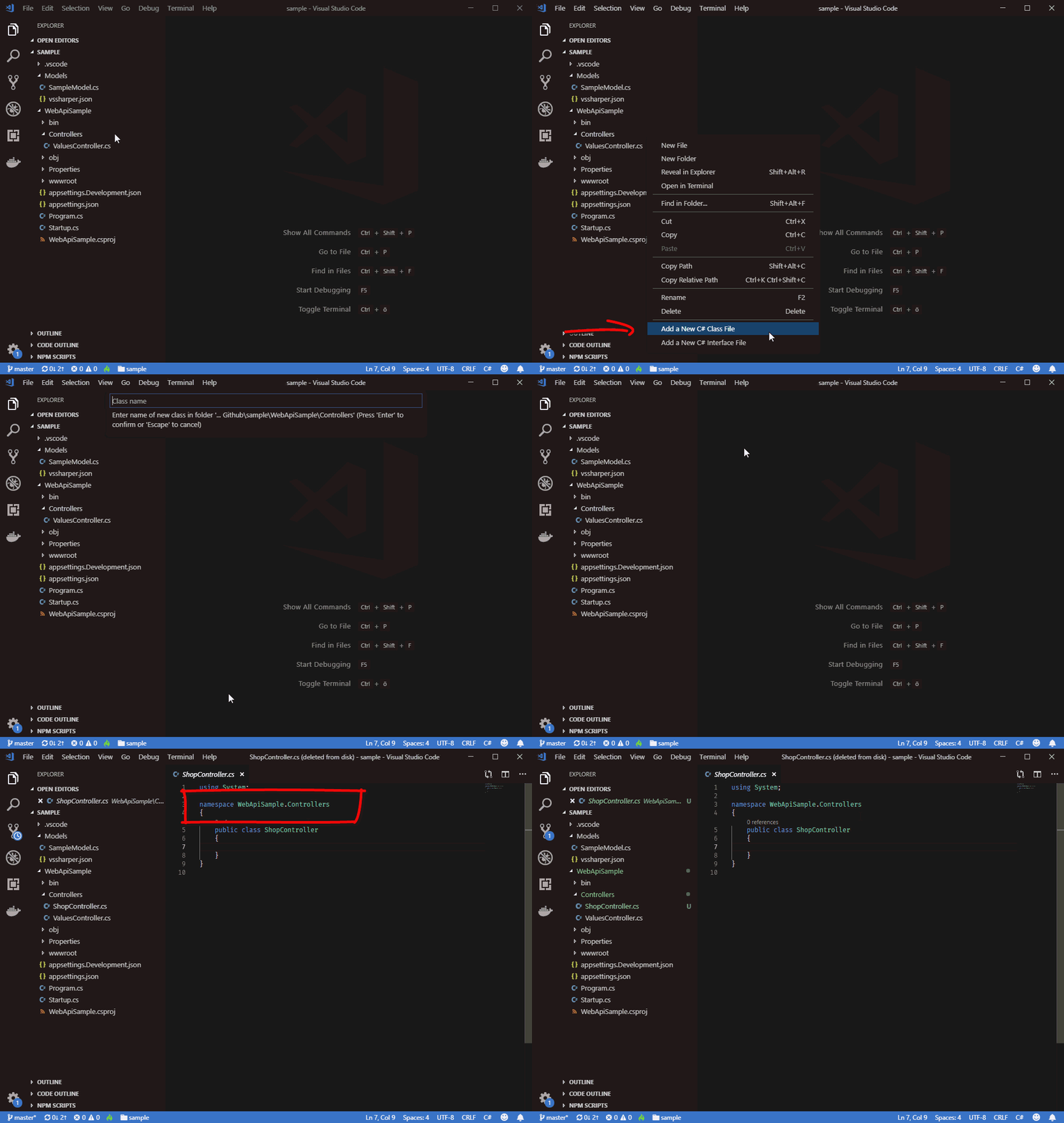
Use the File Explorer's context menu to add a class or interface file.
Tip: See below on how to change the generated namespace's name.
Embed Current Line or Selection
Embeds the current line or selection in a code control block.
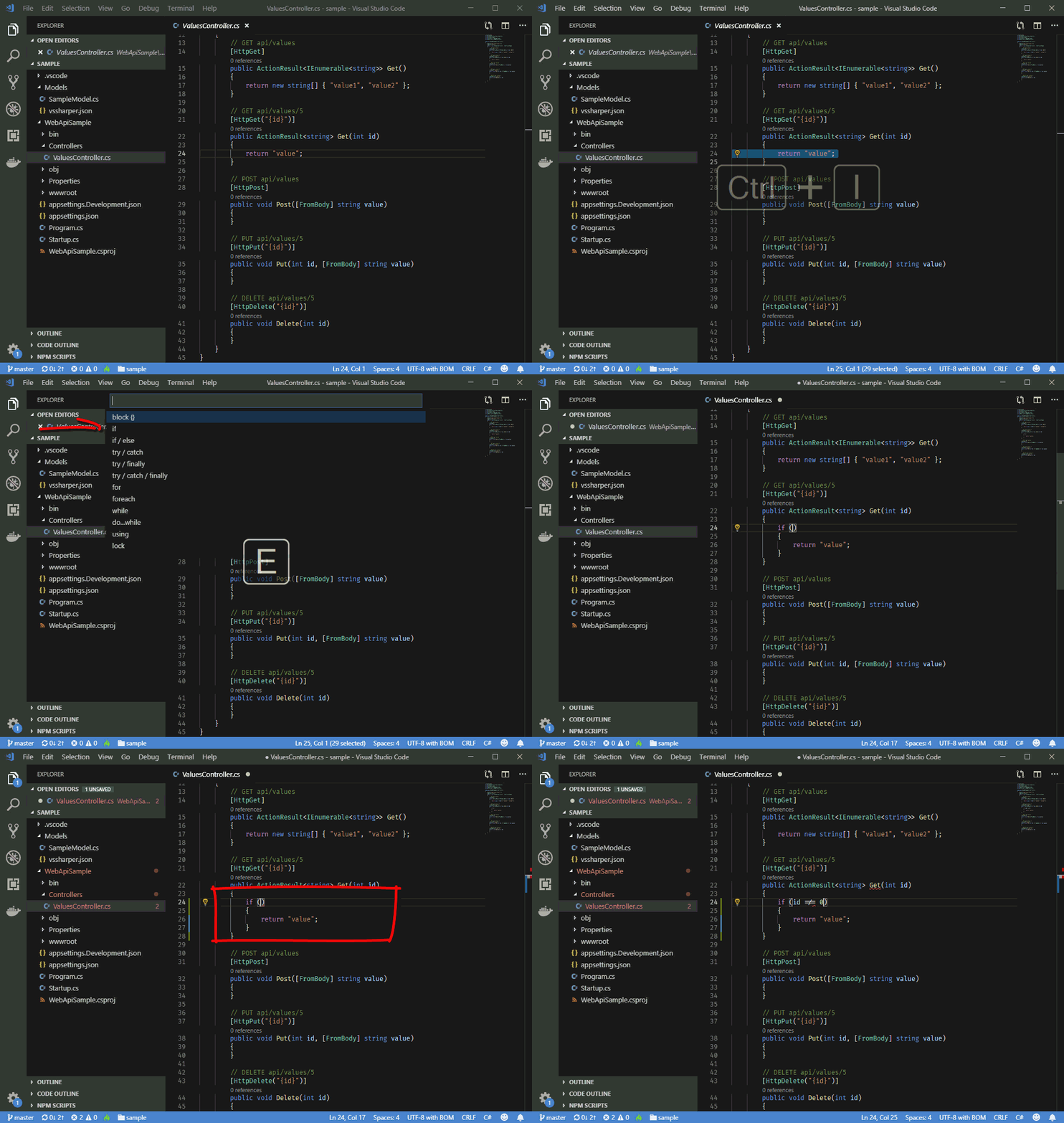
Available code blocks:
- Block { ... }
- do { ... } while ();
- for (...) { ... }
- foreach (...) { ... }
- if (...) { ... }
- if (...) { ... } else { ... }
- lock (...) { ... }
- try { ... } catch { ... }
- try { ... } catch { ... } finally { ... }
- try { ... } finally { ... }
- using (...) { ... }
- while (...) { ... }
Keyboard shortcut: CMD+I E on macOS or Ctrl+I E on Windows and Linux
Tip: The feature is also available in the code editor's context menu and in 'Quick fixes' after selecting text in the editor.
Sort and group Using statements
Sorts using statements alphabetically and groups them by the first namespace part. The System and Microsoft namespaces are placed at the beginning.
For example:
using System.Text;
using Microsoft.Data;
using SomeOtherLibrary.Core;
using SomeOtherLibrary;
using System;
Becomes:
using System;
using System.Text;

using Microsoft.Data;

using SomeOtherLibrary;
using SomeOtherLibrary.Core;
Select 'Sort and Group Using Statements' from the 'Quick Fixes' menu when the editor caret is in a line with a using statement.
Requirements
It is recommended to install the VS Code C# extension.
Extension Settings
VS Sharper generates the name for the namespace of a new file from the project's folder structure. You can place a vssharper.json file in the projects root or any subfolder to overwrite the generated namespace name for this folder or any of its subfolders.
For example:
{
    "namespace": "MyProject"
}
The extension looks up the subfolders' chain for a vssharper.json file until it reaches the root of the project.
Telemetry
This extension collects anonymous usage data like VS Code. You can use VS Code's telemetry setting to turn it off.
Extension Commands
- Add a New C# Class File (
vsSharper.addCsharpClassFile) - Add a New C# Interface File (
vsSharper.addCsharpClassFile) - Embed Current Line or Selection (
vsSharper.embedSelection) - Embed Current Line or Selection into Code Block (
vsSharper.embedSelection.block) - Sort and group using statements (
vsSharper.sortUsings)
Known Issues
No known isssues.
Release Notes
See: Change Log
More features and productivity tools will be added in the coming weeks and months.
Please use Github to report issues or send any feature requests.
Description from the VS Code Marketplace listing.
- C#
- code assistance
- csharp
- ide
- keybindings
- refactoring
README badge
Show your rank in a README or on your website. The badge updates automatically.
Charts
Images: 30d · 1y · all time · 1600×900 dark


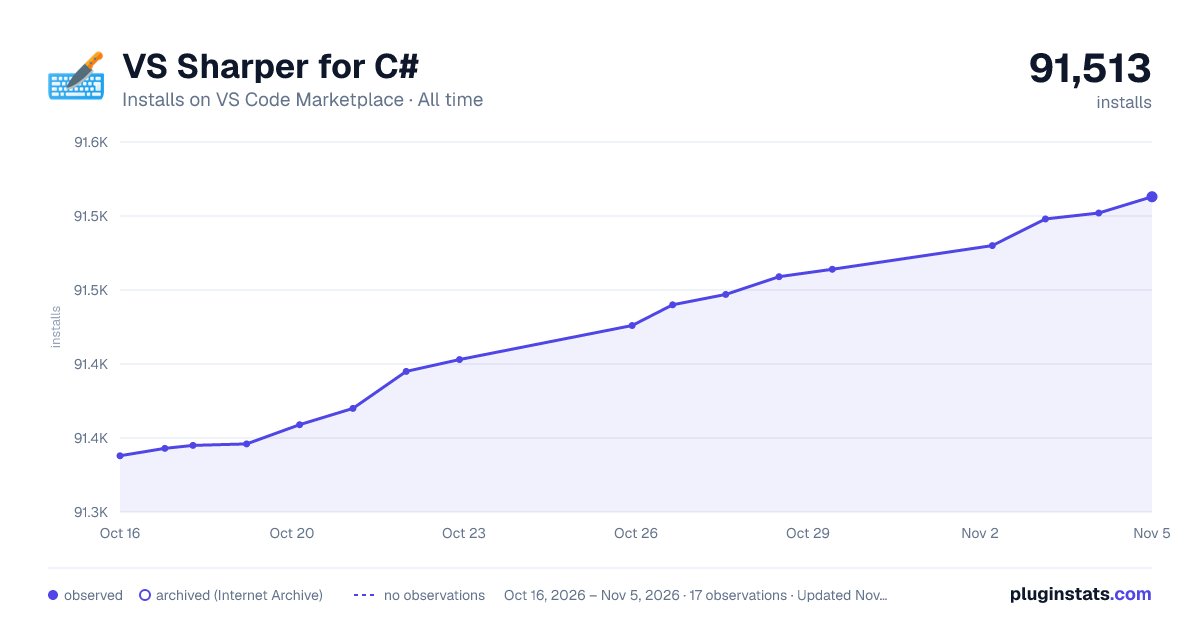

Adoption over time
7/30/90-day growth
Ranking history
Ratings over time
Listing placement
Listing placement
Listing placement
Listing placement
Filled points are observed values; hollow points come from Internet Archive snapshots of the listing page. Dashed segments span periods with no observations — values between points are not interpolated.
Each band is one page of 20. Installs on a linear scale. Placement is projected from installs, so it can differ from the marketplace's own sort order. Hover a dot to see the listing.
Recent observations
Full history (5)Similar VS Code Marketplace Programming Languages plugins
All 20 VS Sharper for C# alternativesData source
Install counts, average rating, and rating counts come from the public Visual Studio Marketplace gallery API. Installs are cumulative and exclude updates.
Listing: https://marketplace.visualstudio.com/items?itemName=eservice-online.vs-sharper. First seen Oct 16, 2026; last successful collection Oct 20, 2026. See the methodology.