 PluginStats
Python installs statistics
By Microsoft (223 listings) · VS Code Marketplace · Programming Languages
Python language support with extension access points for IntelliSense (Pylance), Debugging (Python Debugger), linting, formatting, refactoring, unit tests, and more.
Python has 241,606,913 recorded installs on VS Code Marketplace.
It ranks #1 of 2,500 tracked VS Code Marketplace listings by installs.
It is rated 4.2 out of 5 from 630 ratings.
PluginStats has 3 daily observations since Oct 16, 2026; the latest is from Oct 18, 2026.
Rating: 4.20 / 5 from 630 ratings
About Python
Python extension for Visual Studio Code
A Visual Studio Code extension with rich support for the Python language (for all actively supported Python versions), providing access points for extensions to seamlessly integrate and offer support for IntelliSense (Pylance), debugging (Python Debugger), formatting, linting, code navigation, refactoring, variable explorer, test explorer, environment management (NEW Python Environments Extension).
Support for vscode.dev
The Python extension does offer some support when running on vscode.dev (which includes github.dev). This includes partial IntelliSense for open files in the editor.
Installed extensions
The Python extension will automatically install the following extensions by default to provide the best Python development experience in VS Code:
• Pylance – performant Python language support • Python Debugger – seamless debug experience with debugpy • (NEW) Python Environments – dedicated environment management (see below)
These extensions are optional dependencies, meaning the Python extension will remain fully functional if they fail to be installed. Any or all of these extensions can be disabled or uninstalled at the expense of some features. Extensions installed through the marketplace are subject to the Marketplace Terms of Use.
About the Python Environments Extension
You may now see that the Python Environments Extension is installed for you, but it may or may not be "enabled" in your VS Code experience. Enablement is controlled by the setting "python.useEnvironmentsExtension": true (or false).
• If you set this setting to true, you will manually opt in to using the Python Environments Extension for environment management. • If you do not have this setting specified, you may be randomly assigned to have it turned on as we roll it out until it becomes the default experience for all users.
The Python Environments Extension is still under active development and experimentation. Its goal is to provide a dedicated view and improved workflows for creating, deleting, and switching between Python environments, as well as managing packages. If you have feedback, please let us know via issues.
Extensibility
The Python extension provides pluggable access points for extensions that extend various feature areas to further improve your Python development experience. These extensions are all optional and depend on your project configuration and preferences.
• Python formatters • Python linters
If you encounter issues with any of the listed extensions, please file an issue in its corresponding repo.
Quick start
• Step 1. Install a supported version of Python on your system (note: the system install of Python on macOS is not supported). • Step 2. Install the Python extension for Visual Studio Code. • Step 3. Open or create a Python file and start coding!
Set up your environment
• Select your Python interpreter by clicking on the status bar • Configure the debugger through the Debug Activity Bar • Configure tests by running the Configure Tests command
Jupyter Notebook quick start
The Python extension offers support for Jupyter notebooks via the Jupyter extension to provide you a great Python notebook experience in VS Code.
• Install the Jupyter extension. • Open or create a Jupyter Notebook file (.ipynb) and start coding in our Notebook Editor!
For more information you can:
• Follow our Python tutorial with step-by-step instructions for building a simple app. • Check out the Python documentation on the VS Code site for general information about using the extension. • Check out the Jupyter Notebook documentation on the VS Code site for information about using Jupyter Notebooks in VS Code.
Useful commands
Open the Command Palette (Command+Shift+P on macOS and Ctrl+Shift+P on Windows/Linux) and type in one of the following commands:
| Command | Description |
| Python: Select Interpreter | Switch between Python interpreters, versions, and environments. | | Python: Start Terminal REPL | Start an interactive Python REPL using the selected interpreter in the VS Code terminal. | | Python: Run Python File in Terminal | Runs the active Python file in the VS Code terminal. You can also run a Python file by right-clicking on the file and selecting Run Python File in Terminal. | | Python: Configure Tests | Select a test framework and configure it to display the Test Explorer. |
To see all available Python commands, open the Command Palette and type Python. For Jupyter extension commands, just type Jupyter.
Feature details
Learn more about the rich features of the Python extension:
• IntelliSense: Edit your code with auto-completion, code navigation, syntax checking and more. • Linting: Get additional code analysis with Pylint, Flake8 and more. • Code formatting: Format your code with black, autopep or yapf. • Debugging: Debug your Python scripts, web apps, remote or multi-threaded processes. • Testing: Run and debug tests through the Test Explorer with unittest or pytest. • Jupyter Notebooks: Create and edit Jupyter Notebooks, add and run code cells, render plots, visualize variables through the variable explorer, visualize dataframes with the data viewer, and more. • Environments: Automatically activate and switch between virtualenv, venv, pipenv, conda and pyenv environments. • Refactoring: Restructure your Python code with variable extraction and method extraction. Additionally, there is componentized support to enable additional refactoring, such as import sorting, through extensions including isort and Ruff.
Supported locales
The extension is available in multiple languages: de, en, es, fa, fr, it, ja, ko-kr, nl, pl, pt-br, ru, tr, zh-cn, zh-tw
Questions, issues, feature requests, and contributions…
Description from the VS Code Marketplace listing.
- debuggers
- django
- ini
- jinja
- json
- keybindings
- language-model-tools
- linters
- multi-root ready
- piprequirements
- pip-requirements
- python
- requirements.txt
- toml
- tools
- unittest
- yaml
Where Python sits in the listing
Each band is one page of 20. Installs on a log scale. Placement is projected from installs, so it can differ from the marketplace's own sort order. Hover a dot to see the listing.


Charts
Images: 30d · 1y · all time · 1600×900 dark


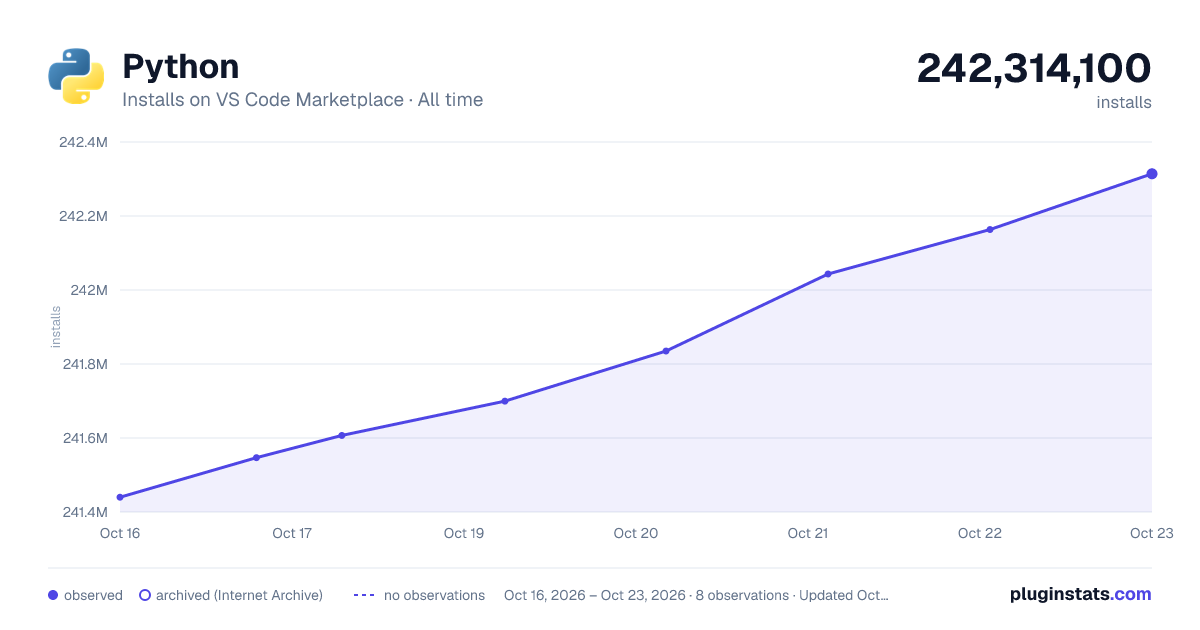

Adoption over time


7/30/90-day growth


Filled points are observed values; hollow points come from Internet Archive snapshots of the listing page. Dashed segments span periods with no observations — values between points are not interpolated.
Recent observations
Full history (3)Similar VS Code Marketplace Programming Languages plugins
Data source
Install counts, average rating, and rating counts come from the public Visual Studio Marketplace gallery API. Installs are cumulative and exclude updates.
Listing: https://marketplace.visualstudio.com/items?itemName=ms-python.python. First seen Oct 16, 2026; last successful collection Oct 18, 2026. See the methodology.