 PluginStats
Go to Next/Previous Member installs statistics
By Mishkin Faustini · VS Code Marketplace · Other
Visual Studio Code Extenion to navigate through the functions, variables, and classes using quick and easy keycommands similar to functionality provided by IntelliJ IDE's (next/previous function) or Resharper (next/previous member)
Go to Next/Previous Member has 107,247 recorded installs on VS Code Marketplace, a change of +0.1% over the past 7 days, ranking #2272 of 2,502 tracked listings.
Rating: 4.80 / 5 from 25 ratings
About Go to Next/Previous Member
vscode-goto-next-previous-member
Visual Studio Code Extension to navigate through the functions, variables, and classes using quick and easy keycommands similar to functionality provided by IntelliJ IDE's (next/previous function) or Resharper (next/previous member)
Features
This Extension provides two key commands to navigate up and down through the members in your file.

Requirements
- vscode@1.28.0+
- Works in both VS Code Desktop and code-server environments
Commands and Settings
Commands
This extension provides the following commands that can be used in keyboard shortcuts:
| Command | Description | Default Shortcut |
|---|---|---|
gotoNextPreviousMember.previousMember | Move To Previous Member | ctrl+up |
gotoNextPreviousMember.nextMember | Move To Next Member | ctrl+down |
You can customize these commands in your keybindings.json to target specific symbol types. For example:
{
    "key": "ctrl+shift+up",
    "command": "gotoNextPreviousMember.previousMember",
    "args": ["function", "method"]
}
Settings
This extension provides the following settings that can be configured in your settings.json:
-
gotoNextPreviousMember.symbolKinds(default:[]- all symbols included)- An array of symbol types to include when navigating
- When empty or not set, all symbol types are included
- Example setting:
{
    "gotoNextPreviousMember.symbolKinds": ["function", "class", "method"]
}
Available symbol types:
Symbol Kind "array" "boolean" "class" "constant" "constructor" "enum" "enummember" "event" "field" "file" "function" "interface" "key" "method" "module" "namespace" "null" "number" "object" "operator" "package" "property" "string" "struct" "typeparameter" "variable" -
gotoNextPreviousMember.selectEntireSymbol(default:false)- Determines whether to select the entire symbol when navigating
- Example setting:
{ "gotoNextPreviousMember.selectEntireSymbol": true }- When
true: The entire symbol will be selected when navigating - When
false: Only the cursor will be moved to the start of the symbol
-
gotoNextPreviousMember.symbolPosition(default:"center")- Controls where the symbol appears in the viewport when navigating
- Possible values:
"top": Position the symbol at the top of the viewport"center": Position the symbol in the center of the viewport"bottom": Position the symbol at the bottom of the viewport
- Example setting:
{
    "gotoNextPreviousMember.symbolPosition": "top"
}
Language Support
For the outline to work, the language support plugins need to support symbol information.
For the outline to form a tree structure, the language support plugins need to report the entire definition range as part of symbol.
See VS Code [issue #34968](https://github.com/Microsoft/vscode/issues/34968) and language server protocol [issue #132](https://github.com/Microsoft/language-server-protocol/issues/132) for a discussion.
Here is a list of languages known to work with Code Outline:
| Language/Format | Extension |
|---|---|
| C | C/C++ |
| C++ | C/C++, cquery |
| Docker | Docker |
| HTML | Comes with VS Code |
| JavaScript | Comes with VS Code |
| JSON | Comes with VS Code |
| Markdown | Comes with VS Code |
| ruby | Ruby Symbols |
| Perl | Perl |
| PHP | PHP Symbols |
| Python | Python |
| TypeScript | Comes with VS Code |
| YAML | YAML Support by Red Hat |
Please report any missing extensions and I'll update the list.
Known Issues
If you are experiencing no movement upon running the command:
I have observed an issue with the Visual Studio API to return symbols from vscode.executeDocumentSymbolProvider. One way I have found to possibly fix the issue is to disable all extensions, restart Visual Studio and then enable all extensions and restart again.
Possible Related Issue: https://github.com/OmniSharp/omnisharp-vscode/issues/2192
Release Notes
See CHANGELOG.md
More Visual Studio Code Extensions by mishkinf
Visual Studio Code Navigate Edits History - Goto Last Edit…
Description from the VS Code Marketplace listing.
- keybindings
README badge
Show your rank in a README or on your website. The badge updates automatically.
Charts
Images: 30d · 1y · all time · 1600×900 dark


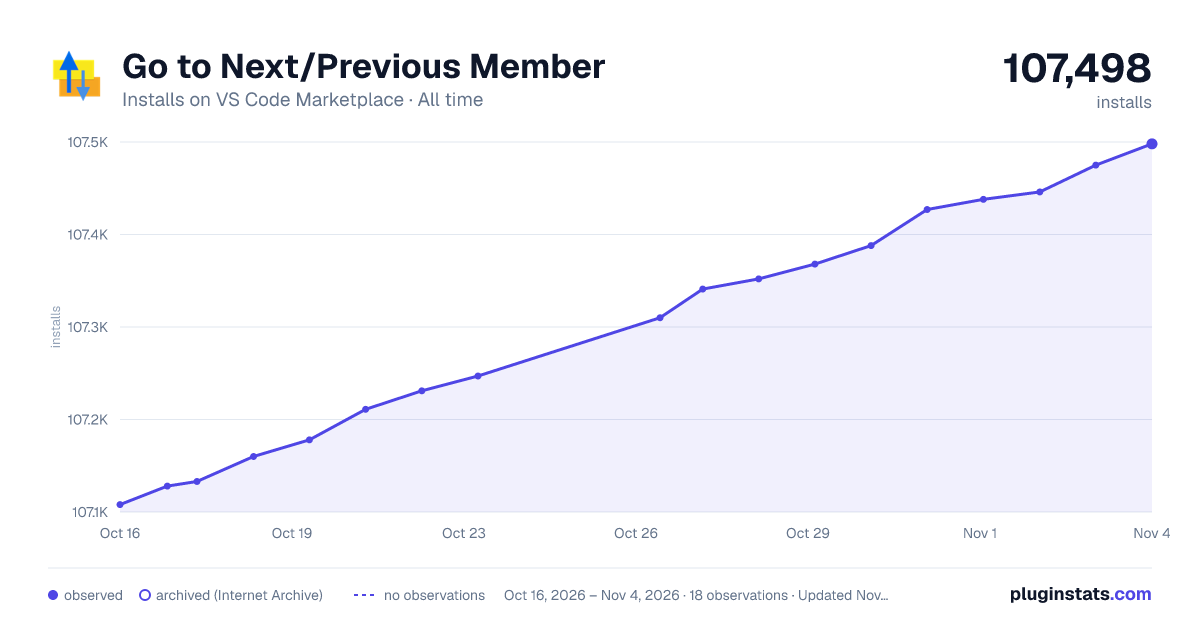

Adoption over time
7/30/90-day growth
Ranking history
Ratings over time
Listing placement
Listing placement
Filled points are observed values; hollow points come from Internet Archive snapshots of the listing page. Dashed segments span periods with no observations — values between points are not interpolated.
Each band is one page of 20. Installs on a linear scale. Placement is projected from installs, so it can differ from the marketplace's own sort order. Hover a dot to see the listing.
Recent observations
Full history (8)Similar VS Code Marketplace Other plugins
All 20 Go to Next/Previous Member alternativesData source
Install counts, average rating, and rating counts come from the public Visual Studio Marketplace gallery API. Installs are cumulative and exclude updates.
Listing: https://marketplace.visualstudio.com/items?itemName=mishkinf.goto-next-previous-member. First seen Oct 16, 2026; last successful collection Oct 23, 2026. See the methodology.