 PluginStats
OpenAPI (Swagger) Editor installs statistics
By 42Crunch (3 listings) · VS Code Marketplace · Programming Languages
OpenAPI creation, editing and preview, as well as static and dynamic API security testing. Identifies OWASP API vulnerabilities in both the design and implementation of the API
OpenAPI (Swagger) Editor has 1,629,865 recorded installs on VS Code Marketplace.
It ranks #393 of 2,501 tracked VS Code Marketplace listings by installs.
It is rated 4.2 out of 5 from 44 ratings.
PluginStats has 4 daily observations since Oct 16, 2026; the latest is from Oct 19, 2026.
Rating: 4.18 / 5 from 44 ratings
About OpenAPI (Swagger) Editor
OpenAPI Editing with API Quality, Conformance and Security Testing
Manually create, import, navigate and edit OpenAPI contracts, along with using features such as Preview, functional "Try it" testing and IntelliSense. The plugin provides rich support for the OpenAPI Specification (OAS) / Swagger specification. The OpenAPI editor is free and does not require registration or have usage limits.
Additional 42Crunch tools are available in the OpenAPI Editor. These API security testing tools are provided primarily for our enterprise customers. We have also made these tools available on a limited free basis to all our OpenAPI editor users (free trial registration is required). The tools are as follows:
• API Contract Generator - Automatically generate OpenAPI contracts from your existing Postman Collections and HAR files • API Contract Audit - Check the quality, conformance and security of your OpenAPI contracts • API Scan - Scan your API for security vulnerabilities
OpenAPI Editing
The plugin supports code navigation, linting, SwaggerUI or ReDoc preview, IntelliSense, schema enforcement and generation, schema definition links and snippets. It also supports both OpenAPI v2 and v3.0.x in JSON or YAML format. QuickStart
• Creating OpenAPI files • Navigating an API definition • Add new elements • Use IntelliSense • Jump to a reference • Sort entries in the navigation pane • Preview OpenAPI documentation • Execute operations with "Try it" • Generate JSON schemas based on the response content • Configure authentication for external references in OpenAPI files • Split your OpenAPI into multiple files linked via $ref • Use quick fixes to automatically resolve problems in your OpenAPI • Use Code snippets to add paths, operations, components, security
API Contract Generator
Designed to reduce time spent by developers on repetitive manual tasks and improve the quality of OpenAPI documentation, this feature enables users to automatically generate OpenAPI contracts from your existing Postman Collections and HAR files (recorded web traffic to the API).
• Allows users to automatically generate API specifications from scratch • Streamlines the API design process • Helps maintain consistency across API definitions
To access the API Contract Generator, click on the 42C icon in the 42Crunch OpenAPI (Swagger) Editor in the IDE.
Activating API Audit
A static analysis that lets you check the quality, conformance (to the OpenAPI specification) and security of your API definition. Video explainer
• Running an audit • Navigating the issues in the audit report • Priority issues • Full issue list • Issues details • Fixing issues
Activating API Scan
A dynamic conformance and security tool that tests the API for conformance to the API definition and security vulnerabilities. The free version of API Scan runs locally in your own environment and does not require your API to be uploaded to the 42Crunch platform. Video explainer
• Conformance to the API Definition • Launching the Scan
The free version of API Scan runs locally in your own environment and requires no API file to be uploaded.
Free Trial
This service lets users of our OpenAPI editor extension, who are not customers, run API Contract Generator, API Audit and API Scan.
• Get a free trial token
Support and Documentation:
For tips-n-tricks and tutorial videos go here: https://42crunch.com/tutorials/
Quick start
After installing the plugin, open any JSON or YAML file that contains an OpenAPI definition. The plugin automatically detects that this is an OpenAPI file, and the /API button is shown in the left-hand panel.
We also encourage you to watch this video that gives you a full tour of the editor and its different features.
Editor features
This extension makes it easier and faster to navigate your OpenAPI definitions, especially when they get longer.
You can home in on elements in the OpenAPI explorer view, or jump directly to the target of a reference in the API. You can also add new elements to your API directly in the OpenAPI explorer directly where they are needed. Filling in the details is quicker with IntelliSense support for OpenAPI elements.
Creating OpenAPI files
1. Press Ctrl+Shift+P on Windows or Linux, or Cmd+Shift+P on a Mac. 2. In the command prompt, start typing new openapi, and click the corresponding command to create either an OAS v2 or v3 template file. 3. Use the OpenAPI explorer to populate the template with new paths and other elements as needed. 4. Save the file to your disk to fully enable IntelliSense.
Watch this video on editor basics.
Navigating an API definition
1. Open an OpenAPI file. 2. Click the OpenAPI button to switch to the OpenAPI explorer view. 3. Expand the sections and elements in the file as needed, and click the ones you want to jump to in the editor.
Add new elements in the OpenAPI explorer
1. In OpenAPI explorer pane, go to the section where you want to add a new element and right-click on the relevant node to open a context menu. 2. Click the item you want to add from the list.
Use IntelliSense
As you start typing OpenAPI elements or their values, the context-sensitive list of available options is displayed in the IntelliSense menu. In JSON OpenAPI files, just type double-quote (") to show the menu, and type further to filter the list. In YAML OpenAPI files, start typing the property name.
You can also use the corresponding VS Code hotkey (Ctrl+Space on Windows, Cmd+Space on Mac) to open the IntelliSense menu.
Jump to a reference
Use Go to Definition to locate the targets of references easily. To jump to view the definition from a reference in your API, either Ctrl+click a reference, or right-click a reference and click Go to Definition in the shortcut menu.
Sort entries in the navigation pane…
Description from the VS Code Marketplace listing.
- api
- api testing
- audit
- json
- keybindings
- openapi
- scan
- security
- swagger
- vulnerability
- yaml
Where OpenAPI (Swagger) Editor sits in the listing
Each band is one page of 20. Installs on a log scale. Placement is projected from installs, so it can differ from the marketplace's own sort order. Hover a dot to see the listing.


Charts
Images: 30d · 1y · all time · 1600×900 dark


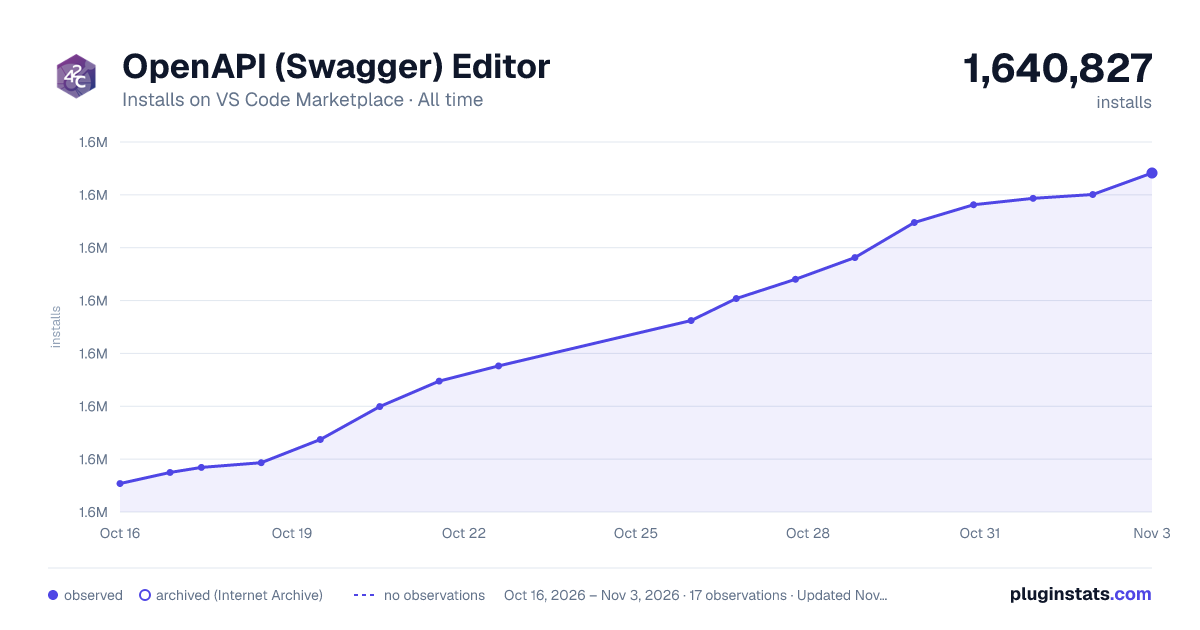

Adoption over time


7/30/90-day growth


Ranking history


Filled points are observed values; hollow points come from Internet Archive snapshots of the listing page. Dashed segments span periods with no observations — values between points are not interpolated.
Recent observations
Full history (4)Similar VS Code Marketplace Programming Languages plugins
Data source
Install counts, average rating, and rating counts come from the public Visual Studio Marketplace gallery API. Installs are cumulative and exclude updates.
Listing: https://marketplace.visualstudio.com/items?itemName=42Crunch.vscode-openapi. First seen Oct 16, 2026; last successful collection Oct 19, 2026. See the methodology.