 PluginStats
Java IDE installs statistics
By JavaHub · VS Code Marketplace · Programming Languages
To make the vscode work as Eclipse or IDEA when you are coding in java.
Java IDE has 687,511 recorded installs on VS Code Marketplace, ranking #694 of 2,501 tracked listings.
Rating: 2.80 / 5 from 5 ratings
About Java IDE
Saber for VS Code [中文]
This extension includes many useful utilities for Java. To make the vscode work as Eclipse or IDEA when you are coding in java. These functions are implemented by parsing strings in java files. Therefore, your codes should best meet the specification of java. If you have some good ideas, you can submit a feature suggestion here.
Overview
It makes users coding in java more efficient. Here`s a list of features: • New: Java files(annotation/class/interface/enum/package/JSP/HTML) • Generate Getters and Getters • Copy Qualified Name • Sort Project By Name • Run Maven Goals • Generate Docs
Some features ready to do: • Rename Java File
Requirements
• JDK (version 1.8.0 or later) • VS Code (version 1.19.0 or later)
Install
• Install from the Marketplace, you can find it by typing: "vscode-java-saber" "Java IDE"
How To Use
New
• Method 1: Right click on a java file or a directory in the explorer • Method 2: You must open a java file in text editor => ctrl + shift + p => type: java new
It will create a java file in the same directory of the opened file.
Generate Getters and Setters
Known issue: When the inner class is defined in the class, there will be problems with generating getters and setters • Method 1: Right click on the opened java file in the editor • Method 2: You must open a java file in text editor => ctrl + shift + p => type: getter setter • Method 3: Use keyboard shortcut 'alt + insert'
Copy Qualified Name
• Method 1: Right click on the opened java file in the explorer • Method 2: You must open a java file in text editor => ctrl + shift + p => type: copy qualified name • Method 3: Right click on the opened java file in the editor
Sort Project By Name
Edit the config "ide.projectAutoSort" to true, it will auto sort projects by name when adding a project to the workspace, default is false
• Method 1: Right click on the project explorer • Method 2: ctrl + shift + p => type: Sort Project By Name
Run Maven Goals
Edit the config "ide.mavenDefaultGoals" to what you like, default is "clean install -Dmaven.test.skip=true" and "clean install"
• Method 1: Right click on a pom.xml file
Generate Docs
• Method 1: 1. Select the codes you want to generate java docs as below
- Then right click on the opened java file in the editor or use keyboard shortcut 'alt + i'
Feedback and Questions
You can find the full list of issues at Issue Tracker. You can submit a bug or feature suggestion.
License
Dual-licensed under BSD 2-Clause License and GPLv2 with the Classpath Exception.
This extention is included into "Java IDE Pack" extention pack.
Description from the VS Code Marketplace listing.
- copy qualified name
- execute maven goals
- generate getter setter
- generate java docs
- java
- keybindings
- new files or package
- sort projects
README badge
Show your rank in a README or on your website. The badge updates automatically.
Charts
Images: 30d · 1y · all time · 1600×900 dark


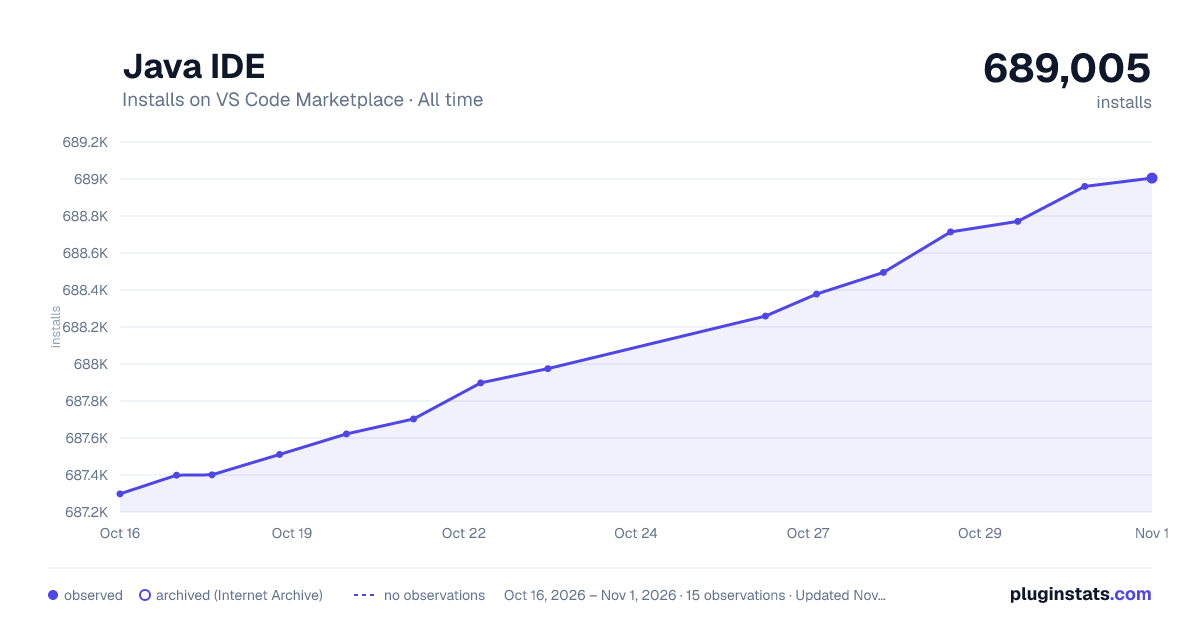

Adoption over time
7/30/90-day growth
Ranking history
Ratings over time
Listing placement
Listing placement
Filled points are observed values; hollow points come from Internet Archive snapshots of the listing page. Dashed segments span periods with no observations — values between points are not interpolated.
Each band is one page of 20. Installs on a linear scale. Placement is projected from installs, so it can differ from the marketplace's own sort order. Hover a dot to see the listing.
Recent observations
Full history (4)Similar VS Code Marketplace Programming Languages plugins
All 20 Java IDE alternativesData source
Install counts, average rating, and rating counts come from the public Visual Studio Marketplace gallery API. Installs are cumulative and exclude updates.
Listing: https://marketplace.visualstudio.com/items?itemName=YouMayCallMeV.vscode-java-saber. First seen Oct 16, 2026; last successful collection Oct 19, 2026. See the methodology.