 PluginStats
Gcov Viewer installs statistics
By Jacques Lucke (2 listings) · VS Code Marketplace · Other
Decorate C/C++ source files with code coverage information generated by gcov.
Gcov Viewer has 133,410 recorded installs on VS Code Marketplace, ranking #2002 of 2,502 tracked listings.
Rating: 5.00 / 5 from 10 ratings
About Gcov Viewer
Gcov Viewer
Gcov is a tool you can use in conjunction with GCC to test code coverage in your programs. This extension visualizes the output of gcov in Visual Studio Code. It allows you to see which lines of the program have been executed and how often.
Usage
- Compile your code with
gcc/g++(version >= 9) with--coverageand without optimizations. - Run your program or tests.
- Open a source file in vscode and use
ctrl+shift+Pto run theGcov Viewer: Showcommand.
During compilation, gcc will generate a .gcno file next to every .o file. When you run the program, it will create .gcda files in the same location. Those contain information about how often functions and lines have been executed.
This vscode extension uses the gcov program to parse these additional files and displays the information on top of your source files. For this to work, it has to find the generated .gcda for a given project. Those are usually in your build directory. If the extension does not find them on its own, you have to edit the gcovViewer.buildDirectories setting of your workspace folder. The most convenient way to do this is to use the Gcov Viewer: Select Build Directory command.
Troubleshooting
- Try passing
-fprofile-abs-pathto gcc. This helps the extension to match source files with their corresponding coverage data.
Known Issues
- Sometimes lines are counted more than once when they do more than one thing. That might be confusing in some cases. Usually it is quite easy to get the correct number by looking at neighboring lines.
- When the
Highlight Missed Linessetting is enabled, some missed lines might not be marked as such.
Limitations
- Only works with version 9 or higher of
gcc,g++andgcov. If you have multiple versions ofgcov, you might have to change theGcov Binarysetting.
Screenshots


Description from the VS Code Marketplace listing.
- c++
README badge
Show your rank in a README or on your website. The badge updates automatically.
Charts
Images: 30d · 1y · all time · 1600×900 dark


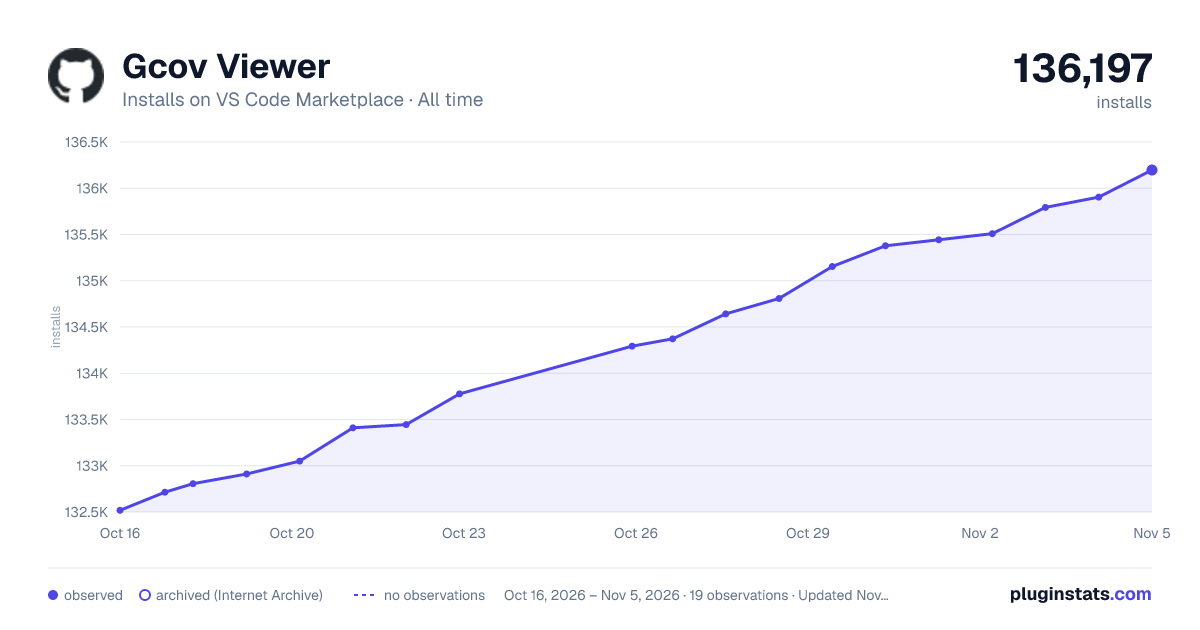

Adoption over time
7/30/90-day growth
Ranking history
Ratings over time
Listing placement
Listing placement
Filled points are observed values; hollow points come from Internet Archive snapshots of the listing page. Dashed segments span periods with no observations — values between points are not interpolated.
Each band is one page of 20. Installs on a linear scale. Placement is projected from installs, so it can differ from the marketplace's own sort order. Hover a dot to see the listing.
Recent observations
Full history (6)Similar VS Code Marketplace Other plugins
All 20 Gcov Viewer alternativesData source
Install counts, average rating, and rating counts come from the public Visual Studio Marketplace gallery API. Installs are cumulative and exclude updates.
Listing: https://marketplace.visualstudio.com/items?itemName=JacquesLucke.gcov-viewer. First seen Oct 16, 2026; last successful collection Oct 21, 2026. See the methodology.