 PluginStats
Markdown Extended installs statistics
By jebbs (2 listings) · VS Code Marketplace · Other
Extended syntaxes to built-in markdown & What you see is what you get exporter.
Markdown Extended has 151,148 recorded installs on VS Code Marketplace.
It ranks #1842 of 2,501 tracked VS Code Marketplace listings by installs.
It is rated 4.9 out of 5 from 14 ratings.
PluginStats has 4 daily observations since Oct 16, 2026; the latest is from Oct 19, 2026.
Rating: 4.86 / 5 from 14 ratings
About Markdown Extended
Markdown Extended Readme
Markdown Extended is an extension extends syntaxes and abilities to VSCode built-in markdown function.
Markdown Extended includes lots of editing helpers and a what you see is what you get exporter, which means export files are consistent to what you see in markdown preview, even it contains syntaxes and styles contributed by other plugins.
Features
• Exporter (View Detail) • Export to Self Contained HTML / PDF / PNG / JPEG • Export current document / workspace • Copy exported HTML to clipboard • Editing Helpers (View Detail): • Paste, format table. • Add, delete and move table columns & rows. • Toggle various formates, eg.: bold, italics, underline, strikethrough, code inline, code block, block quote, superscript, subscript, unordered list, ordered list. • Extended Language Features (View Detail): • Admonition (built-in), View Document • Enhanced Anchor Link (built-in), View Document • markdown-it-table-of-contents • markdown-it-footnote • markdown-it-abbr • markdown-it-deflist • markdown-it-sup • markdown-it-sub • markdown-it-checkbox • markdown-it-attrs • markdown-it-kbd • markdown-it-underline • markdown-it-multimd-table • markdown-it-emoji • markdown-it-html5-embed • markdown-it-toc • markdown-it-container • markdown-it-mark
Post an issue on [GitHub][issues] if you want other plugins.
Disable Plugins
To disable integrated plugins, put their names separated with ,:
Available names: toc, container, admonition, footnote, abbr, sup, sub, checkbox, attrs, kbd, underline, mark, deflist, emoji, multimd-table, html5-embed
Q: Why You Don't Integrate Some Plugin?
The extension works with other markdown plugin extensions (those who contribute to built-in Markdown engine) well, Both Preview and Export. Like: • Markdown Preview Github Styling • Markdown+Math • Markdown Preview Mermaid Support
The extension does not tend to do all the work, so just use them, those plugins could be deeper developed, with better experience.
Exporter
Find in command palette, or right click on an editor / workspace folder, and execute:
• Markdown: Export to File • Markdown: Export Markdown to File
The export files are organized in out directory in the root of workspace folder by default.
Export Configurations
You can configure exporting for multiple documents with user settings.
Further, you can add per-file settings inside markdown to override user settings, it has the highest priority:
See all available settings for puppeteer.pdf, and puppeteer.image
Helpers
Editing Helpers and Keys
Inspired by joshbax.mdhelper, but totally new implements.
Default Keyboard Shortcut bindings are removed due to conflict issues on platforms, please consider:
• Switch to use command palette • Switch to use Snippets • Setup key bindings on your own
| Command | Keyboard Shortcut |
| Format: Toggle Bold | ~~Ctrl+B~~ | | Format: Toggle Italics | ~~Ctrl+I~~ | | Format: Toggle Underline | ~~Ctrl+U~~ | | Format: Toggle Mark | ~~Ctrl+M~~ | | Format: Toggle Strikethrough | ~~Alt+S~~ | | Format: Toggle Code Inline | ~~Alt+`~~ | | Format: Toggle Code Block | ~~Alt+Shift+`~~ | | Format: Toggle Block Quote | ~~Ctrl+Shift+Q~~ | | Format: Toggle Superscript | ~~Ctrl+Shift+U~~ | | Format: Toggle Subscript | ~~Ctrl+Shift+L~~ | | Format: Toggle Unordered List | ~~Ctrl+L, Ctrl+U~~ | | Format: Toggle Ordered List | ~~Ctrl+L, Ctrl+O~~ | | Table: Paste as Table | ~~Ctrl+Shift+T, Ctrl+Shift+P~~ | | Table: Format Table | ~~Ctrl+Shift+T, Ctrl+Shift+F~~ | | Table: Add Columns to Left | ~~Ctrl+Shift+T, Ctrl+Shift+L~~ | | Table: Add Columns to Right | ~~Ctrl+Shift+T, Ctrl+Shift+R~~ | | Table: Add Rows Above | ~~Ctrl+Shift+T, Ctrl+Shift+A~~ | | Table: Add Row Below | ~~Ctrl+Shift+T, Ctrl+Shift+B~~ | | Table: Move Columns Left | ~~Ctrl+Shift+T Ctrl+Shift+Left~~ | | Table: Move Columns Right | ~~Ctrl+Shift+T Ctrl+Shift+Right~~ | | Table: Delete Rows | ~~Ctrl+Shift+D, Ctrl+Shift+R~~ | | Table: Delete Columns | ~~Ctrl+Shift+D, Ctrl+Shift+C~~ |
Looking for Move Rows Up / Down? You can use vscode built-in Move Line Up / Down, shortcuts are alt+↑ and alt+↓
Snippets
| Index | Prefix | Context | View |
| 0 | underline | _under_ line | _under_ line | | 1 | mark | ==mark== | ==mark== | | 2 | subscript | ~sub~script | ~sub~script | | 3 | superscript | ^super^script | ^super^script | | 4 | checkbox | [] checkbox | [ ] checkbox | | 4 | tasklist | - [] task | [ ] tasklist | | 5 | table | Markdown | Table | | 6 | kbd | Keyboard | Keyboard | | 7 | admonition note | !!! warn text | addmonition | | 8 | footnote | [^abc] [^abc]: ABC | footnote | | 9 | container | markdown | container | | 10 | abbr | *[ABBR]: Abbreviation | abbr | | 11 | attr | attr{style="color:red"} | attr{style="color:red"} | | 12 | color | color red | color red |
Table Editing
Move columns key bindings has been changed to ctrl+shift+t ctrl+shift+left/right, due to #57, #68
Paste as Markdown Table
Copy a table from Excel, Web and other applications which support the format of Comma-Separated Values (CSV), then run the command Paste as Markdown Table, you will get the markdown table.
Export & Copy
Extended Syntaxes
Admonition
Inspired by MkDocs
Nesting supported (by indent) admonition, the following shows a danger admonition nested by a note admonition.
Removing Admonition Title
Supported Qualifiers
note | summary, abstract, tldr | info, todo | tip, hint | success, check, done | question, help, faq | warning, attention, caution | failure, fail, missing | danger, error, bug | example, snippet | quote, cite
See also: Python-Markdown Documentation for Admonitions
markdown-it-table-of-contents
[[TOC]]
• Markdown Extended Readme • Features • Requirements • Demos
markdown-it-footnote
Here is a footnote reference,[^1] and another.[^longnote]
Here is a footnote reference,[1] and another.[2]
markdown-it-abbr
*[HTML]: Hyper Text Markup Language *[W3C]: World Wide Web Consortium The HTML specification is maintained by the W3C.…
Description from the VS Code Marketplace listing.
- markdown
- snippet
Where Markdown Extended sits in the listing
Each band is one page of 20. Installs on a log scale. Placement is projected from installs, so it can differ from the marketplace's own sort order. Hover a dot to see the listing.


Charts
Images: 30d · 1y · all time · 1600×900 dark


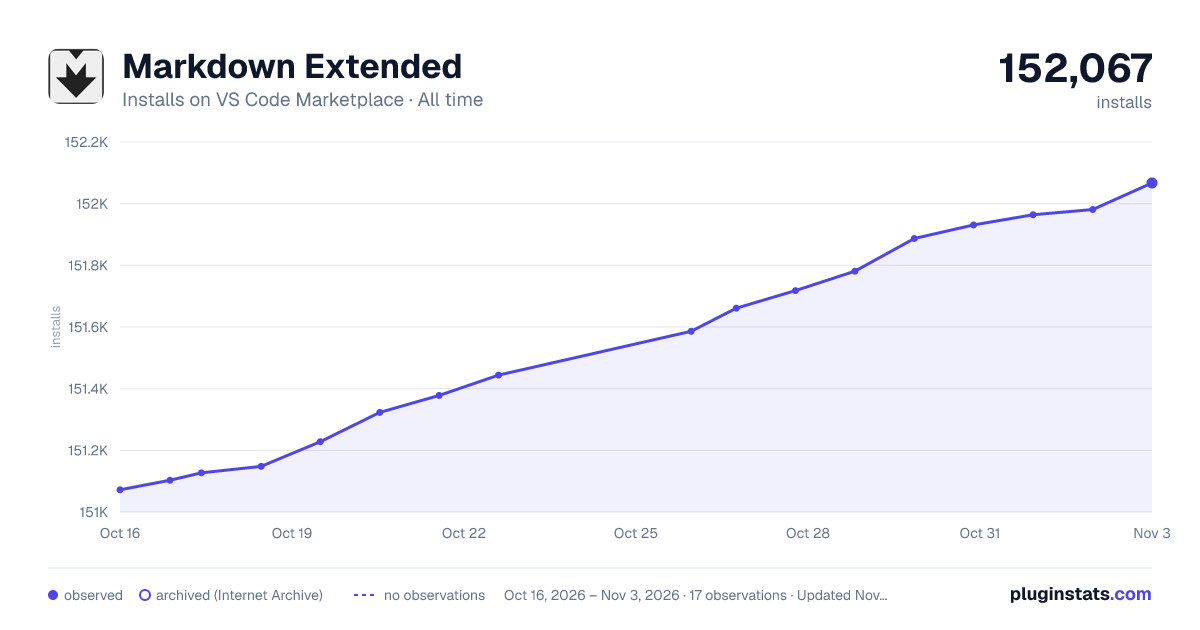

Adoption over time


7/30/90-day growth


Ranking history


Filled points are observed values; hollow points come from Internet Archive snapshots of the listing page. Dashed segments span periods with no observations — values between points are not interpolated.
Recent observations
Full history (4)Similar VS Code Marketplace Other plugins
Data source
Install counts, average rating, and rating counts come from the public Visual Studio Marketplace gallery API. Installs are cumulative and exclude updates.
Listing: https://marketplace.visualstudio.com/items?itemName=jebbs.markdown-extended. First seen Oct 16, 2026; last successful collection Oct 19, 2026. See the methodology.