 PluginStats
Markdown Image installs statistics
By Hancel.Lin (2 listings) · VS Code Marketplace · Other
Easy to insert a image to markdown
Markdown Image has 148,475 recorded installs on VS Code Marketplace, ranking #1872 of 2,501 tracked listings.
Rating: 5.00 / 5 from 30 ratings
About Markdown Image
English Readme / 简体中文说明 / 繁體中文說明 / 日本語説明
Markdown Image
An extension for conveniently inserting pictures in Markdown, which supports storing pictures in local or third-party CDN service.
❤ Sponsor me / 赞助开发者
Features
- Copy image files or paste screenshots, Shortcut key
Alt + Shift + V, or right-click menuPaste Image. - Automatically generate Markdown code insertion.
- Configurable to support
Imgur,Qiniu,S.EE,Cloudflare,Cloudinary,S3,Azure Storageand other CDN service. The default is local, you need to open the folder where the Markdown file is located. - You can also customize the code to upload pictures.
- Support Windows, MacOS, Linux.
Requirements
Linux users must install xclip.
Ubuntu
sudo apt install xclip
CentOS
sudo yum install epel-release.noarch
sudo yum install xclip
Notice
If you want to use in the Remote Mode, please set remote.extensionKind like this:
"remote.extensionKind": {
  "hancel.markdown-image": [
    "ui"
  ]
}
And if you want to save image in your remote workplace, you must use SFTP upload method. Local couldn't use in Remote Mode.
Extension Settings
Base Settings
markdown-image.base.uploadMethod: Method to upload pictures. To the local or another picture CDN service.markdown-image.base.uploadMethods: The upload method for parallel upload. The upload results of the upload method set here will not be inserted into the Markdown file.markdown-image.base.fileNameFormat: The filename format for upload. Not Support inImgurandS.EE. You can use some variables. You can find more in setting.markdown-image.base.codeType: The type of image code, you can set to<img>tag or markdownmarkdown-image.base.codeFormat: Insert code format, effective whenmarkdown-image.base.codeTypeis set toDIY.markdown-image.base.imageWidth: The maximum width of the image, if the image is greater than this width, the width is set to this value. Set to 0 means not change.markdown-image.base.urlEncode: Whether URL encode for the url of image.
Local Settings
markdown-image.local.path: Picture storage directory that in the local (automatically created if it does not exist).markdown-image.local.referencePath: The reference path format in markdown(not include file name). Empty means use relative path. You can use variable of#markdown-image.base.fileNameFormat#in here. For example:/images/${YY}-${MM}/
GitHub Settings
markdown-image.github.path: Picture upload directory that in the repository (automatically created if it does not exist). The repository must initialization first.markdown-image.github.token: GitHub person access token.markdown-image.github.repository: GitHub repository, for example:https://github.com/username/repositorymarkdown-image.github.branch: GitHub repository branch to save.markdown-image.github.cdn: The github cdn address format to be used,${username}is the username ofmarkdown-image.github.repository, and${repository}is the repository name.${branch}is the value ofmarkdown-image.github.branch.${filepath}is the upload path in repository.markdown-image.github.httpProxy: Connect to Github via http proxy.
Imgur Settings
markdown-image.imgur.clientId: The client id registered with imgur. You can registed it at here.markdown-image.imgur.httpProxy: Connect to Imgur via http proxy.
S.EE Settings
markdown-image.s_ee.token: S.EE API token (Options). You can register an account and then visit API Token Page to generate secret token.
Qiniu Settings
markdown-image.qiniu.accessKey: The Access Key of account.markdown-image.qiniu.secretKey: The Secret Key of account.markdown-image.qiniu.bucket: The storage name.markdown-image.qiniu.domain: Bound domain name of storage.markdown-image.qiniu.zone: Zone of storage.
Upyun Settings
markdown-image.upyun.bucket: Storge name of upload.markdown-image.upyun.domain: Domain bind with storge name.markdown-image.upyun.operator: Operator of upyun.markdown-image.upyun.password: Password of upyun operator.markdown-image.upyun.path: The path that img store.markdown-image.upyun.link: The link that connect to upyun.
Cloudinary Settings
These values can be found on your Cloudinary Dashboard
markdown-image.cloudinary.cloudName: Your user account name.markdown-image.cloudinary.apiKey: API key for your account.markdown-image.cloudinary.apiSecret: API secret for your account.markdown-image.cloudinary.folder: Folder to upload the image to.
Cloudflare Settings
These values can be found on your Cloudflare dashboard
markdown-image.cloudflare.accountId: Your account ID.markdown-image.cloudflare.apiToken: Cloudflare Images API token.
S3 Settings
These values can be found in your S3 service provider dashboard…
Description from the VS Code Marketplace listing.
- cdn
- helper
- imgur
- keybindings
- markdown
- Picture
- sm.ms
- 七牛
README badge
Show your rank in a README or on your website. The badge updates automatically.
Charts
Images: 30d · 1y · all time · 1600×900 dark


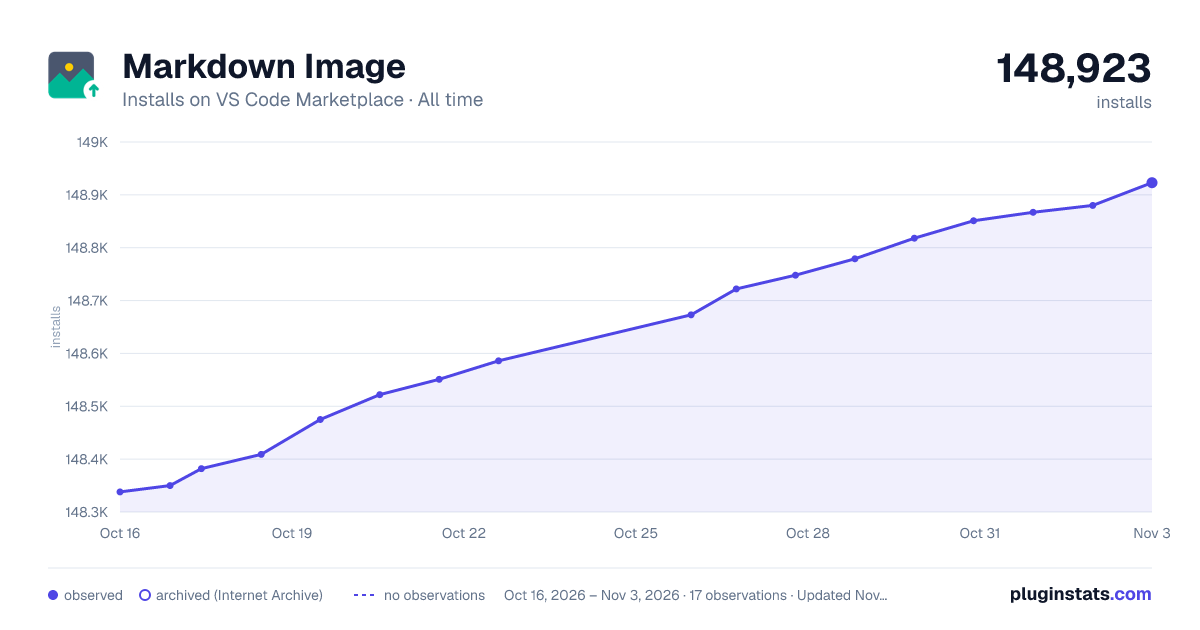

Adoption over time
7/30/90-day growth
Ranking history
Ratings over time
Listing placement
Listing placement
Filled points are observed values; hollow points come from Internet Archive snapshots of the listing page. Dashed segments span periods with no observations — values between points are not interpolated.
Each band is one page of 20. Installs on a linear scale. Placement is projected from installs, so it can differ from the marketplace's own sort order. Hover a dot to see the listing.
Recent observations
Full history (5)Similar VS Code Marketplace Other plugins
All 20 Markdown Image alternativesData source
Install counts, average rating, and rating counts come from the public Visual Studio Marketplace gallery API. Installs are cumulative and exclude updates.
Listing: https://marketplace.visualstudio.com/items?itemName=hancel.markdown-image. First seen Oct 16, 2026; last successful collection Oct 20, 2026. See the methodology.