 PluginStats
Angular Files installs statistics
By Alexander Ivanichev · VS Code Marketplace · Programming Languages
Quickly scaffold angular file templates
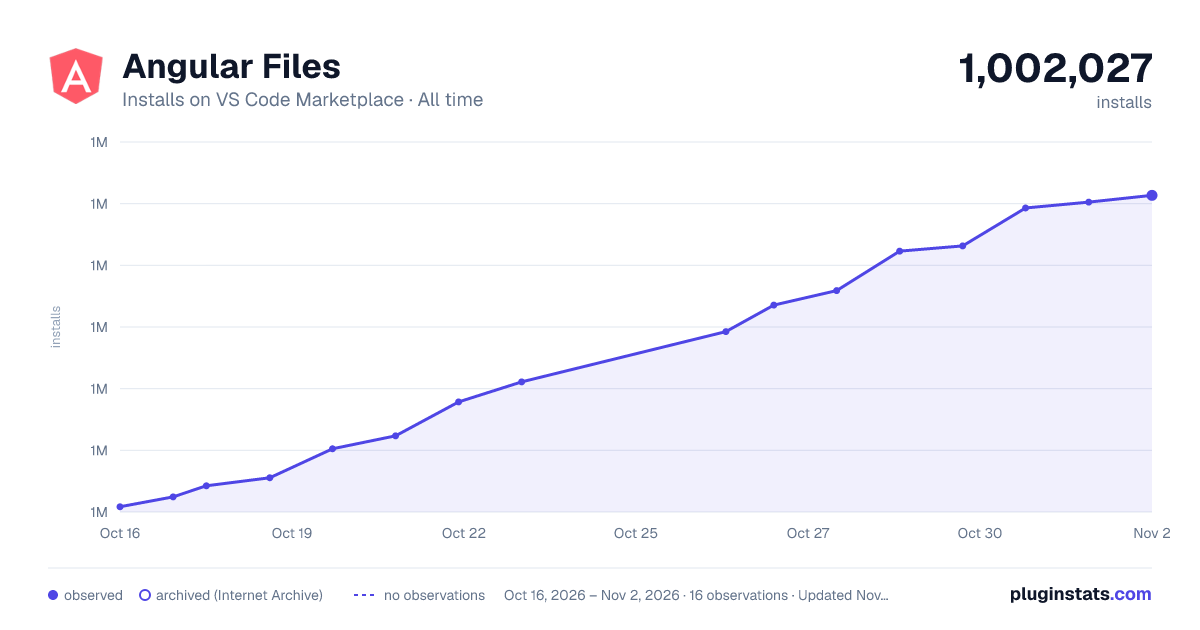
Angular Files has 1,001,111 recorded installs on VS Code Marketplace.
It ranks #538 of 2,501 tracked VS Code Marketplace listings by installs.
It is rated 3.9 out of 5 from 22 ratings.
PluginStats has 4 daily observations since Oct 16, 2026; the latest is from Oct 19, 2026.
Rating: 3.86 / 5 from 22 ratings
About Angular Files
VS Code Angular Files
This extension allows quickly scaffold angular 2 file templates in VS Code project.
Inspired by angular-cli (https://github.com/angular/angular-cli)
Changelog
1.6.4
• Fixed issues with module imports • Fixed issues with comments while imporing in module • Fixed issues with style extensions
1.6.2
• Fixed issue with module import
1.6.1
• Fix module declaration and exports automatic import • Fix small issue with empty default values • Change module finding logic to ignore module name • Default options improvements
1.6.0
You can now leverage angular-cli resource generation options without remembering their names, while keeping things simple and fast!
• "my-component -o" - Use "-o" flag to specify which options to override • "my-component --inline-style -t" - Specify resource generation options without invoking options window • "my-component --inline-style --prefix dsdds -o" - Use both modes together
Angular Files will automatically scan you angular.json to determine which default options you have already set and will let you to override them while displaying the current values
1.5.2
• Support generating module with routing praram eg. "my-module --routing" similar to "ng g module my-module --routing"
1.5.1
• Support global level angular.json config
1.5.0
• Support angular 6 new service template
1.4.9
• Fix angular.json (angular 6) schema parsing issues
1.4.7
• Fix issue reading angular.json component prefix
1.4.6
• Added support for angular.json (both schemas of .angular-cli.json and angular.json are supported)
1.4.5
• Added configuration to hide some menu names, thanks to roknow for contribution!
1.4.4
• Fix issue finding .angular-cli.json file in multi root projects
1.4.3
• Fix naming issue that prevent extension to work on linux distributions
1.4.2
• Reduced extension size
1.4.1
• Fix issue generating non flat service
1.4.0
• Fix trailing commas issue
1.3.10
• Fix .angular-cli.json was automatically included in every non cli project • Fix add module declarations to *.module.ts instead of *.module.js
1.3.9
• Multiple enhancements and performance improvements • Added support for .angular-cli.json flexible file generation
1.3.8
• Fixed support for custom app structure
1.3.7
• It's just angular • Module style ext fix - thanks to Sam Lin
1.3.6
• Fix incorrect extension in component generation
1.3.5
• CPU usage improvements
1.3.4
• Support for non angular-cli file-structure, code should reside in 'app' folder by default • Fixed import declarations to incorrect module • Added route class generat template
1.3.2
• Angular-Files now supports angular-cli.json and you can use custom prefixes, different style extensions. • Note: if you not using angular-cli it is possible to add angular-cli.json to customize file generatiion.
1.3.1
• Fixed serivces was incorrectly imported to module declarations
1.3.0
• Fixed import declarations to closest module
1.1.0
• angular-cli removed due to slowness • app.module added automatic import of dependencies
1.0.0
• Integrated angular-cli for file generation
Features
Right click on a file or a folder in your current project. You can find multiple options been added to the context menu:
Menu Options |
New Component | New Directive | New Pipe | New Service | New Module |
Menu Options |
New Class | New Interface | New Enum |
** Override default configuration like app prefix and style: ** Create a angular-cli.json (can be used without angular-cli):
The naming of the files as well as the (boilerplate) snippets are based on the official Angular Style Guide
Installation
1. Install Visual Studio Code 1.5.0 or higher 2. Launch Code 3. From the command palette Ctrl-Shift-P (Windows, Linux) or Cmd-Shift-P (OSX) 4. Select Install Extension 5. Type angular files and press enter 6. Reload Visual Studio Code
Disclaimer
Important: This extension due to the nature of it's purpose will create files on your hard drive and if necessary create the respective folder structure. While it should not override any files during this process, I'm not giving any guarantees or take any responsibility in case of lost data.
License
MIT
Description from the VS Code Marketplace listing.
- angular
- Angular 2
- angular-cli
- javascript
- Templates
- TypeScript
Charts
Images: 30d · 1y · all time · 1600×900 dark



Adoption over time


7/30/90-day growth


Ranking history


Ratings over time


Listing placement


Listing placement


Filled points are observed values; hollow points come from Internet Archive snapshots of the listing page. Dashed segments span periods with no observations — values between points are not interpolated.
Each band is one page of 20. Installs on a log scale. Placement is projected from installs, so it can differ from the marketplace's own sort order. Hover a dot to see the listing.
Recent observations
Full history (4)Similar VS Code Marketplace Programming Languages plugins
All 20 Angular Files alternativesData source
Install counts, average rating, and rating counts come from the public Visual Studio Marketplace gallery API. Installs are cumulative and exclude updates.
Listing: https://marketplace.visualstudio.com/items?itemName=alexiv.vscode-angular2-files. First seen Oct 16, 2026; last successful collection Oct 19, 2026. See the methodology.