 PluginStats
Auto-Align installs statistics
By bladnman · VS Code Marketplace · Programming Languages
Align code on assignment characters.
Auto-Align has 114,320 recorded installs on VS Code Marketplace, ranking #2188 of 2,501 tracked listings.
Rating: 4.80 / 5 from 5 ratings
About Auto-Align
Auto-Align
This is an alignment utility that allows for a bit of customization. It will line up assignment operators (= and : by default) in selected text.
Features
Still working on it... I use it daily so it works, but always finding little things. Send me an issue on GitHub if you are looking for something or something doesn't work.
This system will not alter any lines where any of the non-moveable items are found to the left of a moveable item.
It is likely you will find scenarios where this does not quite fit your needs with advanced CSS selectors and the likes. You get to set the moveable and non-moveable in your personal settings file.
You can also define a minimum amount of space you want to see on the left of the moveable items. This is essentially the margin.
[BECOMES]
You get the idea. This can be done in any language format.
Extension Settings
This extension contributes the following settings:
Additional Lists
Use these settings to "add" to the default lists in the extension so that you don't have to repeat the whole original list.
| setting name | description |
| autoalign.moveableItemsAdditional | Items you want added to the default list of moveable items | autoalign.nonMoveableItemsAdditional | Items you want added to the default list of non-moveable items | autoalign.skipLinesEndingWithItemsAdditional | Lines to not be aligned if they end with these items
Properties
Some parameters to define how things lay out.
| setting name | description |
| autoalign.minSeparationLeft | Minimum amount of white-space placed before the aligned items | autoalign.separationRight | The number of spaces you want after the aligned item (e.g. spaces to the right of the equals) | autoalign.columnWidth | If this is > 1 then all alignments will be matched up to imaginary columns of this width
Default Lists
You can also override the original default list to be in complete control of all moveable and non-moveable items.
| setting name | description |
| autoalign.moveableItems | An array of strings of the items which can be moved and aligned | autoalign.nonMoveableItems | An array of string which cannot be moved and will prevent a line from being aligned | autoalign.skipLinesEndingWithItemsAdditional | An array of string which cannot be moved and will prevent a line from being aligned
Description from the VS Code Marketplace listing.
README badge
Show your rank in a README or on your website. The badge updates automatically.
Charts
Images: 30d · 1y · all time · 1600×900 dark


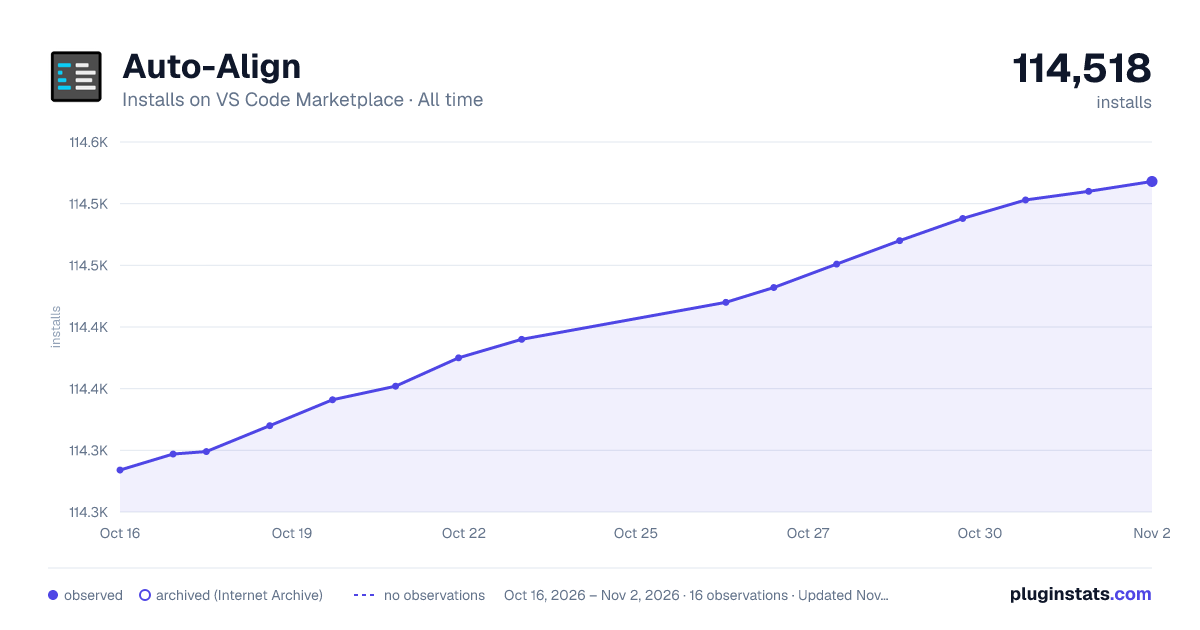

Adoption over time
7/30/90-day growth
Ranking history
Ratings over time
Listing placement
Listing placement
Listing placement
Filled points are observed values; hollow points come from Internet Archive snapshots of the listing page. Dashed segments span periods with no observations — values between points are not interpolated.
Each band is one page of 20. Installs on a linear scale. Placement is projected from installs, so it can differ from the marketplace's own sort order. Hover a dot to see the listing.
Recent observations
Full history (4)Similar VS Code Marketplace Programming Languages plugins
All 20 Auto-Align alternativesAuto-Align on other marketplaces
Data source
Install counts, average rating, and rating counts come from the public Visual Studio Marketplace gallery API. Installs are cumulative and exclude updates.
Listing: https://marketplace.visualstudio.com/items?itemName=bladnman.auto-align. First seen Oct 16, 2026; last successful collection Oct 19, 2026. See the methodology.