 PluginStats
XSLT/XPath for Visual Studio Code installs statistics
By DeltaXignia · VS Code Marketplace · Programming Languages
XSLT 3.0/4.0 and XPath 3.1/4.0 language support - linting, auto-completion, code documentation and Quick Run with Saxon
XSLT/XPath for Visual Studio Code has 142,230 recorded installs on VS Code Marketplace, ranking #1918 of 2,501 tracked listings.
Rating: 4.22 / 5 from 9 ratings
About XSLT/XPath for Visual Studio Code
<img src="https://github.com/DeltaXML/vscode-xslt-tokenizer/raw/HEAD/deltaxigniaLogoSmall.png">
XSLT/XPath for Visual Studio Code
The XSLT/XPath extension for VSCode provides comprehensive language support for XSLT 3.0 and XPath 3.1, and for the XSLT 4.0 and XPath 4.0 features implemented in Saxon 13. This ReadMe is merely a 'quick start' guide, see the XSLT/XPath User Guide for more comprehensive help.
<p align="center"> <em>XSLT 4.0 with a documentation note, its hover help where the function is called, and the XSLT Imports view:</em> <img alt="XSLT Editor" src="https://github.com/DeltaXML/vscode-xslt-tokenizer/raw/HEAD/vscode-xslt-notes.png"> </p>
Features
This release adds full support for XSLT 4.0 in Saxon 13 - see Release 2.0 Highlights.
<table> <tr> <td width="50%" valign="top"> <h4><a href="https://deltaxml.github.io/vscode-xslt-xpath/xslt40.html">XSLT & XPath languages</a></h4> <ul> <li><a href="https://www.w3.org/TR/xslt-30/">XSLT 3.0</a> and XPath 3.1</li> <li><a href="https://qt4cg.org/2026-01-28/xslt-40/Overview.html">XSLT 4.0</a> and XPath 4.0, as in <a href="https://www.saxonica.com/html/documentation13/changes/v13/xslt40.html">Saxon 13</a></li> <li>SaxonJS interactive extensions (IXSL)</li> <li><code>.xpath</code> files, as XPath 4.0</li> <li>Fast semantic highlighting</li> </ul> </td> <td width="50%" valign="top"> <h4><a href="https://deltaxml.github.io/vscode-xslt-xpath/xslt40-records.html">XSLT 4.0</a></h4> <ul> <li>Record and enum types, with type-aware checks</li> <li>Named item types: <code>xsl:item-type</code></li> <li><code>xsl:switch</code>, with missing-case quick fixes</li> <li>Keyword arguments and optional parameters</li> <li>Functions in no namespace</li> </ul> </td> </tr> <tr> <td width="50%" valign="top"> <h4><a href="https://deltaxml.github.io/vscode-xslt-xpath/editing-xslt.html#intellisense">Editing</a></h4> <ul> <li>Context-aware auto-completion, incl. node names</li> <li>Signature help and hover help</li> <li>Snippets, incl. new stylesheets for 3.0 and 4.0</li> <li>Formatting of instructions and multi-line XPath</li> <li>Rename symbol, across imported modules</li> <li>Semantic highlighting from a full XPath parser</li> </ul> </td> <td width="50%" valign="top"> <h4><a href="https://deltaxml.github.io/vscode-xslt-xpath/xslt40-notes.html">Code documentation</a></h4> <ul> <li><code>xsl:note</code> with Markdown and xqDoc-style tags</li> <li>Shown in hover and signature help</li> <li><code>@see</code> references, with navigation and rename</li> <li>Checks of <code>@param</code> and <code>@field</code> tags</li> <li>Module notes for stylesheets</li> <li>Highlighting and auto completion for tags or references</li> </ul> </td> </tr> <tr> <td width="50%" valign="top"> <h4><a href="https://deltaxml.github.io/vscode-xslt-xpath/editing-xslt.html#checking">Linter</a></h4> <ul> <li>XPath syntax and XSLT instructions</li> <li>Types, records, enums and function arguments</li> <li>Unused XSLT and XPath variables or parameters</li> <li>References across imported modules</li> <li>Saxon errors from runs, in the Problems panel</li> <li>Quick fixes for common problems</li> </ul> </td> <td width="50%" valign="top"> <h4><a href="https://deltaxml.github.io/vscode-xslt-xpath/navigation.html">Navigation</a></h4> <ul> <li>Go to (or peek) definition, and find references</li> <li>Go to the declarations of record fields</li> <li>Outline, breadcrumbs and Go to Symbol</li> <li>Links for <code>xsl:import</code> and <code>xsl:include</code></li> <li>XSLT Imports view, with inferred top-level stylesheets</li> <li>Filterable dropdown listing all symbols and modes</li> </ul> </td> </tr> <tr> <td width="50%" valign="top"> <h4><a href="https://deltaxml.github.io/vscode-xslt-xpath/refactoring-xslt.html">Refactoring</a></h4> <ul> <li>Context-aware with safe symbol renaming</li> <li>Extract <code>xsl:function</code> or <code>xsl:template</code></li> <li>Extract <code>xsl:variable</code> from an XPath expression</li> <li>Extract a record type from a map</li> <li><strong>Wrap with...</strong> an instruction (<code>⌥⇧W</code> / <code>Alt+Shift+W</code>)</li> <li>Add a documentation note</li> </ul> </td> <td width="50%" valign="top"> <h4><a href="https://deltaxml.github.io/vscode-xslt-xpath/quick-run.html">Running XSLT</a></h4> <ul> <li><strong>Quick Run</strong> (<code>⌘⌥R</code> / <code>Ctrl+Alt+R</code>)</li> <li>Tasks for SaxonJ, SaxonJS and SaxonC</li> <li><code>xsl:param</code> defaults pre-filled by Quick Run</li> <li><code>xsl:param</code> values controlled by tasks</li> <li>XML catalogs for <code>xsl:import</code> URIs</li> <li>File pickers for task inputs</li> </ul> </td> </tr> <tr> <td width="50%" valign="top"> <h4><a href="https://deltaxml.github.io/vscode-xslt-xpath/code-diagnostics.html">Debugging & tools</a></h4> <ul> <li><code>xsl:message</code> for all in-scope variables</li> <li>Formatted, colored output with <code>xdm:debug()</code></li> <li>Companion <a href="https://marketplace.visualstudio.com/items?itemName=deltaxml.xpath-notebook">XPath Notebook</a> extension</li> <li>Test XPath against the current XML file</li> <li>The full <a href="https://deltaxml.github.io/vscode-xslt-xpath/">User Guide</a></li> </ul> </td> <td width="50%" valign="top"> <h4><a…Description from the VS Code Marketplace listing.
- bpmn
- dcp
- formatter
- highlighter
- keybindings
- linter
- linters
- saxon
- saxonjs
- sch
- Schematron
- xml
- xml catalog
- xpath
- xpath 3.1
- xpath 4.0
- XPathSignature
- xpath-signature
- xsl
- xslt
README badge
Show your rank in a README or on your website. The badge updates automatically.
Charts
Images: 30d · 1y · all time · 1600×900 dark


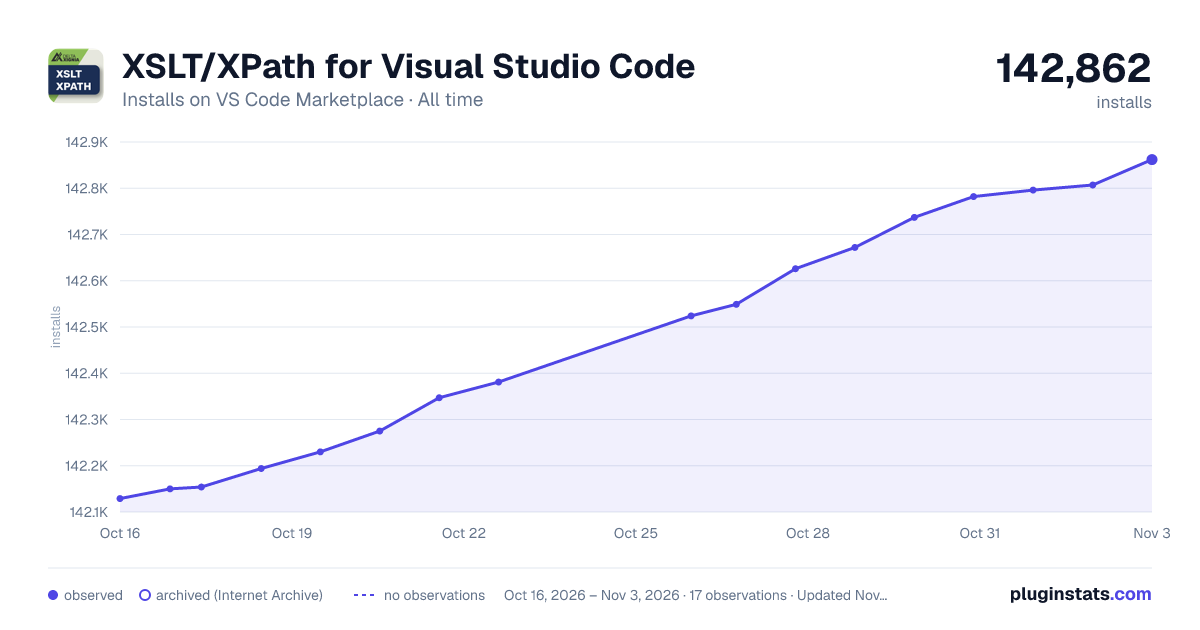

Adoption over time
7/30/90-day growth
Ranking history
Ratings over time
Listing placement
Listing placement
Listing placement
Listing placement
Filled points are observed values; hollow points come from Internet Archive snapshots of the listing page. Dashed segments span periods with no observations — values between points are not interpolated.
Each band is one page of 20. Installs on a linear scale. Placement is projected from installs, so it can differ from the marketplace's own sort order. Hover a dot to see the listing.
Recent observations
Full history (5)Similar VS Code Marketplace Programming Languages plugins
All 20 XSLT/XPath for Visual Studio Code alternativesData source
Install counts, average rating, and rating counts come from the public Visual Studio Marketplace gallery API. Installs are cumulative and exclude updates.
Listing: https://marketplace.visualstudio.com/items?itemName=deltaxml.xslt-xpath. First seen Oct 16, 2026; last successful collection Oct 20, 2026. See the methodology.