 PluginStats
Sourcery installs statistics
By sourcery (3 listings) · VS Code Marketplace · Programming Languages
Instant Code Reviews in your IDE
Sourcery has 1,287,730 recorded installs on VS Code Marketplace.
It ranks #468 of 2,501 tracked VS Code Marketplace listings by installs.
It is rated 4.3 out of 5 from 43 ratings.
PluginStats has 4 daily observations since Oct 16, 2026; the latest is from Oct 19, 2026.
Rating: 4.28 / 5 from 43 ratings
About Sourcery
[![Github Repo][github-shield]][github-url] [![VSCode Plugin][vscode-shield]][vscode-url] [![Twitter Follow][twitter-shield]][twitter-url]
WEBSITE | DOCS | BUGS
Sourcery is your pair programmer that reviews and enhances your code in real-time. With intelligent code reviews and an AI chat assistant that understands your code, you can ship better code faster.
Sourcery
Sourcery is a VS Code extension to help you move faster and ship code with confidence. Sourcery gives you code reviews anytime you want, so you can get feedback before you need to open a PR. Plus Sourcery's coding assistant helps you speed up repetitive tasks while you work.
Here are some of the features Sourcery offers to help improve your code:
• Chat with an AI that knows about your code • Code reviews anytime, in IDE • GitHub & GitLab Pull Request reviews • Real-time refactoring suggestions • Continuous code quality feedback
To start using Sourcery on your code, check out our Getting Started guide.
Check out our documentation for more information on how to use Sourcery.
Sourcery is free to use for open source projects.
To use Sourcery on non open-sourced projects you'll need a Sourcery Pro subscription. To get a 14 day free trial to Sourcery Pro, sign up for an account on the Sourcery site.
Features
Chat
Talk with an AI that knows about your code. Select code to add it to context and ask questions or ask for improvements. Apply code changes with a single click.
Sourcery Chat comes with in-built recipes to: • Generate diagrams: No need to spend hours manually creating diagrams. Sourcery can generate them for you in Mermaid format - grab the code or view it as an image. • Generate Tests: Generate comprehensive unit tests for your code. • Generate docstrings: Sourcery can generate docstrings for your code, copying the style from your existing docstrings. Add them to your code with a single click. • Explain code: Sourcery can explain your code, point out how it works and anything unusual or not idiomatic.
Code reviews on demand
Get feedback on your code anytime you want. Sourcery can review your code directly in your IDE and give you instant actionable feedback. Review your current file, your uncommitted changes, or compare any two Git branches. Individual review comments are shown inline in your code, along with suggested fixes if applicable.
GitHub & GitLab Pull Request Review
Sourcery can help you speed up code reviews and clean up every new commit by automatically reviewing each of your GitHub pull requests. This also gives you a PR summary, can generate PR titles, and posts a reviewers guide to the PR, including diagrams and a breakdown of the changes.
To get started, add Sourcery to your GitHub repo or GitLab project. Sourcery will then start reviewing every new pull request automatically!
Real-time refactoring suggestions
While you work, Sourcery will review all of the Python, JavaScript, and TypeScript files you have open and look for opportunities to clean up and improve your code. Once Sourcery finds a potential improvement it will underline that section of your code.
Hover your mouse over the underlined section of code to see the changes Sourcery suggests and to see a diff of the proposed change.
To make the change, just bring up the quick fix menu and choose to accept the change. Sourcery will then apply the change to your code. We're constantly adding new improvements and rules that Sourcery can make. The current list of rules Sourcery checks for is available here.
The commands to bring up the quick fix menu depend on your OS & region, but generally they are:
| OS | Keyboard Shortcut |
| Mac | Command . | | Windows | Ctrl . | | Linux | Ctrl . |
Sourcery reviews all of the files you have open. You can get an overview of all the suggestions Sourcery has in the Problem window.
Set up your own rules - or use public rulesets
Sourcery is widely extendable so that you can have it check for whatever types of best practices you care about within your code.
Sourcery reads rules from a .sourcery.yaml configuration file that you can set up in your project directory - then it will look to apply those rules across the full project. To get started we’ve set up a quick tutorial and you can dive deeper in our full documentation
You can also opt into publicly available sets of rules to help improve your code. Check out the Google Python Style Guide and see how you can add it to Sourcery.
Continuous code quality feedback
Sourcery gives each of your functions a quality score ranging from 0% (bad) - 100% (good) and also gives you sub-scores on Method Length, Complexity, and Working Memory so that you can figure out how to structure your code as cleanly as possible.
Method Length is a metric is a measure of how long each method is on average. It is based on the number of nodes in the method's Abstract Syntax Tree.
Complexity is a measure of how difficult your code is to read and understand. It is based on these principles:
• Each break in the linear flow of the code makes it harder to understand • When these flow-breaking structures are nested they are even harder to understand
Working Memory is a measure of the number of variables that need to be kept in your working memory as you read through the code.
Sourcery will warn you if your overall quality score for a function falls below 25%.
About us
We're a small team out of London trying to make it easier for everyone to write brilliant code. Follow us on Twitter or visit our blog to keep up with updates.
Licensing
This repository includes source code as well as packaged binaries. The MIT license only applies to the source code, not the binaries.
Description from the VS Code Marketplace listing.
- ai
- code quality
- code review
- copilot
- javascript
- jupyter
- keybindings
- node
- node.js
- nodejs
- Python
- refactor
- refactoring
- review
- tabnine
- typescript
Where Sourcery sits in the listing
Each band is one page of 20. Installs on a log scale. Placement is projected from installs, so it can differ from the marketplace's own sort order. Hover a dot to see the listing.


Charts
Images: 30d · 1y · all time · 1600×900 dark


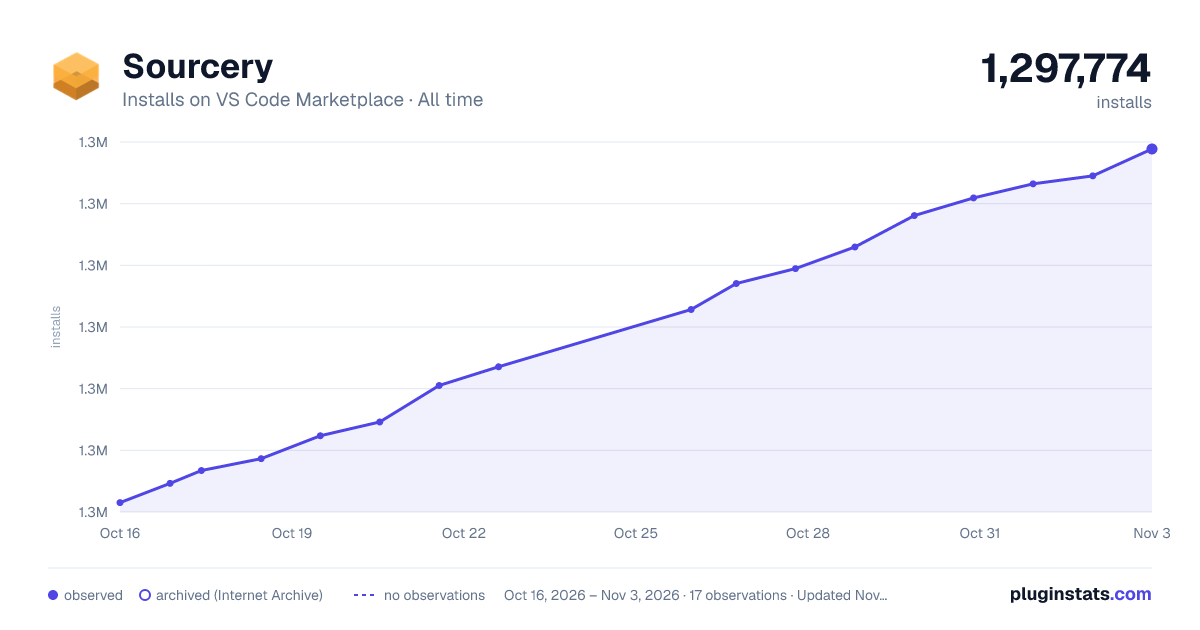

Adoption over time


7/30/90-day growth


Filled points are observed values; hollow points come from Internet Archive snapshots of the listing page. Dashed segments span periods with no observations — values between points are not interpolated.
Recent observations
Full history (4)Similar VS Code Marketplace Programming Languages plugins
Data source
Install counts, average rating, and rating counts come from the public Visual Studio Marketplace gallery API. Installs are cumulative and exclude updates.
Listing: https://marketplace.visualstudio.com/items?itemName=sourcery.sourcery. First seen Oct 16, 2026; last successful collection Oct 19, 2026. See the methodology.