 PluginStats
uni-highlight installs statistics
By Uni Helper (6 listings) · VS Code Marketplace · Other
在 VS Code 中对条件编译的代码注释部分提供了语法高亮
uni-highlight has 165,996 recorded installs on VS Code Marketplace, ranking #1742 of 2,501 tracked listings.
Rating: 5.00 / 5 from 1 ratings
About uni-highlight
@uni-helper/uni-highlight-vscode
<p align="center"> <img src="https://cdn.jsdelivr.net/gh/uni-helper/uni-highlight-vscode@main/logo.png" alt="logo" width="256" height="256" /> </p> <p align="center"> <a href="https://github.com/uni-helper/uni-highlight-vscode/blob/main/LICENSE"><img src="https://img.shields.io/github/license/uni-helper/uni-highlight-vscode?labelColor=005947&color=eee&style=for-the-badge" alt="License"></a> <a href="https://github.com/uni-helper/uni-highlight-vscode/stargazers"><img src="https://img.shields.io/github/stars/uni-helper/uni-highlight-vscode?labelColor=005947&color=eee&style=for-the-badge" alt="GitHub Stars"></a> <a href="https://marketplace.visualstudio.com/items?itemName=uni-helper.uni-highlight-vscode"><img src="https://vsmarketplacebadges.dev/version-short/uni-helper.uni-highlight-vscode.svg?labelColor=005947&color=eee&style=for-the-badge" alt="VSCode version"></a> <a href="https://marketplace.visualstudio.com/items?itemName=uni-helper.uni-highlight-vscode"><img src="https://vsmarketplacebadges.dev/downloads-short/uni-helper.uni-highlight-vscode.svg?labelColor=005947&color=eee&style=for-the-badge" alt="VSCode downloads"></a> </p> <p align="center"> <a href="https://github.com/FliPPeDround"><img src="https://img.shields.io/badge/Author-FliPPeDround-blue?style=for-the-badge" alt="Author"></a> </p>在 VS Code 中为 uni-app 条件编译的代码注释提供语法高亮、错误提示和折叠功能。
请考虑持续赞助以维持该项目的持续健康发展,非常感谢!🙏
想让 uni-app 开发变得更直观、高效?想要更好的 uni-app 开发体验?不妨看看 uni-helper 主页 和 uni-helper GitHub Organization!
插件特性
- 条件编译注释语法高亮,多平台分色显示
- 未知平台错误提示,并推测最接近的正确写法
- 条件编译注释块折叠,支持一键折叠其他平台
- 支持 Vue、JS、TS、CSS、HTML 等多种文件类型
基础使用
<img src="https://github.com/uni-helper/uni-highlight-vscode/raw/HEAD/.github/images/base.png" width="300" alt="base">错误提示
<img src="https://github.com/uni-helper/uni-highlight-vscode/raw/HEAD/.github/images/error.png" width="400" alt="error">错误推测
<img src="https://github.com/uni-helper/uni-highlight-vscode/raw/HEAD/.github/images/infer.png" width="400" alt="infer">注释块折叠
<img src="https://github.com/uni-helper/uni-highlight-vscode/raw/HEAD/.github/images/folding.png" width="300" alt="folding">多平台高亮
<img src="https://github.com/uni-helper/uni-highlight-vscode/raw/HEAD/.github/images/more.png" width="300" alt="more">各平台多种颜色高亮
<img src="https://github.com/uni-helper/uni-highlight-vscode/raw/HEAD/.github/images/colorful.png" width="300" alt="colorful">CSS 高亮
<img src="https://github.com/uni-helper/uni-highlight-vscode/raw/HEAD/.github/images/css.png" width="300" alt="css">HTML 高亮
<img src="https://github.com/uni-helper/uni-highlight-vscode/raw/HEAD/.github/images/html.png" width="300" alt="html">扩展设置
| 设置 | 类型 | 默认值 | 说明 |
|---|---|---|---|
uni-highlight.platform | object | {} | 自定义平台高亮和名称,可覆盖内置平台的颜色、标签,或添加新平台 |
在 .vscode/settings.json 中配置,值可以直接写颜色:
{
  "uni-highlight.platform": {
    "MP-DINGTALK": "#41b883"
  }
}
也可以带上平台说明:
{
  "uni-highlight.platform": {
    "MP-DINGTALK": {
      "color": "#41b883",
      "label": "钉钉"
    }
  }
}
修改设置后需要重载窗口(Developer: Reload Window)才会生效。
命令
| 命令 | 标题 | 说明 |
|---|---|---|
uni.comment.reload | Uni Helper: 重新加载条件编译高亮 | 重新扫描当前文件的条件编译注释,刷新高亮和折叠 |
uni.comment.fold-other-platform | Uni Helper: 选择平台并折叠其他平台注释 | 选择一个平台,折叠其余平台的注释块;检测到条件编译注释时,编辑器标题栏会显示对应按钮 |
参与贡献
欢迎通过 Issue 或 Pull Request 参与改进本项目。开始前请阅读 CONTRIBUTING.md,了解项目结构、本地开发流程、测试方式与提交规范。
许可证
MIT © 2022-present uni-helper & Collaborators
Description from the VS Code Marketplace listing.
- highlight
- uniapp
- uni-app
README badge
Show your rank in a README or on your website. The badge updates automatically.
Charts
Images: 30d · 1y · all time · 1600×900 dark


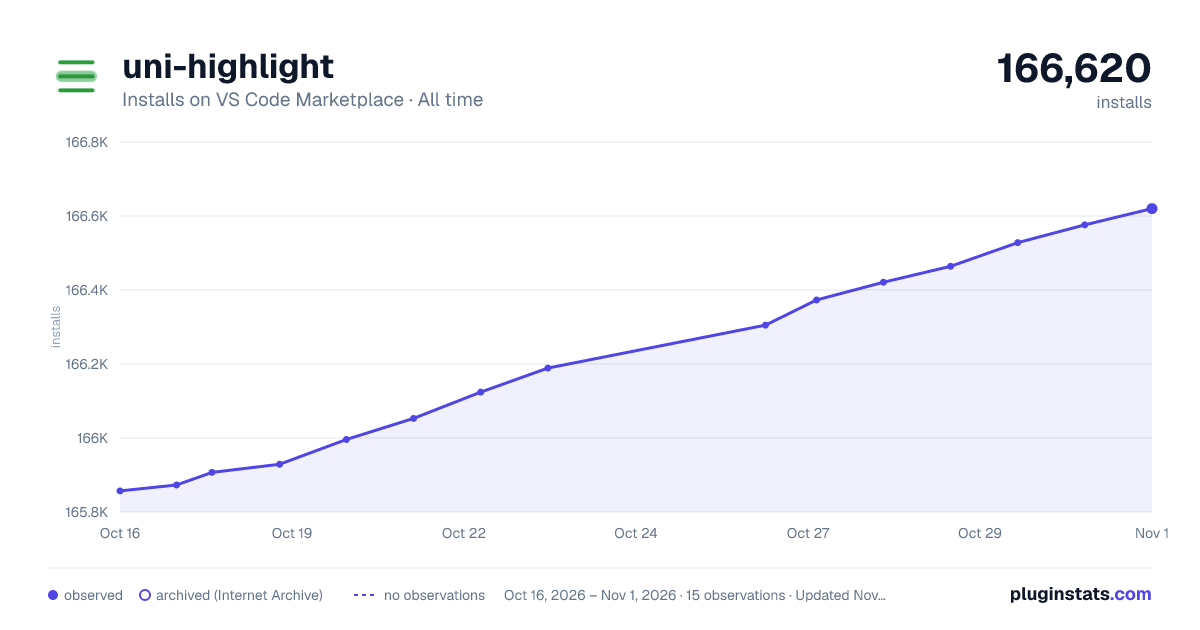

Adoption over time
7/30/90-day growth
Ranking history
Ratings over time
Listing placement
Listing placement
Filled points are observed values; hollow points come from Internet Archive snapshots of the listing page. Dashed segments span periods with no observations — values between points are not interpolated.
Each band is one page of 20. Installs on a linear scale. Placement is projected from installs, so it can differ from the marketplace's own sort order. Hover a dot to see the listing.
Recent observations
Full history (5)Similar VS Code Marketplace Other plugins
All 20 uni-highlight alternativesData source
Install counts, average rating, and rating counts come from the public Visual Studio Marketplace gallery API. Installs are cumulative and exclude updates.
Listing: https://marketplace.visualstudio.com/items?itemName=uni-helper.uni-highlight-vscode. First seen Oct 16, 2026; last successful collection Oct 20, 2026. See the methodology.