 PluginStats
Prophet installs statistics
By SqrTT · VS Code Marketplace · Programming Languages
Debugger and Uploader for SFCC sandbox
Prophet has 116,857 recorded installs on VS Code Marketplace, ranking #2168 of 2,501 tracked listings.
Rating: 4.17 / 5 from 23 ratings
About Prophet
A VS Code extension to work with Demandware/Salesforce Cloud code on Sandbox that support the Script Debugger API (SDAPI) 2.0
Supported features
- Upload cartridges and watch changes
- Syntax highlight for
ismlanddsfiles - Validate isml files (based on htmlhint plugin, configurable by
.htmlhintrc) - Advanced support of ISML syntax
- hover information
- autocomplete tags
- auto formatting
- find Symbols
- highlighting selected tags
- rename tag (via F2)
- Setting breakpoints
- Stepping
- Change variables values in running threads
- Locals scope variables via the VARIABLES panel
- View variables on hover
- Variable watches
- Console/evaluate code
- Open files trough Storefront Toolkit
- Quick open
isincludetemplates and custom tags via Ctrl+Click (as links) - Cartridges overview in explorer
- Server logs viewer with syntax highlight
- Multi-root Workspaces (allows to work with different repo in same time).
- Override template and JS file in another cartridge (via context menu).
- enhanced autocompletion and goto for
Resource.msg/msgf(js files and isml) - autocompletion and goto for
URLUtils.url/http/https/abs(js files and isml) - Added autocompletion for
server.append/prepend/replace - autocompletion for
require('dw/') - autocompletion and goto for
require('~/...')&require('*/...')(correct resolving based on cartridge path) - autocompletion and goto for
res.render&isinclude&isdecorate&ismodule(template=""attribute) (correct resolving based on cartridge path) - quick find controllers (via Ctrl-F7)
- Download SOAP WebService API from Server. This feature is similar to Eclipse/UXStudio feature to download & generate SOAP web-service documentation.
- Import/export properties from/to CSV (useful for translation)
- Logs monitor
WARNING: Some users had reported that debugger completely halts sandbox. Currently, this issue is not fixed and no known steps to reproduce. If you have some info about it please share. So please, before debugger usage make sure that you have availability to restart sandbox for the case if extension halts yours.
Getting Started
To use this extension, you must first open the folder containing the cartridges you want to work on or one of subfolders contain folder cartridges.
Using the debugger
When your launch config is set up, you can debug your project! Pick a launch config from the dropdown on the Debug pane in Code. Press the play button or F5 to start.
Configuration
The extension operates in one mode - it launch an adapter that connects to sandbox. Just like when using the other debugger, you configure with a .vscode/launch.json file in the root directory of your project. You can create this file manually, or Code will create one for you if you try to run your project, and it doesn't exist yet.
Launch
Example launch.json configs with "request": "launch". You must not specify hostname and other credentials. Since they will be loaded from corresponding dw.json, dw.js or .env file.
{
    "version": "0.1.0",
    "configurations": [
      {
          "type": "prophet",
          "request": "launch",
          "name": "Attach to Sandbox"
      }
    ]
}
Other optional launch config fields
trace: When true, the adapter logs its own diagnostic info to console. This is often useful info to include when filing an issue on GitHub.
Using the uploader
Credentials of sandbox may be defined in .env file in the root of workspace.
Example of .env file:
SFCC_SERVER=example.demandware.net
# or SFCC_HOST=example.demandware.net
#username is case sensitive (copy from Business Manager)
SFCC_USERNAME=user
SFCC_PASSWORD=password
# required for code assistance (copy from Business Manager)
SFCC_CARTRIDGES_PATH=cartridgeA:cartridgeB:app_storefront_base
SFCC_CODE_VERSION=version1
SFCC_SITE_ID=RefArch
SFCC_STOREFRONT_PASSWORD=pass123
SFCC_BM_CARTRIDGES_PATH=cartridgeA:cartridgeB:app_storefront_base
Additionaly values from VSCode Settings terminal.integrated.env.* is respected.
If VS Code environment variables contains SFCC_SERVER or SFCC_HOST, SFCC_USERNAME and SFCC_PASSWORD they could be used along with .env file.
The workspace may contain multiple .env files with suffixes like .env.local, .env.brandA, .env.local.brandA, .env.development, etc.
Only one file can be used at once. To select which one to use you should click SFCC context (bottom right corner) and choose one of available credentials.
Example of dw.json file:
{
	"hostname": "example.demandware.net",
	// username is case sensitive (copy from Business Manager)
	"username": "user",
	"password": "password",
	"cartridgesPath": "cartridgeA:cartridgeB",
	"code-version": "version1",
	"siteID": "RefArch",
	"storefrontPassword": "pass123"
}
The second step: enabling the uploader in workspace preferences. Open preferences, switch to workspace preferences and set value to true for "extension.prophet.upload.enabled". Detailed log information is written in output channel Prophet Uploader. (Note: once you change dw.json, dw.js or .env you should run 'Clean Project/Upload all' from command menu to apply it).
You can temporarily disable watching or force upload cartridges (i.e. clean project) via commands.
- Prophet: Enable Upload
- Prophet: Disable Upload
- Prophet: Clean Project/Upload all
(press F1 and select command)
Note: the extension relies on the
.projectfiles to detect cartridge so it must not be added tofiles.exclude
Other configuration…
Description from the VS Code Marketplace listing.
- debuggers
- DemandWareScriptDeprecated
- dwlog
- DWLogFile
- dwscript
- isml
- javascript
- json
- keybindings
- language-model-tools
- multi-root ready
- snippet
- tools
README badge
Show your rank in a README or on your website. The badge updates automatically.
Charts
Images: 30d · 1y · all time · 1600×900 dark



Adoption over time
7/30/90-day growth
Ranking history
Ratings over time
Listing placement
Listing placement
Listing placement
Listing placement
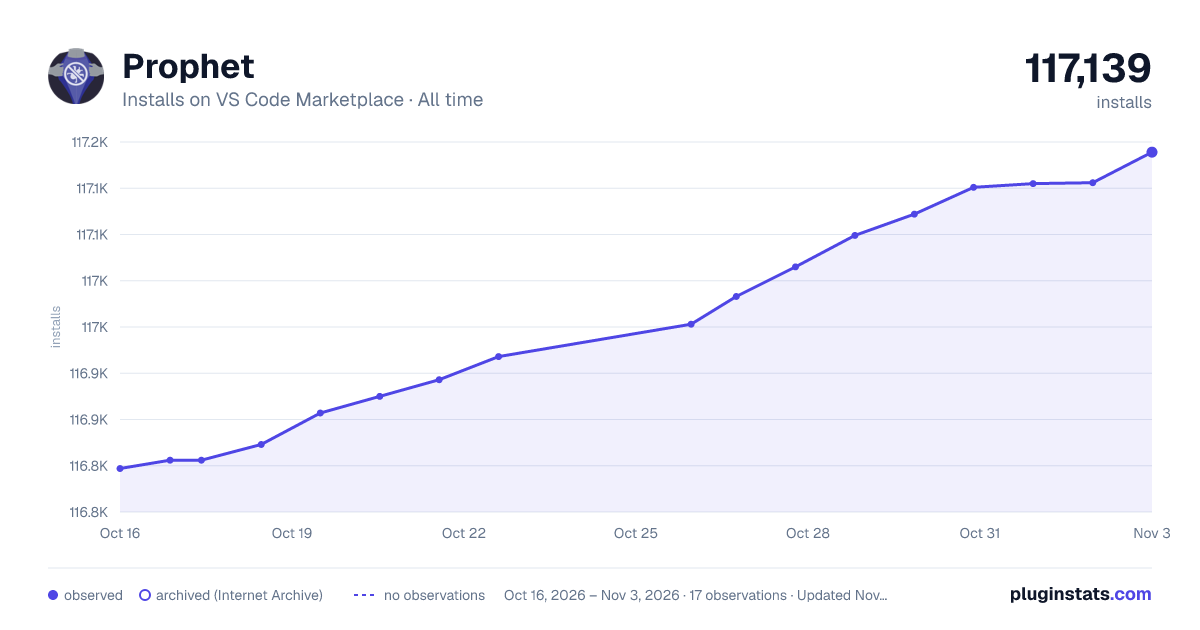
Filled points are observed values; hollow points come from Internet Archive snapshots of the listing page. Dashed segments span periods with no observations — values between points are not interpolated.
Each band is one page of 20. Installs on a linear scale. Placement is projected from installs, so it can differ from the marketplace's own sort order. Hover a dot to see the listing.
Recent observations
Full history (5)Similar VS Code Marketplace Programming Languages plugins
All 20 Prophet alternativesData source
Install counts, average rating, and rating counts come from the public Visual Studio Marketplace gallery API. Installs are cumulative and exclude updates.
Listing: https://marketplace.visualstudio.com/items?itemName=SqrTT.prophet. First seen Oct 16, 2026; last successful collection Oct 20, 2026. See the methodology.