 PluginStats
DevDb installs statistics
By Damilola Olowookere · VS Code Marketplace · Programming Languages
A zero-config extension that displays your database records right inside VS Code and provides tools and affordances to aid development and debugging.
DevDb has 734,916 recorded installs on VS Code Marketplace.
It ranks #668 of 2,501 tracked VS Code Marketplace listings by installs.
It is rated 4.6 out of 5 from 11 ratings.
PluginStats has 4 daily observations since Oct 16, 2026; the latest is from Oct 19, 2026.
Rating: 4.64 / 5 from 11 ratings
About DevDb
DevDb
Documentation ⋅ VS Code Marketplace ⋅ Open VSX Registry
DevDb finds the database of your project and shows it in a panel in VS Code, Cursor and Windsurf. You do not write a connection.
Features
• Zero-config detection. DevDb reads Laravel, Rails, Django, AdonisJS, DDEV, Supabase, Prisma, Drizzle, docker-compose, Wrangler and DATABASE_URL setups. More • Browse and edit. Filter rows, edit values, set null, delete rows. Undo, redo and save with Cmd+Z, Cmd+Y and Cmd+S. More • Editor features. Go to a table (Cmd+K Cmd+G), open the table at the cursor, generate Laravel factories from real data, explain MySQL queries, export as JSON or SQL. More • MCP server. Claude Code, Cursor, Windsurf and other MCP clients can read your schema and run queries. Localhost only, with a token, read-only by default. More • Remote connections (Pro). Direct with TLS, SSH tunnels with host key checks, and MongoDB. More
Supported datastores
| Datastore | Free | Pro |
| SQLite, MySQL, MariaDB, PostgreSQL, SQL Server | Yes | Yes | | MongoDB that zero-config detection finds | Yes | Yes | | Cloudflare D1 local | Yes | Yes | | Remote MySQL, MariaDB, PostgreSQL (direct or SSH), remote MongoDB, Supabase Cloud | — | Yes | | Redis / Valkey, ClickHouse, DuckDB, Neon | — | Yes | | pgvector search, Cloudflare D1 remote, Turso / libSQL, DynamoDB | — | Yes |
DevDb Pro is a one-time payment for a lifetime license. See devdbpro.com and Pro and Licensing.
Quick start
1. Install DevDb from the VS Code Marketplace or Open VSX. 2. Open your project. Trust the workspace when VS Code asks. 3. Press Cmd+K Cmd+D (macOS) or Ctrl+K Ctrl+D (Windows, Linux) to open the DevDb panel. 4. Click your database under Local Databases.
If DevDb does not find your database, add a .devdbrc file. Type devdb in it to get snippets. Add .devdbrc to .gitignore, because it can contain passwords.
Requirements: VS Code 1.90 or later. DevDb runs on macOS, Windows, Linux and Alpine (x64 and arm64) and Linux armhf. See Getting Started.
Documentation
| Topic | Link |
| Install and set up | Getting Started | | Frameworks and tools that DevDb detects | Zero-Config Detection | | .devdbrc reference | Config File | | SSH tunnels, TLS, MongoDB, Supabase Cloud | Remote Connections | | MCP setup and security | MCP Server | | All settings | Settings | | Errors and logs | Troubleshooting | | Report a security problem | Security | | Release notes | Changelog |
Featured in
Sponsors
• DevWorkspace Pro: build and manage web apps on your computer, with DDEV, terminal, SSH, GitHub and AI sessions in one desktop app. • Traycer AI: AI help in your VS Code workflow.
To support DevDb, sponsor the project, buy DevDb Pro, or see other projects.
Support
• Questions and ideas: GitHub Discussions • Bugs: GitHub Issues. Add the log from the DevDb output channel. • License and billing: hi@devdbpro.com
Contribution
[!IMPORTANT] You can contribute to the extension core code only. The UI code is not public.
1. Fork this repository and clone your fork. 2. Run bun install. 3. Make your changes. Press F5 to test them in VS Code. 4. Run bun run test-services. All tests must pass. 5. Push to your fork and open a pull request.
Description from the VS Code Marketplace listing.
- database
- database management
- database management system
- database manager
- devdb
- DevDbConfig
- django
- javascript
- json
- keybindings
- mariadb
- mysql
- php
- postgres
- postgresql
- python django
- rails
- ruby on rails
- snippet
- sql
Where DevDb sits in the listing
Each band is one page of 20. Installs on a log scale. Placement is projected from installs, so it can differ from the marketplace's own sort order. Hover a dot to see the listing.


Charts
Images: 30d · 1y · all time · 1600×900 dark


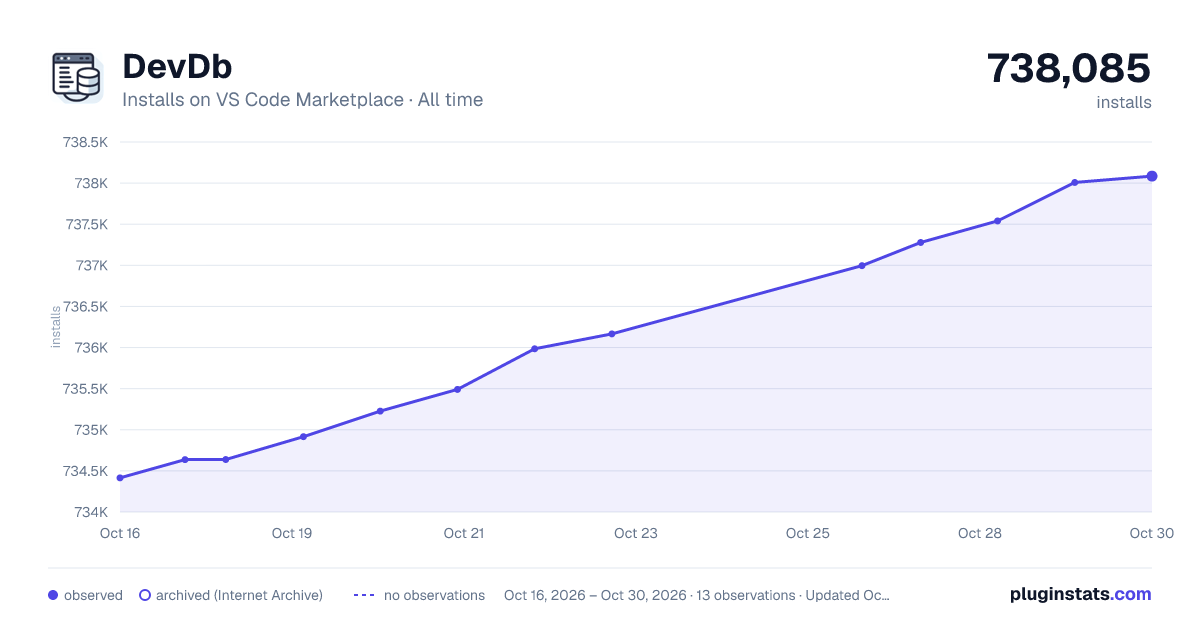

Adoption over time


7/30/90-day growth


Filled points are observed values; hollow points come from Internet Archive snapshots of the listing page. Dashed segments span periods with no observations — values between points are not interpolated.
Recent observations
Full history (4)Similar VS Code Marketplace Programming Languages plugins
Data source
Install counts, average rating, and rating counts come from the public Visual Studio Marketplace gallery API. Installs are cumulative and exclude updates.
Listing: https://marketplace.visualstudio.com/items?itemName=damms005.devdb. First seen Oct 16, 2026; last successful collection Oct 19, 2026. See the methodology.