 PluginStats
LaTeX Utilities installs statistics
By tecosaur · VS Code Marketplace · Programming Languages
An add-on to LaTeX Workshop that provides some fancy features that are less vital to the basic experience editing a LaTeX document, but can be rather nice to have.
LaTeX Utilities has 437,324 recorded installs on VS Code Marketplace, ranking #914 of 2,501 tracked listings.
Rating: 4.20 / 5 from 5 ratings
About LaTeX Utilities
An add-on to the vscode extension LaTeX Workshop that provides some fancy features that are less vital to the basic experience editing a LaTeX document, but can be rather nice to have. The feature should continue to expand at a gradually decreasing rate.
Got an idea? Make a PR!
<hr/>Features
- Formatted Pastes
- Unicode characters 🡒 LaTeX characters (e.g.
“is this… a test”🡒``is this\ldots a test'') - Paste table cells (from spreadsheet programs or similar) 🡒 tabular
- Paste images, customisable template
- Paste location of CSVs/images to have them included
- Unicode characters 🡒 LaTeX characters (e.g.
- Live Snippets (auto-activating, with regex) see here for documentation
- Word count in status bar
- Zotero citation management
Documentation
- See the wiki
Requirements
- A LaTeX installation in your path
- The
texcountscript (only necessary for the word-count function). Configure using thelatex-utilities.countWord.pathandlatex-utilities.countWord.argssettings.- Alternatively, install the
texcountpackage from your TeX package manager (e.g.,tlmgr) if it doesn't come with your TeX distribution.
- Alternatively, install the
- Zotero with the Better BibTeX extension (only necessary for Zotero functions).
Demos
Formatted Paste (image)
<img src="https://github.com/tecosaur/LaTeX-Utilities/raw/master/demo-media/formattedPasteImage.gif" height="160px">Live Snippets
<img src="https://github.com/tecosaur/LaTeX-Utilities/raw/master/demo-media/liveSnippets.gif" height="30px">Zotero Integration
<img src="https://github.com/tecosaur/LaTeX-Utilities/raw/master/demo-media/zotero-integration.gif" height="100px"> <br/> <br/>Telemetry
Why
As a bunch of fancy, but non-essential features, it can be hard to know what features users actually derive value from. In adding telemetry to this extension I hope to get an idea of this, and inform future development efforts. It should also be possible to report errors in the background, and so I also hope this extension will be more stable as a result.
At the moment I'm just logging when one of the main features is used.
TLDR; I want to get around the 1% rule
I hate telemetry, go away!
You probably have disabled vscode's telemetry.enableTelemetry then, in which case no telemetry is done.
Description from the VS Code Marketplace listing.
- doctex
- hint
- jlweave
- json
- keybindings
- latex
- rsweave
- tex
README badge
Show your rank in a README or on your website. The badge updates automatically.
Charts
Images: 30d · 1y · all time · 1600×900 dark


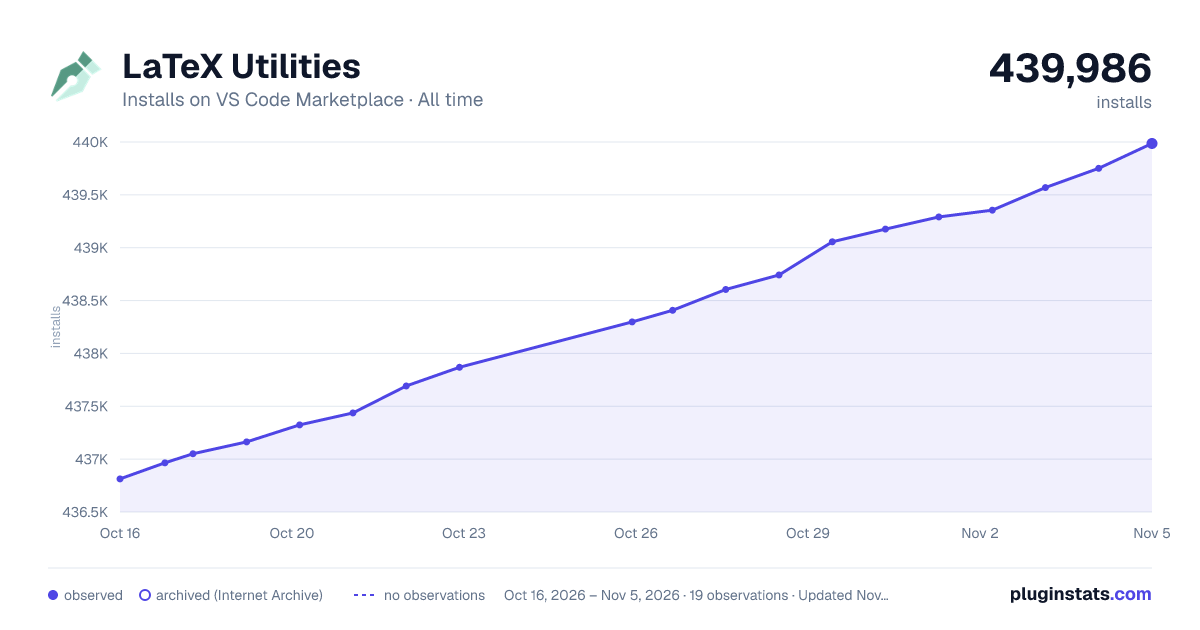

Adoption over time
7/30/90-day growth
Ranking history
Ratings over time
Listing placement
Listing placement
Listing placement
Filled points are observed values; hollow points come from Internet Archive snapshots of the listing page. Dashed segments span periods with no observations — values between points are not interpolated.
Each band is one page of 20. Installs on a linear scale. Placement is projected from installs, so it can differ from the marketplace's own sort order. Hover a dot to see the listing.
Recent observations
Full history (5)Similar VS Code Marketplace Programming Languages plugins
All 20 LaTeX Utilities alternativesData source
Install counts, average rating, and rating counts come from the public Visual Studio Marketplace gallery API. Installs are cumulative and exclude updates.
Listing: https://marketplace.visualstudio.com/items?itemName=tecosaur.latex-utilities. First seen Oct 16, 2026; last successful collection Oct 20, 2026. See the methodology.