 PluginStats
PYQT Integration has 390,539 recorded installs on VS Code Marketplace, ranking #980 of 2,501 tracked listings.
Rating: 4.91 / 5 from 11 ratings
About PYQT Integration
PYQT Integration


An extension help you coding PYQT form in vsocde. Support ".ui", ".qrc", ".pro", ".ts" files.

Explorer context menu
| No. | Name | Description |
|---|---|---|
| 1 | PYQT: New Form | Open designer |
| 2 | PYQT: Edit In Designer | Open designer with current ui form |
| 3 | PYQT: Preview | Preview current ui form |
| 4 | PYQT: Compile Form | Compile ui form to path defined in "pyqt-integration.pyuic.compile.filepath" |
| 5 | PYQT: Compile Resource | Compile qrc file to path defined in "pyqt-integration.pyrcc.compile.filepath" |
| 6 | PYQT: Generate Translation File (.ts) | Compile UI file (.py) to translation file with path defined in "pyqt-integration.pylupdate.compile.filepath" <br/> Compile .pro file |
| 7 | PYQT: Open With Qt Linguist | Open with Qt Linguist for translation file (.ts) |
Properties
| No. | Name | Description |
|---|---|---|
| 1 | pyqt-integration.qtdesigner.path | Path of executable file of qt designer, the extension will ask you to set at the first time it runs, e.g. c:\\Users\\username\\AppData\\Local\\Programs\\Python\\Python35\\Lib\\site-packages\\pyqt5-tools\\designer.exe |
| 2 | pyqt-integration.pyuic.cmd | "pyuic" command, default "pyuic5" |
| 3 | pyqt-integration.pyuic.compile.filepath | Compile file path, relative path as default, switch to absolute path by involving ${workspace}, e.g. ${workspace}\\UI\\Ui_${ui_name}.py |
| 4 | pyqt-integration.pyuic.compile.addOptions | Additional options for pyuic compiling, it can be a combination of '-x', '-d', '-i', etc. |
| 5 | pyqt-integration.pyrcc.cmd | "pyrcc" command, default "pyrcc5" |
| 6 | pyqt-integration.pyrcc.compile.filepath | Compile file path, relative path as default, switch to absolute path by involving ${workspace}, e.g. ${workspace}\\QRC\\${qrc_name}_rc.py |
| 7 | pyqt-integration.pyrcc.compile.addOptions | Additional options for pyrcc compiling, it can be a combination of '-root', '-threshold', '-compress', '-no-compress', etc. |
| 8 | pyqt-integration.pylupdate.cmd | "pylupdate" command, default "pylupdate5" |
| 9 | pyqt-integration.pylupdate.compile.filepath | Only works when compiling an UI file (.py), Stores the target '.ts' file's path, relative path as default, switch to absolute path by involving ${workspace}, e.g. ${workspace}\\TS\\${ts_name}.ts |
| 10 | pyqt-integration.pylupdate.compile.addOptions | Additional options for pylupdate, it can be a combination of '-verbose', '-noobsolete', '-tr-function', '-translate-function', etc. |
| 11 | pyqt-integration.linguist.cmd | "linguist" command, default "linguist" |
Compilation will overwite the target file without confirmation!
Description from the VS Code Marketplace listing.
- css
- pyqt
- qt
- xml
README badge
Show your rank in a README or on your website. The badge updates automatically.
Charts
Images: 30d · 1y · all time · 1600×900 dark


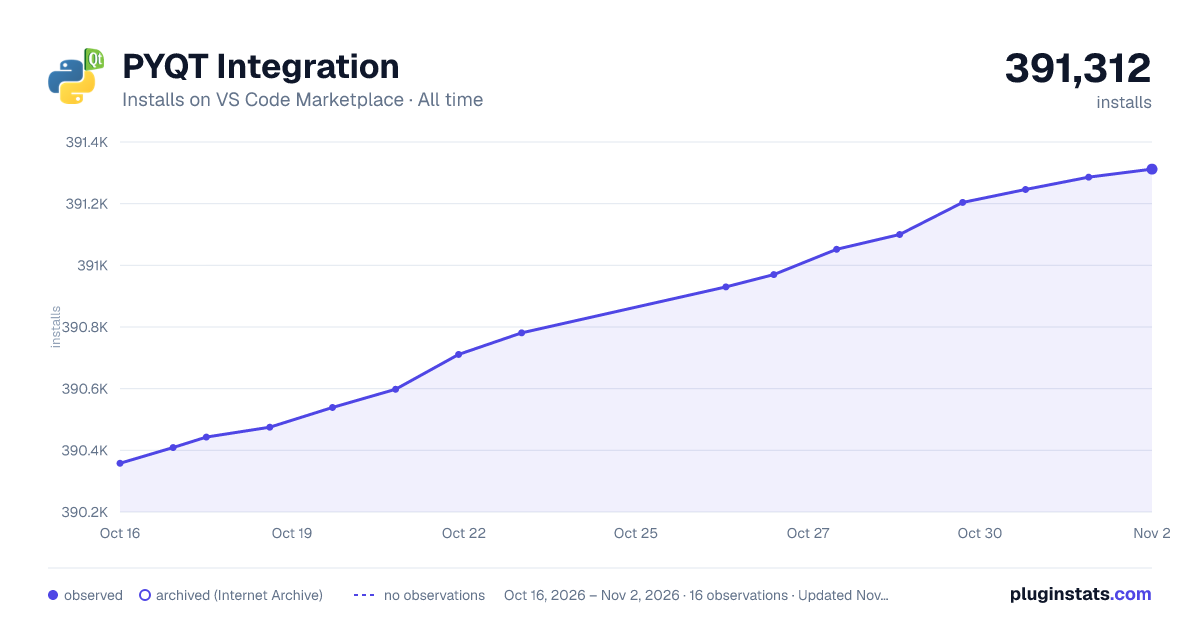

Adoption over time
7/30/90-day growth
Ranking history
Ratings over time
Listing placement
Listing placement
Filled points are observed values; hollow points come from Internet Archive snapshots of the listing page. Dashed segments span periods with no observations — values between points are not interpolated.
Each band is one page of 20. Installs on a linear scale. Placement is projected from installs, so it can differ from the marketplace's own sort order. Hover a dot to see the listing.
Recent observations
Full history (5)Similar VS Code Marketplace Other plugins
All 20 PYQT Integration alternativesData source
Install counts, average rating, and rating counts come from the public Visual Studio Marketplace gallery API. Installs are cumulative and exclude updates.
Listing: https://marketplace.visualstudio.com/items?itemName=zhoufeng.pyqt-integration. First seen Oct 16, 2026; last successful collection Oct 20, 2026. See the methodology.