 PluginStats
Decompiler installs statistics
By tintinweb (7 listings) · VS Code Marketplace · Programming Languages
Decompile the $h*! out of things
Decompiler has 273,428 recorded installs on VS Code Marketplace, ranking #1225 of 2,501 tracked listings.
Rating: 4.50 / 5 from 8 ratings
About Decompiler
[ 🌐 📩 🔥 ]
Decompiler!
Let's be honest, there is no reason to remember how to decompile stuff with the various tools available. Wouldn't it be nice to just decompile the $h*! out of things right off the fingertips in Visual Studio Code? Well, here we go:
This extension decompiles ...
• Binary executables for various platforms • as supported by Ghidra; Windows PE, Linux ELF, IOS, etc.. • or IDAPro (Experimental, Windows Only for now) • Java Jar archives and compiled Classes • Android APK's • Python .pyc and .pyo • Ethereum/EVM based Smart Contracts • (Experimental, Linux/MacOs only)
Just right-click → Decompile on a supported executable and wait for the magic to happen.
The decompilation result is added to a temporary sub-workspace. You can right-click → Download files to your local file-system right from the sub-workspace.
Have phun 🙌
Tour
macOS
Windows (Ghidra vs. IDAPro)
Ethereum Smart Contract
Save the EVM byte-code in a file with extension .evm, then right-click → Decompile.
Setup
Requirements: General
• Requires Java (11+) to be installed system-wide. Just install the latest JRE/JDK for your OS (e.g. OpenJDK, Oracle JDK). • Other tools are bundled with the extension. Just make sure Java is available in your PATH.
Requirements: Binary executables (Ghidra / IDA Pro)
• Requires a working installation of Ghidra (← Download) to decompile executables • either available in PATH (like when you install it with brew cask install ghidra on os-x; or set-up manually) • otherwise please specify the path to the executable /support/analyzeHeadless in code → preferences → settings: vscode-decompiler.tool.ghidra.path and make sure that the analyzeHeadless script runs without errors (and is not prompting for the JDK Home 🤓). Here's a sample Ghidra config for Windows: • (Experimental; Windows Only) Optional a licensed version of IDA Pro with decompiler support. • specify the path to the idaw executable in code → preferences → settings: vscode-decompiler.tool.idaPro.path, e.g. c:\IDA68\idaw.exe. • set preference to idaPro (experimental Windows Only) in code → preferences → settings: vscode-decompiler.default.decompiler.selected. • we'll automatically try to run 32 and 64bits idaw on the target application (preference on what executable is configured by you) • If you're running Requirements: Python • Python decompilation requires pip3 install uncompyle6 (see settings) • specify the uncompyle6 script location in code → preferences → settings: vscode-decompiler.tool.uncompyle.path or set to uncompyle6 if it is available in PATH
Requirements: Smart Contracts (EVM byte-code)
• The pseudocode generator panoramix/eveem requires a working installation of python3.8 or newer. • specify the python3.8 path in code → preferences → settings: vscode-decompiler.tool.python38.path (e.g. /usr/local/opt/python@3.8/bin/python3.8 (macos/homebrew)) • make sure pip for python3.8 is installed • install panoramix dependencies: $ /usr/local/opt/python@3.8/bin/python3.8 -m pip install coloredlogs requests web3 timeout_decorator • Note: Panoramix is run in local mode. EVM byte-code is not sent to eveem.org. • It will attempt to download a function signature database on first load. • It will cache files to /.panoramix. • No Windows support :/ (see this issue).
Setting tool preferences
code → preferences → settings:
• Set default decompiler preference to ghidra (default) or idaPro (experimental Windows Only) (requires a licensed version of IDAPro + Decompiler) • vscode-decompiler.default.decompiler.selected • Set preference for java decompilation to JADX or JD-CLI (default) • vscode-decompiler.java.decompiler.selected • Set preference for android apk decompilation to dex2jar + jd-cli (slow) or JADx (default) • vscode-decompiler.apk.decompiler.selected"
Troubleshooting & FAQ
(macOs) "macOs cannot verify the developer of 'decompiler' ...
• Follow the fix outline in https://support.apple.com/en-za/guide/mac-help/mh40616/mac. • Verify that you've downloaded ghidra from the original website, verify checksums. Note: you're running an NSA tool on your computer, just saying. • Open the /Ghidra/Features/Decompiler/os/osx64 in finder, Ctrl+mouseClick on decompile → open and confirm that you trust the application (you only need to do this one time).
(General) This thing failed with: {"code":1,"type":"single"}. What does this mean?
• Your tool (Ghidra/Ida/...) is not set up correctly and therefore execution failed. The path may be wrong, the tool may fail due ti an incorrect java configuration or the java version is incompatible. There are many ways this error can be provoked and it's in 99% of cases a misconfiguration of the tool or the environment it requires (e.g. java env vars, version, etc) • code: is the tools exit code. we are expecting success (0) but a tool may return non-zero to indicate an error. Check the tools output to troubleshoot. code=1 means the tool retunred exitcode 1, indicating an error conditon. • type: is how ths tool got executed. single or multi command. ignore this.
(Ghidra) Failed to run decompiliation command. Check your configuration. {"code":1,"type":"single"}
• make sure you're using a supported java version (e.g. win: jdk 14 is working, jdk 16 seems to be incompatible) • make sure environment vars are set up correctly (ghida setup doc google: setting env vars) • JAVA_HOME pointing to your jdk installation folder • PATH including an en try pointing to $JAVA_HOME/bin (win: %JAVA_HOME\bin) • make sure ghidraRun and support/analyzeHeadless run without errors (you may have to follow the analyzeheadless documentation to provide meaningful parameters for this test) • check out the ghidra application log in (windows) c:\users\.ghidra\application.log
Note: always restart vscode after changing env vars for changes to take effect.
Credits
This extension wouldn't be possible without the smarties that are developing the following reverse-engineering tools:…
Description from the VS Code Marketplace listing.
- android
- apk
- binary
- class
- decompile
- decompiler
- dex
- elf
- ethereum
- evm
- executable
- ghidra
- ida
- idapro
- jadx
- java
- pe
- pyc
- pyo
- python
README badge
Show your rank in a README or on your website. The badge updates automatically.
Charts
Images: 30d · 1y · all time · 1600×900 dark


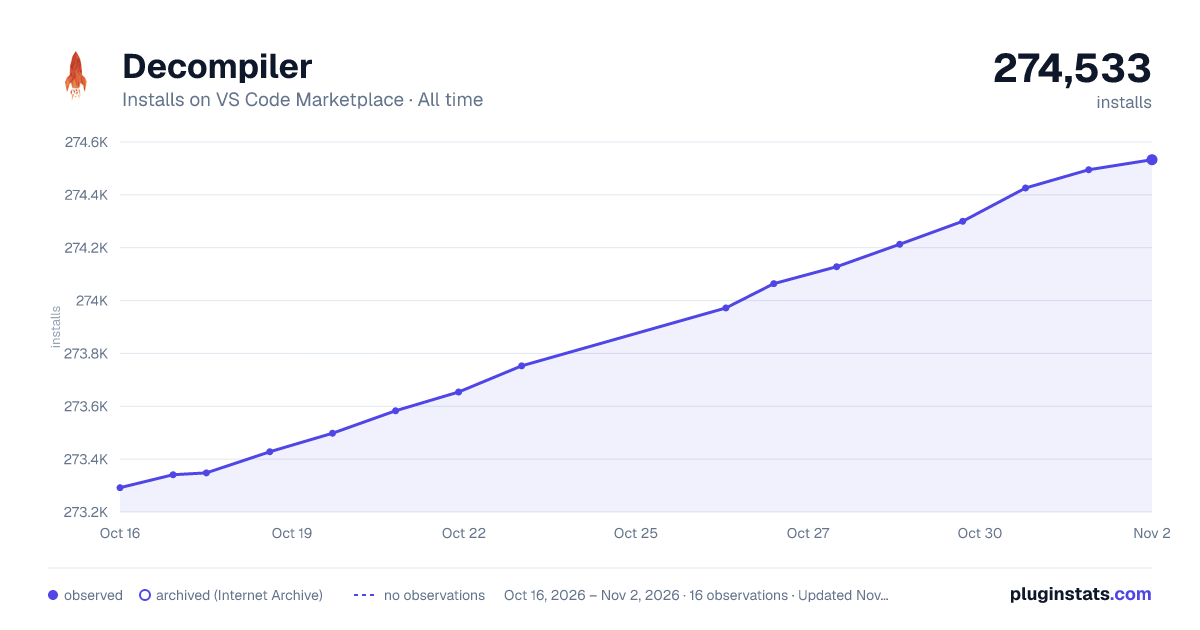

Adoption over time
7/30/90-day growth
Ranking history
Ratings over time
Listing placement
Listing placement
Filled points are observed values; hollow points come from Internet Archive snapshots of the listing page. Dashed segments span periods with no observations — values between points are not interpolated.
Each band is one page of 20. Installs on a linear scale. Placement is projected from installs, so it can differ from the marketplace's own sort order. Hover a dot to see the listing.
Recent observations
Full history (4)Similar VS Code Marketplace Programming Languages plugins
All 20 Decompiler alternativesData source
Install counts, average rating, and rating counts come from the public Visual Studio Marketplace gallery API. Installs are cumulative and exclude updates.
Listing: https://marketplace.visualstudio.com/items?itemName=tintinweb.vscode-decompiler. First seen Oct 16, 2026; last successful collection Oct 19, 2026. See the methodology.