 PluginStats
Context7 MCP Server installs statistics
By Upstash (9 listings) · VS Code Marketplace · AI
Real-time code and documentation access for AI assistants via Context7 MCP server
Context7 MCP Server has 133,534 recorded installs on VS Code Marketplace.
It ranks #2000 of 2,501 tracked VS Code Marketplace listings by installs.
It is rated 5.0 out of 5 from 1 ratings.
PluginStats has 4 daily observations since Oct 16, 2026; the latest is from Oct 19, 2026.
Rating: 5.00 / 5 from 1 ratings
About Context7 MCP Server
Context7 MCP Server for VS Code
This VS Code extension registers the Context7 MCP (Model Context Protocol) server with VS Code's built-in MCP support, giving AI assistants real-time access to up-to-date documentation for thousands of libraries and frameworks.
The extension connects to the hosted Context7 server at https://mcp.context7.com/mcp, so it is always running the latest version — no local server process, no manual updates.
Features
• Up-to-date Documentation: Pulls version-specific documentation and code examples straight from the source into your AI assistant's context • Automatic Library Resolution: Finds the right library documentation based on your query • Zero Configuration: The server is registered automatically when the extension activates • Optional API Key: Add a Context7 API key for higher rate limits and access to private repositories
Installation
Install Context7 MCP Server from the Visual Studio Marketplace, or from the Extensions view in VS Code (Upstash.context7-mcp).
Requires VS Code 1.101 or later.
Usage
Once installed, the Context7 MCP server is available to VS Code's AI features (e.g. Copilot Chat in agent mode). Ask questions like:
• "Show me how to use React hooks. use context7" • "What are the best practices for Next.js routing? use context7" • "How do I implement authentication with Supabase? use context7"
You can also reference a library directly by its Context7 ID:
Tip: Add a rule to your AI assistant's instructions (e.g. .github/copilot-instructions.md) telling it to use Context7 for code generation and library questions, so you don't have to type use context7 every time.
Available Tools
1. resolve-library-id — Resolves a package/product name to a Context7-compatible library ID 2. get-library-docs — Fetches up-to-date documentation for a library
Configuration
| Setting | Description |
| context7.apiKey | Optional Context7 API key for higher rate limits and private repositories. Get one at context7.com/dashboard. |
Changing the API key stops the running server so the new key can be picked up. Restart it via MCP: List Servers → Context7 → Start Server (or just send a new chat request, which prompts to start it) — no window reload required.
Development
Project Structure
Building
Testing
1. Open this repository in VS Code 2. Press F5 to launch the extension in a new Extension Development Host window 3. Run the MCP: List Servers command and confirm "Context7" is listed 4. Open Copilot Chat in agent mode and ask a library question with "use context7"
Contributing
1. Fork the repository 2. Create a feature branch 3. Make your changes 4. Test thoroughly 5. Submit a pull request
License
MIT License - see LICENSE file for details.
Acknowledgments
• Context7 for providing the MCP server for real-time documentation access
Description from the VS Code Marketplace listing.
- ai
- coding
- context7
- documentation
- mcp
Charts
Images: 30d · 1y · all time · 1600×900 dark


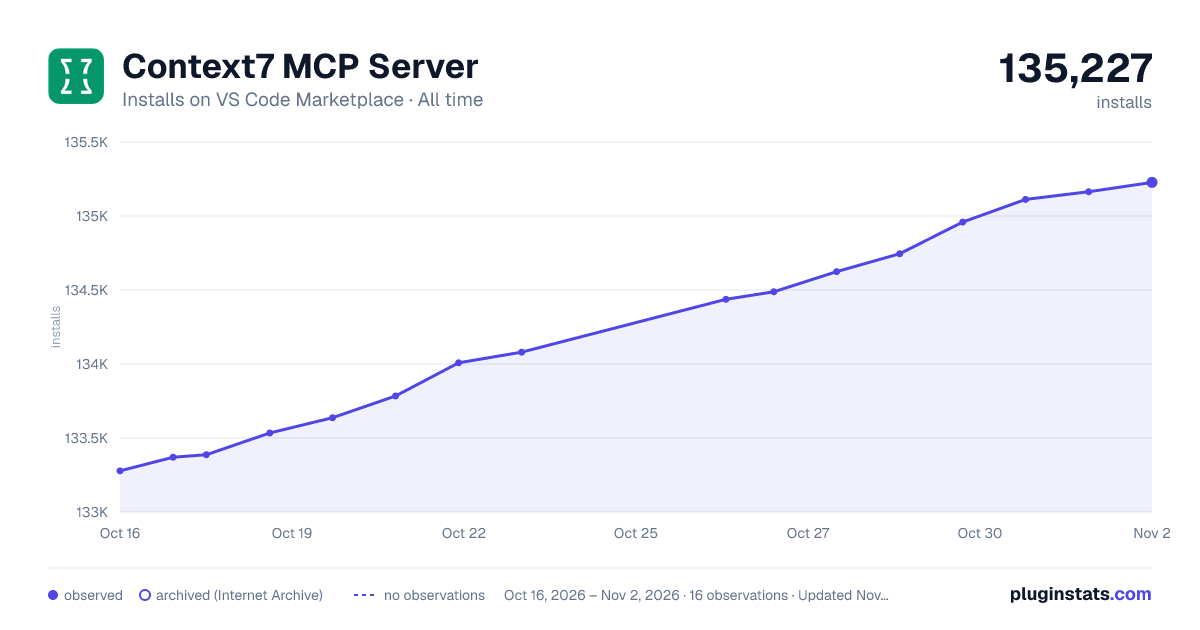

Adoption over time


7/30/90-day growth


Ranking history


Ratings over time


Listing placement


Listing placement


Filled points are observed values; hollow points come from Internet Archive snapshots of the listing page. Dashed segments span periods with no observations — values between points are not interpolated.
Each band is one page of 20. Installs on a log scale. Placement is projected from installs, so it can differ from the marketplace's own sort order. Hover a dot to see the listing.
Recent observations
Full history (4)Similar VS Code Marketplace AI plugins
All 20 Context7 MCP Server alternativesData source
Install counts, average rating, and rating counts come from the public Visual Studio Marketplace gallery API. Installs are cumulative and exclude updates.
Listing: https://marketplace.visualstudio.com/items?itemName=Upstash.context7-mcp. First seen Oct 16, 2026; last successful collection Oct 19, 2026. See the methodology.