 PluginStats
GitHub Copilot for Azure installs statistics
By Microsoft (224 listings) · VS Code Marketplace · Azure
GitHub Copilot for Azure streamlines Azure development with specialized agents, skills, prompts, and tools in Visual Studio Code.
GitHub Copilot for Azure has 2,168,534 recorded installs on VS Code Marketplace.
It ranks #332 of 2,501 tracked VS Code Marketplace listings by installs.
It is rated 3.7 out of 5 from 12 ratings.
PluginStats has 4 daily observations since Oct 16, 2026; the latest is from Oct 19, 2026.
Rating: 3.67 / 5 from 12 ratings
About GitHub Copilot for Azure
What's GitHub Copilot for Azure?
GitHub Copilot for Azure is a Visual Studio Code extension that includes a set of Azure skills for specialized domain knowledge, and integrates support for GitHub Copilot agent mode. Use Azure skills for deep, service-specific guidance and leverage Azure tools in agent mode to automatically complete Azure tasks. Go to the release notes for details on the latest updates.
Azure Skills
Agent mode
Note: GitHub Copilot for Azure currently only supports Windows x64, Windows ARM64, macOS x64, macOS ARM64 and Linux x64.
Azure Skills
GitHub Copilot for Azure includes a set of Azure skills that provide specialized domain knowledge and workflows for Azure services. Skills can be easily installed using the built-in commands and work with agent mode.
Core skills for deploying applications to Azure include:
• azure-prepare – Prepares your application for Azure deployment by generating infrastructure-as-code (Bicep or Terraform), azure.yaml, and Dockerfiles. Use this skill to create, modernize, or set up applications for Azure hosting. • azure-validate – Validates your deployment configuration and infrastructure files to catch issues before deploying, ensuring your application is ready for Azure. • azure-deploy – Executes Azure deployments for prepared applications using azd up, azd deploy, terraform apply, or az deployment commands with built-in error recovery.
View the full list of available skills at github.com/microsoft/azure-skills.
Installation
Github Copilot for Azure installs skills at activation. At that point, you may see a toast like the following:
If you don't see the toast notification, you can manually install them either globally or locally using the commands listed below. To remove local skills, delete the corresponding files from .agents/skills/. Uninstalling the extension will uninstall the Azure Skills globally.
• @azure: Install Azure Skills Globally – Installs Azure skills into the global (home directory) location, making them available across all workspaces. • @azure: Uninstall Azure Skills Globally – Removes all globally installed Azure skills. • @azure: Install Azure Skills Locally – Installs Azure skills into the current workspace directory (under .agents/skills/).
Agent mode
Agent mode can help you complete Azure-related tasks by automatically using tools from GitHub Copilot for Azure. You can let agent mode decide on those tools, or you can guide the process by choosing particular tools from the GitHub Copilot for Azure toolset. GitHub Copilot for Azure tools include:
Account Information
• #azure_get_auth_context: Gets the current authentication state, including which account you are signed in to, the current tenant in use, and the default subscriptions selected. • #azure_set_auth_context: Sets the current authentication state. You can switch to a different account, change the tenant in use, or select default subscriptions.
Azure MCP
GitHub Copilot for Azure installs the Azure MCP Server extension as a dependency. Azure MCP Server offers a wide range of tools for developing applications using Azure services. You can learn more about the tools Azure MCP Server offers in this documentation.
Custom Agents
GitHub Copilot for Azure includes several custom agents that provide specialized workflows for specific Azure tasks:
Infrastructure as Code (IaC) Agents
• Azure IaC Generator – Central hub for generating Infrastructure as Code (Bicep, ARM, Terraform, Pulumi) with format-specific validation and best practices. • Azure IaC Exporter – Export existing Azure resources to Infrastructure as Code templates via Azure Resource Graph analysis and Azure Resource Manager API calls.
Deployment & Migration Agents
• DeployToAzure – Custom agent focusing on deploying Azure resources. • LambdaToFunctionMigration – Migrate AWS Lambda functions to Azure Functions with comprehensive support for assessment, code migration, infrastructure generation, validation, and deployment. • Azure_function_codegen_and_deployment – Generate and deploy Azure Functions with comprehensive planning, code generation, and deployment automation. • Azure_Static_Web_App – Create and deploy Azure Static Web Apps.
Cost Optimization Agents
• AzureCostOptimizeAgent – Identify, quantify, and recommend cost savings across an Azure subscription. • AzqrCostOptimizeAgent – Use Azure Quick Review (azqr) to identify cost-impacting issues and quick wins.
Specialized Builders
• MCP AppService Builder – Plan, scaffold, extend, and deploy .NET 10 MCP App Service MCP servers with azd/Bicep and RBAC.
Custom Prompts
GitHub Copilot for Azure includes custom prompts for AWS Lambda to Azure Functions migration workflow:
• LambdaMigration-Phase1-AssessLambdaProject – Assess the AWS Lambda codebase for migration to Azure Functions. • LambdaMigration-Phase2-MigrateLambdaCode – Migrate AWS Lambda code to Azure Functions. • LambdaMigration-Phase3-GenerateFunctionsInfra – Generate infrastructure as code files for the Azure Functions project. • LambdaMigration-Phase4-ValidateCode – Validate the migrated Azure Functions code. • LambdaMigration-Phase5-ValidateInfra – Validate the infrastructure as code files. • LambdaMigration-Phase6-DeployToAzure – Deploy resources to Azure. • LambdaMigration-GetStatus – Retrieve the current status of the migration.
How do I use GitHub Copilot for Azure tools in agent mode?
1. Set mode to Agent in Chat. 1. Select your model. We recommend using Claude models such as Claude Opus for improved tool invocation. 1. Try to include details in your prompts, especially about your Azure resources.
Alternatively, if you want to select a specific tool, you can say #, followed by your prompt. For general guidance on using agent mode, visit Use Agent mode in VS Code.
Examples of prompts:…
Description from the VS Code Marketplace listing.
- agent
- Azure
- chat
- chat-participant
- copilot
- github-copilot
- language-model-tools
- tools
Where GitHub Copilot for Azure sits in the listing
Each band is one page of 20. Installs on a log scale. Placement is projected from installs, so it can differ from the marketplace's own sort order. Hover a dot to see the listing.
Charts
Images: 30d · 1y · all time · 1600×900 dark
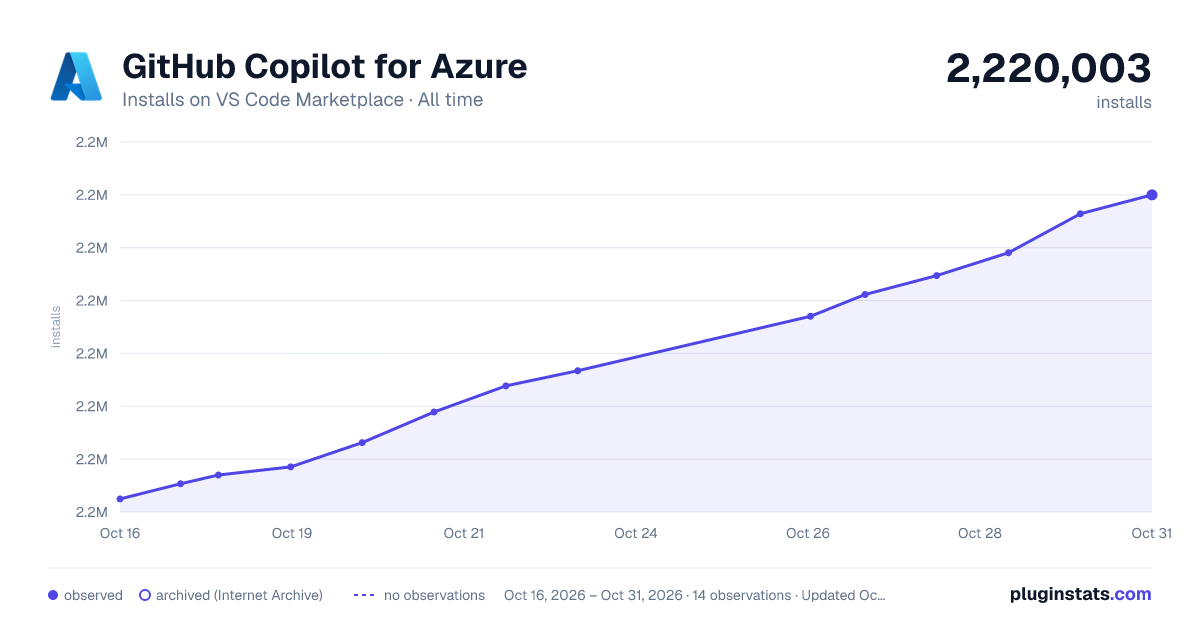
Adoption over time
7/30/90-day growth
Ranking history
Filled points are observed values; hollow points come from Internet Archive snapshots of the listing page. Dashed segments span periods with no observations — values between points are not interpolated.
Recent observations
Full history (4)Similar VS Code Marketplace Azure plugins




Data source
Install counts, average rating, and rating counts come from the public Visual Studio Marketplace gallery API. Installs are cumulative and exclude updates.
Listing: https://marketplace.visualstudio.com/items?itemName=ms-azuretools.vscode-azure-github-copilot. First seen Oct 16, 2026; last successful collection Oct 19, 2026. See the methodology.