 PluginStats
Background installs statistics
By Katsute · VS Code Marketplace · Other
The most advanced background image extension for VSCode
Background has 371,762 recorded installs on VS Code Marketplace.
It ranks #1006 of 2,500 tracked VS Code Marketplace listings by installs.
It is rated 4.7 out of 5 from 38 ratings.
PluginStats has 3 daily observations since Oct 16, 2026; the latest is from Oct 18, 2026.
Rating: 4.66 / 5 from 38 ratings
About Background
Background
The most advanced background image extension for VSCode
Windows + Mac + Linux
Add multiple background images for the window, editors, sidebars, or the panel. Load backgrounds from file, glob, or URL. Transition between multiple background images.
Installation
• Install from the Visual Studio Marketplace. • Install directly from VSCode using the id katsute.code-background.
Customize using the Background: Configuration command or press the Background button in the bottom right to access the configuration menu.
Install using the Background: Install command or press the Install button in the configuration menu to install the background.
Features
Multiple Backgrounds
Add background images for the whole window, editors, sidebars, or the panel. Transition between multiple background images.
Full Window
Editor, Sidebar, and Terminal
Slideshow
Configuration Menu
Use the Background: Configuration command or press the Background button in the bottom right to access the configuration menu.
Glob, URL, and Environment Variable Support
Add background images by file, folder, or URL. Supports glob and environment variables.
▲
Commands
| Command | Description | |:--|:--| |Background: Install|Installs and enables the background| |Background: Uninstall|Uninstalls and disables the background| |Background: Reload|Randomizes the current background| |Background: Configuration|Opens the configuration menu| |Background: Changelog|Opens the changelog|
▲
Configuration
Use the Background: Configuration command or press the Background button in the bottom right to access the configuration menu.
|Background|Description| |:--|:--| |Window Backgrounds|The list of files or globs to use for the window background image| |Editor Backgrounds|The list of files or globs to use for editor background images| |Sidebar Backgrounds|The list of files or globs to use for the sidebar background images| |Panel Backgrounds|The list of files or globs to use for the panel background image| ||| |Style Option|Description| |Alignment|Background alignment| |Alignment Value|Background alignment (CSS)| |Blur|Background blur (CSS)| |Opacity|Background opacity, 1 is fully visible and 0 is invisible| |Repeat|Background repeat| |Size|Background size| |Size Value|Background size (CSS)| |Change Time|How often to change the background image in seconds, set to 0 to never change| ||| |Advanced Option|Description| |Auto Install|Automatically install backgrounds on startup| |Render Text Above Background|Show text, code, browser, and iframes on top of the background| |Remove Terminal Background|Remove terminal background when using the above option| |Use Inverted Opacity|Use an inverted opacity, so 0 is visible and 1 is invisible| |Smooth Image Rendering|Use smooth image rendering when resizing images instead of pixelated| |Setting Scope|Where to save background settings - Global or Workspace| |CSS|Custom CSS| |API|Toggles API access|
▲
Environment Variables
If the path is not working, add an additional / after the variable.
|Variable|Description| |:--|:--| |${vscode:workspace}|Current VSCode project folder| |${vscode:user}|VSCode user directory, either Code/User or data/user-data/User| |${user:home}|Current user's home directory| |${...}|System environment variable|
▲
API
*Requires API setting to be turned on in the extension*
Add this extension to your package.json.
Access the api by using:
• install(): void
Runs the Background: Install command. • uninstall(): void
Runs the Background: Uninstall command. • reload(): void
Runs the Background: Reload command. • get(ui): string[]? • ui : Background to get from; either window, editor, sidebar, panel.
Returns an array of globs for the specified background. • add(ui, glob): Promise • ui : Background to add to; either window, editor, sidebar, panel. • glob: Glob to add.
Returns true if successful. • replace(ui, old, glob): Promise • ui : Background to replace from; either window, editor, sidebar, panel. • old: Glob to replace. • glob: Updated glob.
Returns true if successful. • remove(ui, glob): Promise • ui : Background to remove from; either window, editor, sidebar, panel. • glob: Glob to remove.
Returns true if successful.
▲
This extension is released under the GNU General Public License (GPL) v2.0.
Description from the VS Code Marketplace listing.
- background
- bg
- bk
- cover
- gif
- image
- theme
Where Background sits in the listing
Each band is one page of 20. Installs on a log scale. Placement is projected from installs, so it can differ from the marketplace's own sort order. Hover a dot to see the listing.


Charts
Images: 30d · 1y · all time · 1600×900 dark


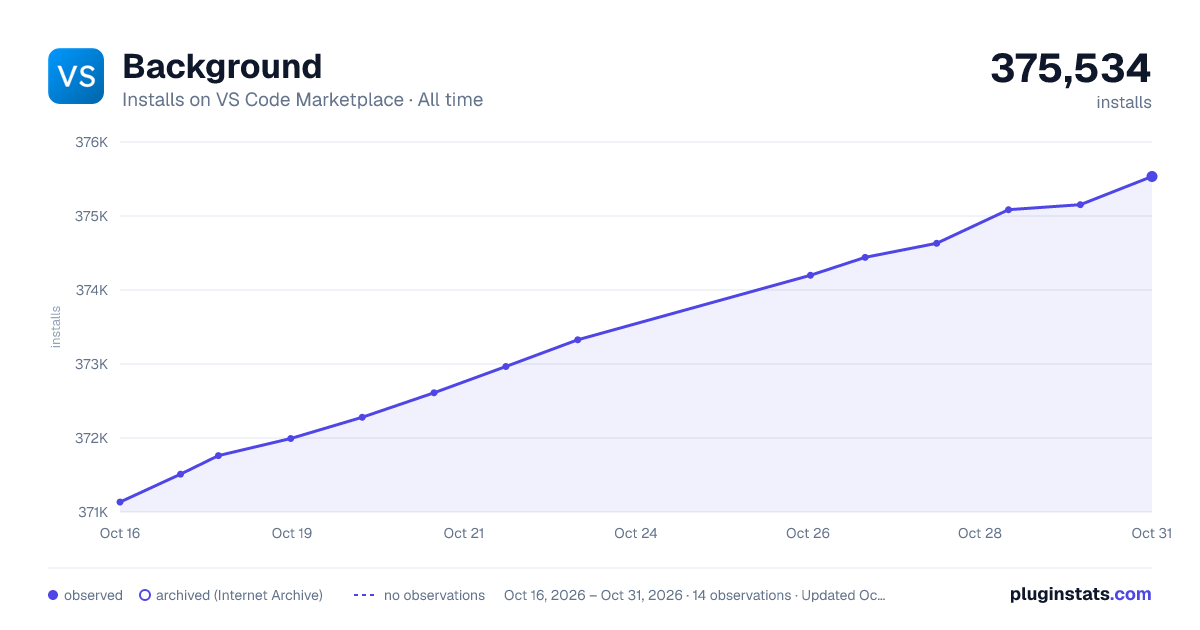

Adoption over time


7/30/90-day growth


Ranking history


Filled points are observed values; hollow points come from Internet Archive snapshots of the listing page. Dashed segments span periods with no observations — values between points are not interpolated.
Recent observations
Full history (3)Similar VS Code Marketplace Other plugins
Data source
Install counts, average rating, and rating counts come from the public Visual Studio Marketplace gallery API. Installs are cumulative and exclude updates.
Listing: https://marketplace.visualstudio.com/items?itemName=Katsute.code-background. First seen Oct 16, 2026; last successful collection Oct 18, 2026. See the methodology.