 PluginStats
C/C++ Runner installs statistics
By franneck94 (4 listings) · VS Code Marketplace · Programming Languages
🚀 Compile, run and debug single or multiple C/C++ files with ease. 🚀
C/C++ Runner has 7,430,140 recorded installs on VS Code Marketplace.
It ranks #127 of 2,500 tracked VS Code Marketplace listings by installs.
It is rated 4.6 out of 5 from 19 ratings.
PluginStats has 3 daily observations since Oct 16, 2026; the latest is from Oct 18, 2026.
Rating: 4.63 / 5 from 19 ratings
About C/C++ Runner
VSCode C/C++ Runner
🚀 Compile, run and debug single or multiple C/C++/Cuda files with ease. 🚀 You do not need to know about any compiler commands. 😎
Example
Software Requirements
• 🔧 Any GCC, Clang, MSVC or Cuda NVCC compiler
Make sure that your GCC/Clang compiler is either in your PATH or you have to manually set the C/C++ Compiler setting of this extension. For Windows Users that want to use the Visual Studio compiler (called MSVC) see instructions here. For Cuda code the NVCC Compiler will be automatically called.
The Extension automatically activates when
• There is a C/C++ file in the root directory of your workspace • You open a C/C++ file in your workspace
Compile a single file
1️⃣ Open the C/C++ file you want to compile (build). 2️⃣ Select either debug or release mode for building the binary (debug is the default case). 3️⃣ To build the binary press ctrl+alt+b. 4️⃣ To run the binary press ctrl+alt+r, or you can click on the play icon in the status bar down below. 5️⃣ To debug the binary press ctrl+alt+d, or you can click on the bug icon in the status bar down below.
Compile all files in one folder
1️⃣ Select the folder that contains the C/C++ files you want to compile. You can select the folder by the quick pick menu from the status bar. 2️⃣ Optional: Select either debug or release mode for building the binary (debug is the default case). 3️⃣ Now you can build/run/debug the binary.
• ⚙️ Build: This task will compile all C/C++ files in the selected folder and will link them into a binary. • ▶️ Run*: This task will execute the built binary. • 🗑️ Clean*: This helper task will delete all files in the build dir. • 🐞 Debug*: This task will start a debugging session for the binary.
*This task is a no-op if the build task was not executed previously.
Basic Features
Configuration
The configuration settings will be stored locally in *".vscode/settings.json"*.
Based on that, the local *".vscode/c_cpp_properties.json"* file is created. It will be used by Microsoft's *C/C++* extension for intellisense (auto-completion etc.). Note: You don't have to edit the c_cpp_properties.json file.
Basic settings
• ⚙️ C Compiler Path (string, defaults to \"gcc\") • ⚙️ C Standard (string, defaults to the compiler's default, e.g. "c99") • ⚙️ C++ Compiler Path (string, defaults to \"g++\") • ⚙️ C++ Standard (string, defaults to the compiler's default, e.g. "c++20") • ⚙️ Debugger Path (string, defaults to \"gdb\") • ⚙️ MSVC Batch Path (string, defaults to \"\") • ⚙️ Use MSVC (boolean, defaults to false) • ⚙️ To enable Compiler Warnings (boolean, defaults to True) • ⚙️ GCC/Clang Compiler Warnings (string array, e.g. "-Wall") • ⚙️ MSVC Compiler Warnings (string array, e.g. "\W4") • ⚙️ To treat Warnings as Errors (boolean, defaults to False) • ⚙️ To disable MSVC Security Warnings (boolean, defaults to False)
Using the MSVC Compiler
To use the Visual Studio MSVC compiler, e.g. VS2022, set the msvcBatchPath setting to a valid path. As an example installation path of the compiler: "C:/Program Files/Microsoft Visual Studio/2022/Community/VC/Auxiliary/Build/vcvarsall.bat". Then set the useMsvc extension setting to true, to use MSVC and not GCC/Clang. If you want to stop using the MSVC compiler, just set useMsvc to false. ⚠️ Only the 64-bit (no cross-compiling) version of MSVC is supported. ⚠️ The extension is only tested for VS2019 and VS2022. ⚠️ For auto detecting the installed VS you have to install it in C:/Program Files/Microsoft Visual Studio
Advanced Features
Passing Commandline Arguments
You can pass in command-line arguments for running or debugging the binary.
Make sure to select the active folder that should be compiled beforehand. Then press ctrl+alt+a to open the message box to type in the arguments:
These arguments will be stored in the launch.json config for debugging the binary.
If you now run or debug your program these values will be fed into argc/argv. Important: The stored arguments will be reset after selecting a new active folder. Note: For strings with whitespaces please use \" (not single \').
Include & Exclude Folders for Selection
You can add glob#Syntax) patterns to include and exclude folders from the folder selection. Note: The include pattern is used before the exclude pattern.
For example with the following exclude glob pattern:
The folder selection would change from left to right.
Generate Assembler Code
When executing the command: Generate Assembler Code. The assembler code will be generated in a .s file that will be in the build directory next to the executable. 👷🏻 Note: Currently, this feature is experimental and only works for single-file builds.
Advanced Settings
• If the compiler has it implemented and only in debug build • ⚙️ Activate the address sanitizer • ⚙️ Activate the undefined sanitizer • ⚙️ Activate the leak sanitizer • ⚙️ Show detailed Information about the Compilation Time • ⚙️ Use link time optimization for release builds • ⚙️ Compiler Arguments (string array, e.g. \[\"-pthreads\"\]) • ⚙️ Linker Arguments (string array, e.g. \[\"-lpthread\"\]). • Note: It is expected to prefix the arguments with the appropriate flags (e.g. -l or -L for GCC/Clang) • ⚙️ Include Paths (string array, e.g. \[\"path/to/headers/\"\]) • Note: It is not (!) expected to prefix the arguments with the -I or /I flag • ⚙️ Include Glob Pattern for the Folder Selection (string array, defaults to ["\*", "\*\*/\*"]) • ⚙️ Exclude Glob Pattern for the Folder Selection (string array, defaults to ["\*\*/build", "\*\*/.\*", "\*\*/.vscode",])
Important Notes
Constraints with Files and Folders
• 📝 File extensions for headers: \*.h, \*.hpp, \*.hh, \*.hxx • 📝 File extensions for sources: \*.c, \*.cpp, \*.cc, \*.cxx • ⚠️ Include paths and file names with whitespaces and special characters (e.g. &) can make the compilation fail
CMake Projects in the Workspace Directory…
Description from the VS Code Marketplace listing.
- c
- c++
- cpp
- keybindings
Where C/C++ Runner sits in the listing
Each band is one page of 20. Installs on a log scale. Placement is projected from installs, so it can differ from the marketplace's own sort order. Hover a dot to see the listing.


Charts
Images: 30d · 1y · all time · 1600×900 dark


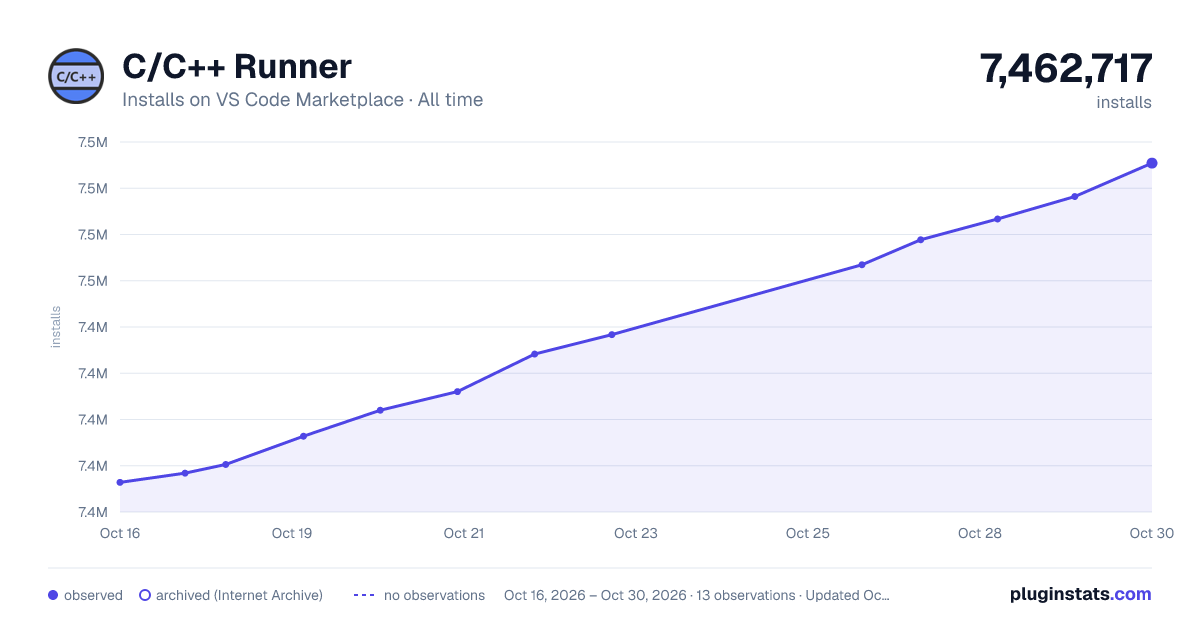

Adoption over time


7/30/90-day growth


Ranking history


Filled points are observed values; hollow points come from Internet Archive snapshots of the listing page. Dashed segments span periods with no observations — values between points are not interpolated.
Recent observations
Full history (3)Similar VS Code Marketplace Programming Languages plugins
Data source
Install counts, average rating, and rating counts come from the public Visual Studio Marketplace gallery API. Installs are cumulative and exclude updates.
Listing: https://marketplace.visualstudio.com/items?itemName=franneck94.c-cpp-runner. First seen Oct 16, 2026; last successful collection Oct 18, 2026. See the methodology.