 PluginStats
Cucumber (Gherkin) Full Support installs statistics
By Alexander Krechik · VS Code Marketplace · Programming Languages
VSCode Cucumber (Gherkin) Full Language Support + Formatting + Autocomplete
Cucumber (Gherkin) Full Support has 1,296,820 recorded installs on VS Code Marketplace, ranking #464 of 2,501 tracked listings.
Rating: 4.50 / 5 from 30 ratings
About Cucumber (Gherkin) Full Support
Cucumber Full Language Support
VS Code Cucumber (Gherkin) Language Support + Format + Steps/PageObjects Autocomplete
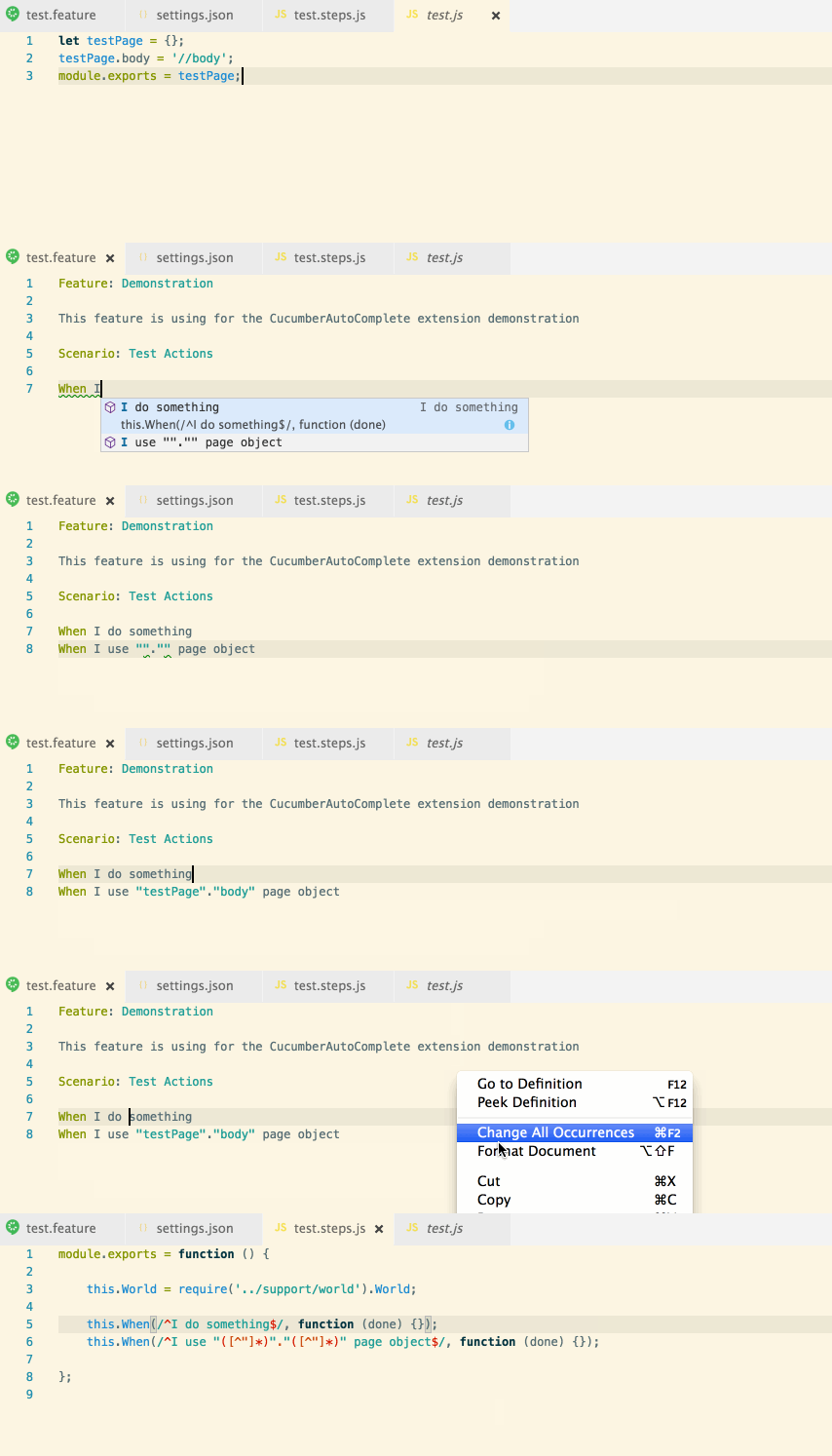
This extension adds rich language support for the Cucumber (Gherkin) language to VS Code, including:
- Syntax highlight
- Basic Snippets support
- Auto-parsing of feature steps from paths, provided in settings.json
- Autocompletion of steps
- Ontype validation for all the steps
- Definitions support for all the steps parts
- Document format support, including tables formatting
- Supporting many spoken languages
- Gherkin page objects native support
- Multiple programming languages, JS, TS, Python, Ruby, Kotlin etc.
Important extension goal is to improve step suggestions list and minimize user edits after step insertion:
- Sort step suggestions by their usage count
- Option to filter step completions depending on words used in their definition
- Option to automatically change all step parts, that require some user action, by snippets
- Option to show several different completion variants for step with 'or' RegEx parts (like
(a|b))
How to use:
- Open your app in VS Code
- Install
cucumberautocompleteextension - In the opened app root create (if absent) .vscode folder with settings.json file or just run
mkdir .vscode && touch .vscode/settings.json - Add all needed settings to the settings.json file
- Reload the app to apply all extension changes
- To get autocomplete working,
stringsvar ofeditor.quickSuggestionssetting should be set to true (because by defaultstringsuggestions will not appear)
Settings:
Basic settings example:
{
    "cucumberautocomplete.steps": [
        "test/features/step_definitions/*.js",
        "node_modules/qa-lib/src/step_definitions/*.js"
    ],
    "cucumberautocomplete.strictGherkinCompletion": true
}
All the settings description:
cucumberautocomplete.steps - Glob-style path or array of glob-style paths to the gherkin step definition files.
All the files, that match path provided, will be handled by the extension. So, ideally, this path should be as strict as possible (for ex. test/features/step_definitions/*.steps.js is better than test/**/*.steps.js and much better than **/*.steps.js).
The Node will watch steps files for change and will automatically update steps in them.
All the paths are relative to the app root.
Empty or non-string values are ignored, so malformed workspace configuration does not crash the extension.
cucumberautocomplete.syncfeatures - Will get steps using count from the glob-style path.
Same as for the steps setting - this path should be as strict as possible.
cucumberautocomplete.strictGherkinCompletion - Strict comparing of declaration function and gherkin word.
For ex. if step definition is When(/I do something/) - in case of strictGherkinCompletion is true - after typing Given I this step will not be shown in the suggestion list.
In case of some non-gherkin step definition usage (for ex. new Step('I do something')) strictGherkinCompletion should be set to false - no steps suggestions will be shown otherwise.
cucumberautocomplete.strictGherkinValidation - Compare step body and gherkin word during steps validation.
Sometimes, it's useful to suggest only steps that are strictly equal to gherkin word, but show no error in case if gherkin word is used inproperly, so this option was separated from the strictGherkinCompletion.
cucumberautocomplete.smartSnippets - Extension will try to change all the steps parts, that requires some user input (for ex. .*, ([a-z]+), \w{1,3}) to snippets.
This option could speed up adding new steps up to several times. Try it ;)
cucumberautocomplete.stepsInvariants - Show all the 'or' step parts as separate suggestions (for ex. show I use a and I use b step suggestions for the Given(/I use (a|b)/) step. It could also help to speed up new steps addition.
cucumberautocomplete.customParameters - Change some steps RegEx parts depending on array of 'parameter' - 'value' key pairs. Parameter could be string or regular expression. Whether 'parameter' is interpreted as a string or a regular expression is
controlled by 'isRegex' option.
This setting will be be applied before getting the steps.
For ex. to get step from the py expression @given(u'I do something') we could use the next parameters:
"cucumberautocomplete.customParameters": [
        {
            "parameter":"(u'",
            "value":"('"
        }
    ],
After this, the current expression will be handled as @given('I do something'), so the extension would be able to get 'I do something' step.
cucumberautocomplete.pages - Object, which consists of 'page name' => 'page object file path' pairs.
It is allowing to handle some very specific cases of page objects usage in the gherkin steps.
cucumberautocomplete.skipDocStringsFormat - Skip format of strings, that was placed between ''' or """.…
Description from the VS Code Marketplace listing.
- autocomplete
- cucumber
- feature
- gherkin
- snippet
README badge
Show your rank in a README or on your website. The badge updates automatically.
Charts
Images: 30d · 1y · all time · 1600×900 dark


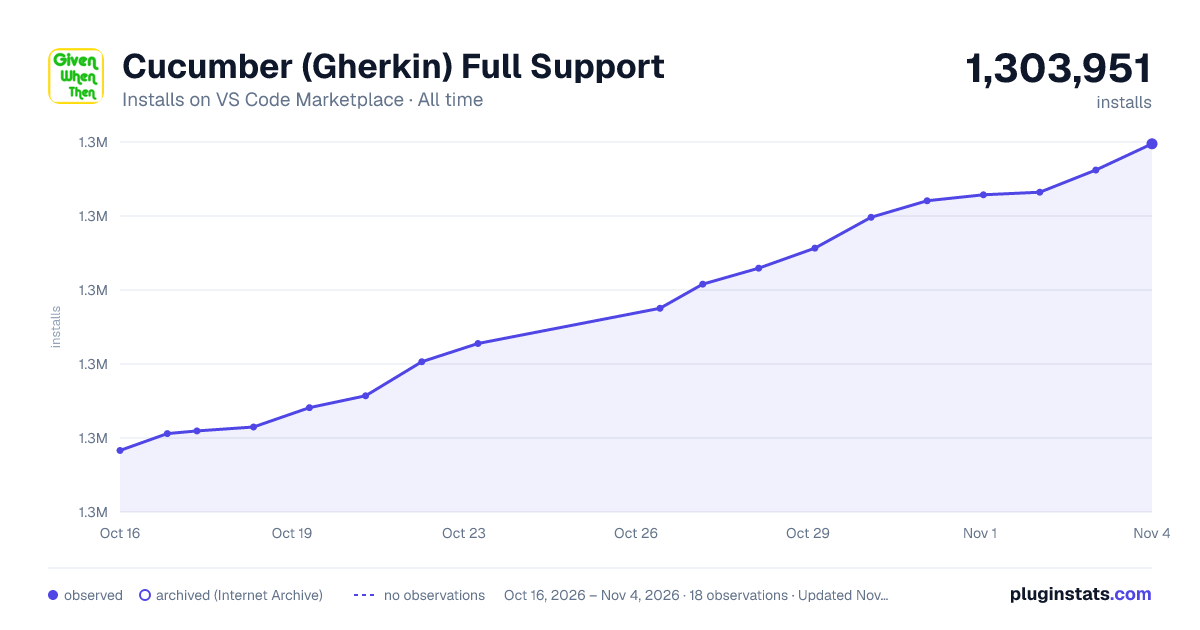

Adoption over time
7/30/90-day growth
Ranking history
Ratings over time
Listing placement
Listing placement
Filled points are observed values; hollow points come from Internet Archive snapshots of the listing page. Dashed segments span periods with no observations — values between points are not interpolated.
Each band is one page of 20. Installs on a linear scale. Placement is projected from installs, so it can differ from the marketplace's own sort order. Hover a dot to see the listing.
Recent observations
Full history (5)Similar VS Code Marketplace Programming Languages plugins
All 20 Cucumber (Gherkin) Full Support alternativesData source
Install counts, average rating, and rating counts come from the public Visual Studio Marketplace gallery API. Installs are cumulative and exclude updates.
Listing: https://marketplace.visualstudio.com/items?itemName=alexkrechik.cucumberautocomplete. First seen Oct 16, 2026; last successful collection Oct 20, 2026. See the methodology.